> ## Documentation Index
> Fetch the complete documentation index at: https://docs.noimosai.com/llms.txt
> Use this file to discover all available pages before exploring further.
# Advisor Agent की बुनियादी बातें
> वर्कस्पेस डेटा से प्राथमिकता वाले एक्शन देखने और उन्हें टास्क चैट में चलाने का तरीका समझें।
## सिंहावलोकन
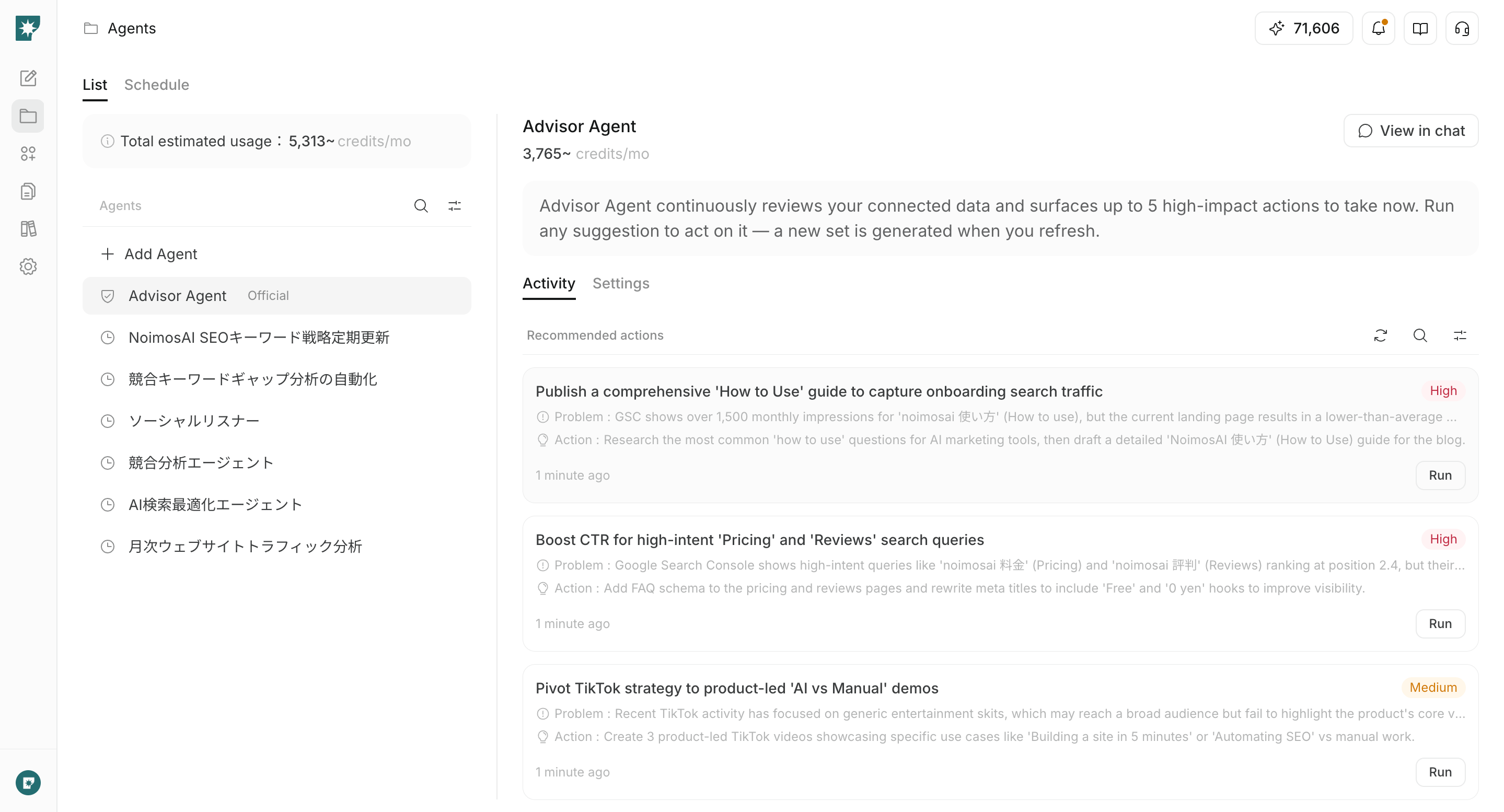
Advisor Agent एक डिफ़ॉल्ट रूप से उपलब्ध एजेंट है जो वर्कस्पेस के मार्केटिंग डेटा का विश्लेषण करता है और अगली ज़रूरी कार्रवाइयों को प्राथमिकता के क्रम में सुझाता है।
हर वर्कस्पेस में एक Advisor Agent होता है। उपयोगकर्ताओं द्वारा बनाए जाने वाले सामान्य एजेंटों से अलग, इसे बनाने या हटाने की आवश्यकता नहीं होती। जब आप कोई सुझाव देखते हैं और `चलाएँ` पर क्लिक करते हैं, तो उस सुझाव के लिए एक टास्क चैट खुलती है और चलाने के लिए उपयोग होने वाला prompt इनपुट बॉक्स में सेट हो जाता है।
`चलाएँ` पर क्लिक करने भर से prompt भेजा नहीं जाता और कोई सामग्री प्रकाशित नहीं होती। सामग्री की समीक्षा करें, फिर टास्क शुरू करने के लिए उसे चैट से भेजें।
 ## कब उपयोग करें
Advisor Agent का उपयोग तब करें जब आप कई डेटा स्रोतों की तुलना खुद करने से पहले यह सीमित करना चाहते हों कि अभी कौन से मार्केटिंग टास्क को प्राथमिकता देनी चाहिए।
उदाहरण के लिए, इसका उपयोग इन निर्णयों और कार्रवाइयों में किया जा सकता है:
* Google Analytics डेटा से वेबसाइट के conversion paths सुधारना
* Google Search Console डेटा से ऐसे queries ढूँढना जिनकी search position या CTR सुधारी जा सकती है
* हाल की social posting मात्रा और engagement से अगली social post तय करना
* जिस channel पर कोई theme अच्छा perform कर रहा है, उसे दूसरे social post या short video में विस्तार देना
* NoimosAI में बनाई गई वेबसाइट के access status से यह तय करना कि traffic acquisition या conversion में किसे प्राथमिकता देनी है
## सुझावों में उपयोग होने वाली जानकारी
सुझाव वर्कस्पेस में सहेजी गई brand information और analysis target के रूप में सेट किए गए apps या websites के डेटा के आधार पर बनाए जाते हैं।
मुख्य जानकारी में शामिल हैं:
* वर्कस्पेस का नाम और onboarding के समय के goals
* Brand name, products या services, value proposition, target audience और business goals
* Google Analytics के sessions, users, key events आदि डेटा
* Google Search Console के clicks, impressions, CTR, search position और search queries
* SNS की हाल की post संख्या, impressions और engagement
* X followers जैसी account information
* NoimosAI में बनाई गई websites का published status, visits, viewed pages और referrers
* `Advisor Agent instructions (optional)` में सहेजी गई प्राथमिकताएँ
जितने अधिक connected apps और accumulated data होंगे, वास्तविक प्रदर्शन पर आधारित सुझाव बनाना उतना आसान होगा। यदि डेटा पर्याप्त नहीं है, तो सुझाव brand information और channel usage के आधार पर दिए जा सकते हैं।
## Recommended actions देखें
Recommended actions home screen या `Agents` से देखे जा सकते हैं।
### Home screen से देखें
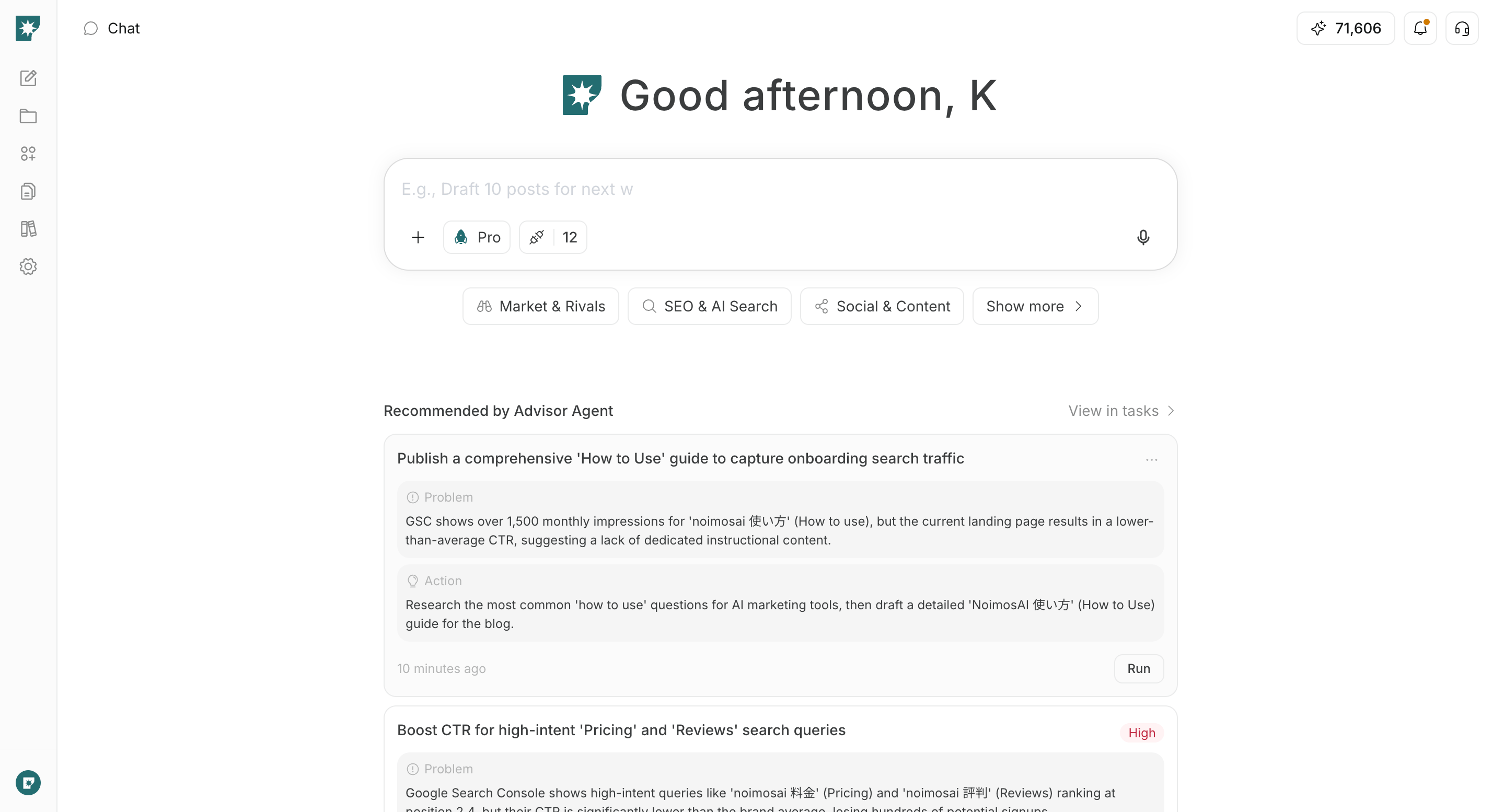
Home screen पर `Advisor Agent recommendations` वर्तमान में high-priority actions दिखाता है।
सभी सुझाव देखने के लिए `View all` पर क्लिक करें। Advisor Agent chat खुलती है और right panel में active suggestions दिखते हैं।
## कब उपयोग करें
Advisor Agent का उपयोग तब करें जब आप कई डेटा स्रोतों की तुलना खुद करने से पहले यह सीमित करना चाहते हों कि अभी कौन से मार्केटिंग टास्क को प्राथमिकता देनी चाहिए।
उदाहरण के लिए, इसका उपयोग इन निर्णयों और कार्रवाइयों में किया जा सकता है:
* Google Analytics डेटा से वेबसाइट के conversion paths सुधारना
* Google Search Console डेटा से ऐसे queries ढूँढना जिनकी search position या CTR सुधारी जा सकती है
* हाल की social posting मात्रा और engagement से अगली social post तय करना
* जिस channel पर कोई theme अच्छा perform कर रहा है, उसे दूसरे social post या short video में विस्तार देना
* NoimosAI में बनाई गई वेबसाइट के access status से यह तय करना कि traffic acquisition या conversion में किसे प्राथमिकता देनी है
## सुझावों में उपयोग होने वाली जानकारी
सुझाव वर्कस्पेस में सहेजी गई brand information और analysis target के रूप में सेट किए गए apps या websites के डेटा के आधार पर बनाए जाते हैं।
मुख्य जानकारी में शामिल हैं:
* वर्कस्पेस का नाम और onboarding के समय के goals
* Brand name, products या services, value proposition, target audience और business goals
* Google Analytics के sessions, users, key events आदि डेटा
* Google Search Console के clicks, impressions, CTR, search position और search queries
* SNS की हाल की post संख्या, impressions और engagement
* X followers जैसी account information
* NoimosAI में बनाई गई websites का published status, visits, viewed pages और referrers
* `Advisor Agent instructions (optional)` में सहेजी गई प्राथमिकताएँ
जितने अधिक connected apps और accumulated data होंगे, वास्तविक प्रदर्शन पर आधारित सुझाव बनाना उतना आसान होगा। यदि डेटा पर्याप्त नहीं है, तो सुझाव brand information और channel usage के आधार पर दिए जा सकते हैं।
## Recommended actions देखें
Recommended actions home screen या `Agents` से देखे जा सकते हैं।
### Home screen से देखें
Home screen पर `Advisor Agent recommendations` वर्तमान में high-priority actions दिखाता है।
सभी सुझाव देखने के लिए `View all` पर क्लिक करें। Advisor Agent chat खुलती है और right panel में active suggestions दिखते हैं।
 ### Agents screen से देखें
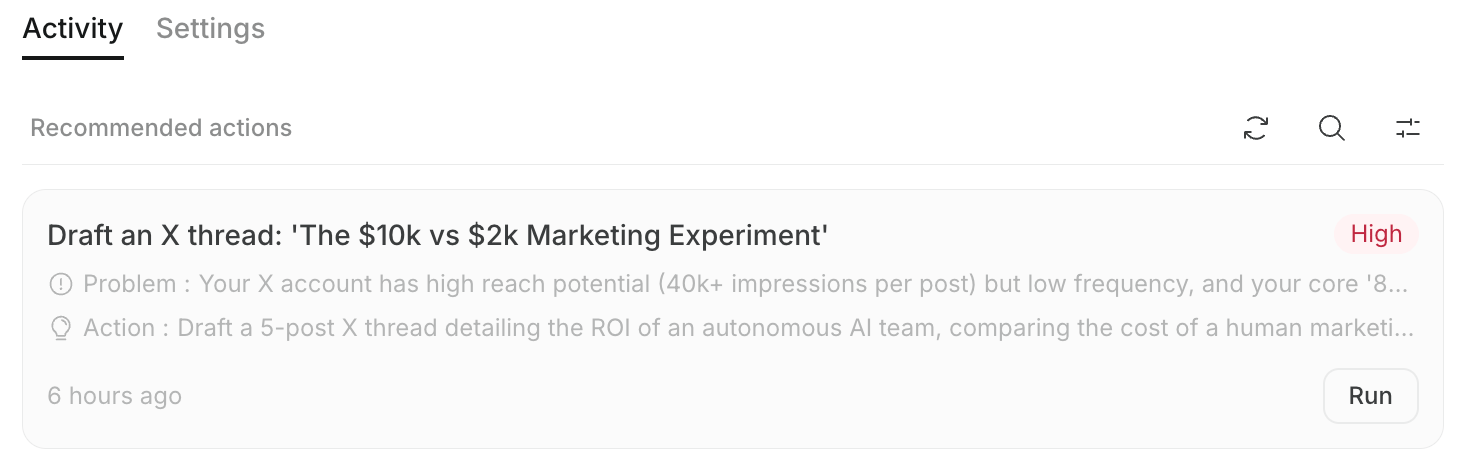
`Agents` में `Advisor Agent` चुनें और `Recommendations` खोलें। यहाँ आप suggestions खोज सकते हैं, status बदल सकते हैं और refresh कर सकते हैं।
सुझाव इन status में बाँटे जाते हैं:
* `Active`: अभी तक handle न किए गए या in-progress suggestions
* `Completed`: completed के रूप में marked suggestions
* `Archived`: जिन्हें handle न करने का निर्णय लिया गया हो या refresh से replace हो गए हों
## सुझाव की सामग्री देखें
हर card में priority और decision/execution के लिए आवश्यक जानकारी दिखाई जाती है।
* **Priority**: traffic या conversion पर अपेक्षित प्रभाव के आधार पर `High`, `Medium`, `Low`
* **Title**: अगला specific task
* **Problem**: डेटा से मिला problem, opportunity या unaddressed area
* **Action**: problem के जवाब में की जाने वाली action
* **Status**: suggestion active, completed या archived है
* **Running state**: यदि task चल रहा है, तो task शुरू करने वाले member का avatar और `Running` दिखता है
* **Run / Open task**: नई task chat शुरू करना या पहले से शुरू हुई task chat पर लौटना
एक ही वर्कस्पेस के कई members उसी suggestion को अपनी-अपनी task chat में चला सकते हैं।
## सुझाव चलाएँ
सुझाव चुनने के बाद, उसे dedicated task chat में देखकर चलाएँ।
1. जिस suggestion को चलाना है, उसके `Run` पर क्लिक करें।
### Agents screen से देखें
`Agents` में `Advisor Agent` चुनें और `Recommendations` खोलें। यहाँ आप suggestions खोज सकते हैं, status बदल सकते हैं और refresh कर सकते हैं।
सुझाव इन status में बाँटे जाते हैं:
* `Active`: अभी तक handle न किए गए या in-progress suggestions
* `Completed`: completed के रूप में marked suggestions
* `Archived`: जिन्हें handle न करने का निर्णय लिया गया हो या refresh से replace हो गए हों
## सुझाव की सामग्री देखें
हर card में priority और decision/execution के लिए आवश्यक जानकारी दिखाई जाती है।
* **Priority**: traffic या conversion पर अपेक्षित प्रभाव के आधार पर `High`, `Medium`, `Low`
* **Title**: अगला specific task
* **Problem**: डेटा से मिला problem, opportunity या unaddressed area
* **Action**: problem के जवाब में की जाने वाली action
* **Status**: suggestion active, completed या archived है
* **Running state**: यदि task चल रहा है, तो task शुरू करने वाले member का avatar और `Running` दिखता है
* **Run / Open task**: नई task chat शुरू करना या पहले से शुरू हुई task chat पर लौटना
एक ही वर्कस्पेस के कई members उसी suggestion को अपनी-अपनी task chat में चला सकते हैं।
## सुझाव चलाएँ
सुझाव चुनने के बाद, उसे dedicated task chat में देखकर चलाएँ।
1. जिस suggestion को चलाना है, उसके `Run` पर क्लिक करें।
 2. Dedicated task chat खुलने के बाद, input box में set prompt की समीक्षा करें।
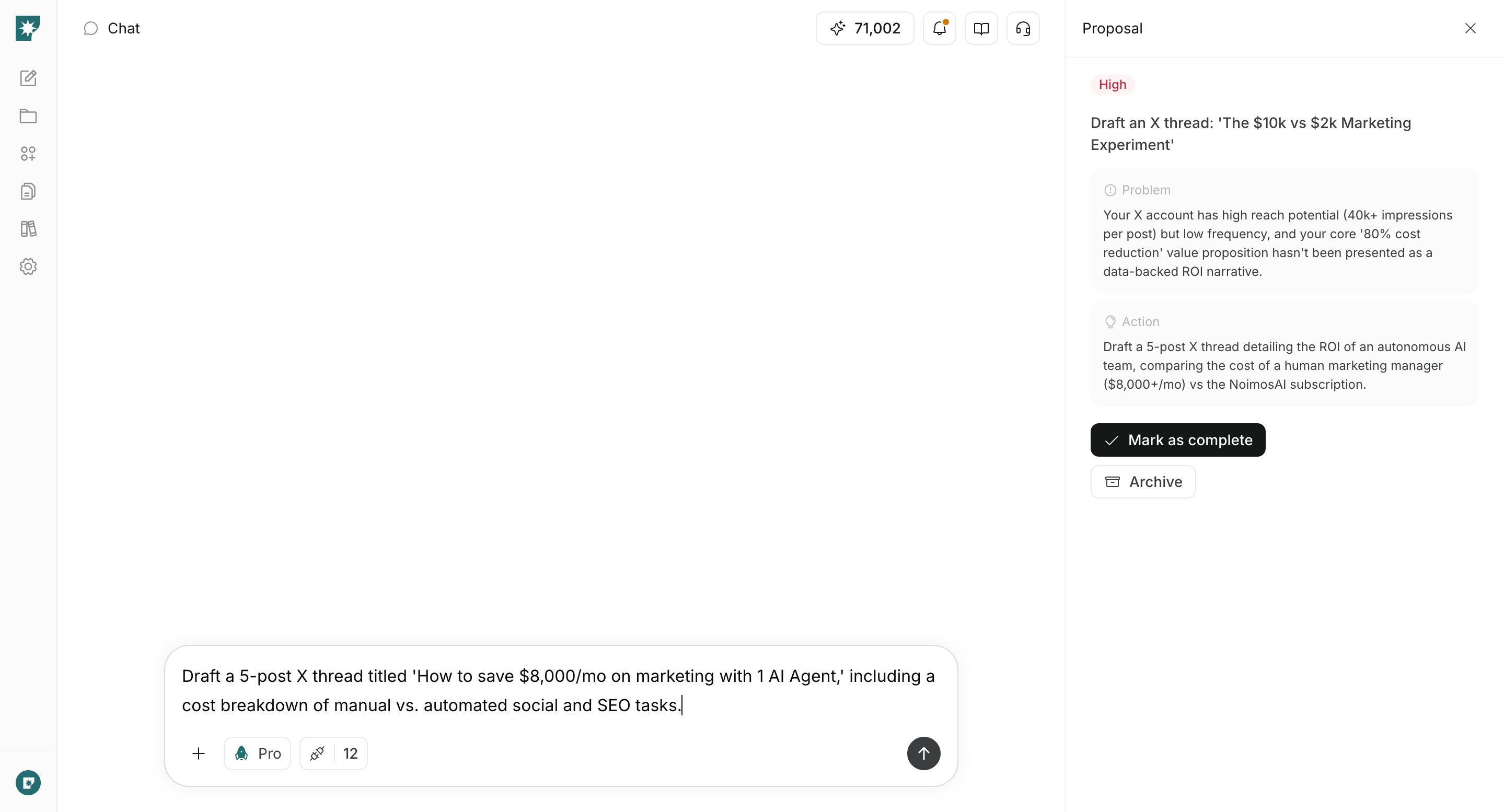 3. ज़रूरत हो तो prompt edit करके भेजें।
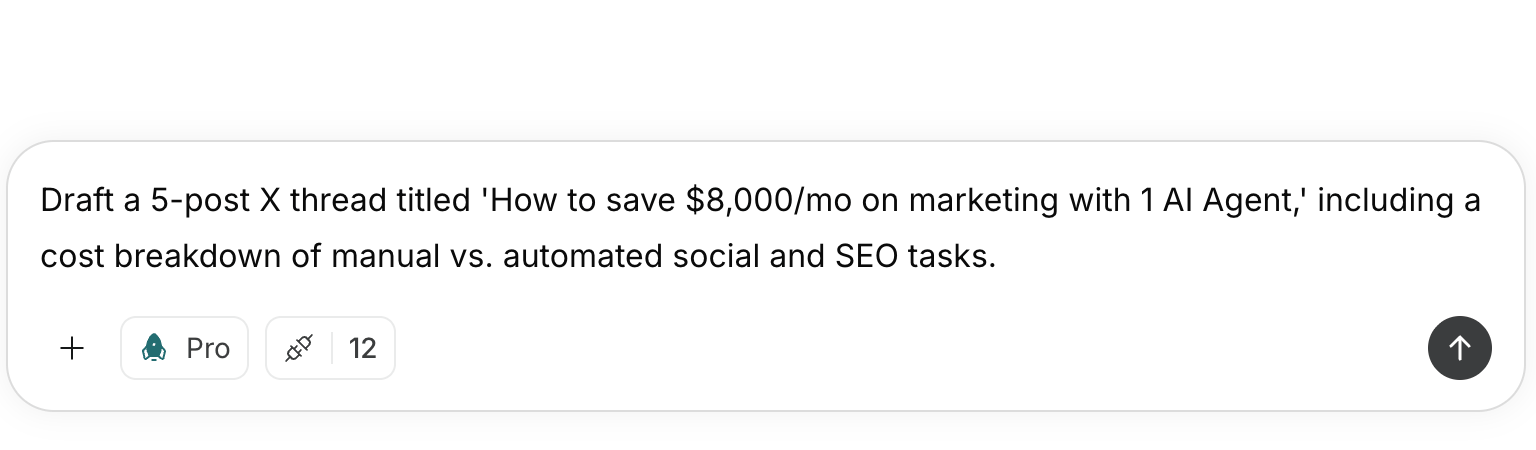 4. chat में generation, analysis, website improvement जैसे task आगे बढ़ाएँ।
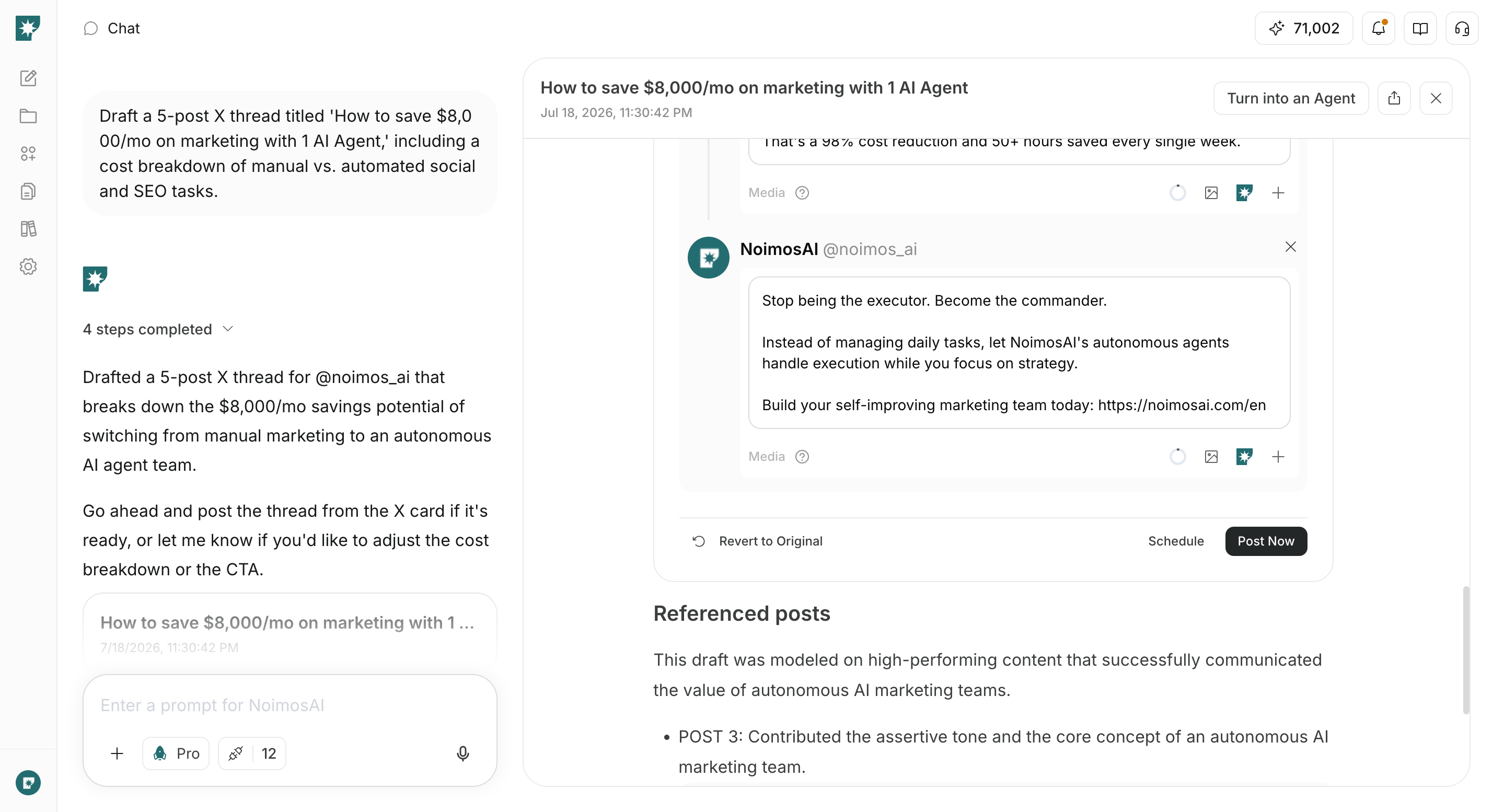 5. result देखें और suggestion panel से `Mark as complete` या `Archive` चुनें।
 एक बार task शुरू होने के बाद, `Open task` से उसी chat पर लौट सकते हैं। chat में additional instructions भेजकर output को adjust भी कर सकते हैं।
## सुझाव refresh करें
यदि मौजूदा suggestions स्थिति से मेल नहीं खाते, या आप connected data में हुए बदलाव को शामिल करना चाहते हैं, तो नए suggestions manually generate किए जा सकते हैं।
`Recommendations` या Advisor Agent chat में `Refresh recommendations` पर क्लिक करें। active suggestions latest workspace information और target data के आधार पर नए suggestions से replace हो जाते हैं।
Advisor Agent chat में दिखाई गई latest suggestion block से भी `Refresh recommendations` चलाया जा सकता है।
एक बार task शुरू होने के बाद, `Open task` से उसी chat पर लौट सकते हैं। chat में additional instructions भेजकर output को adjust भी कर सकते हैं।
## सुझाव refresh करें
यदि मौजूदा suggestions स्थिति से मेल नहीं खाते, या आप connected data में हुए बदलाव को शामिल करना चाहते हैं, तो नए suggestions manually generate किए जा सकते हैं।
`Recommendations` या Advisor Agent chat में `Refresh recommendations` पर क्लिक करें। active suggestions latest workspace information और target data के आधार पर नए suggestions से replace हो जाते हैं।
Advisor Agent chat में दिखाई गई latest suggestion block से भी `Refresh recommendations` चलाया जा सकता है।
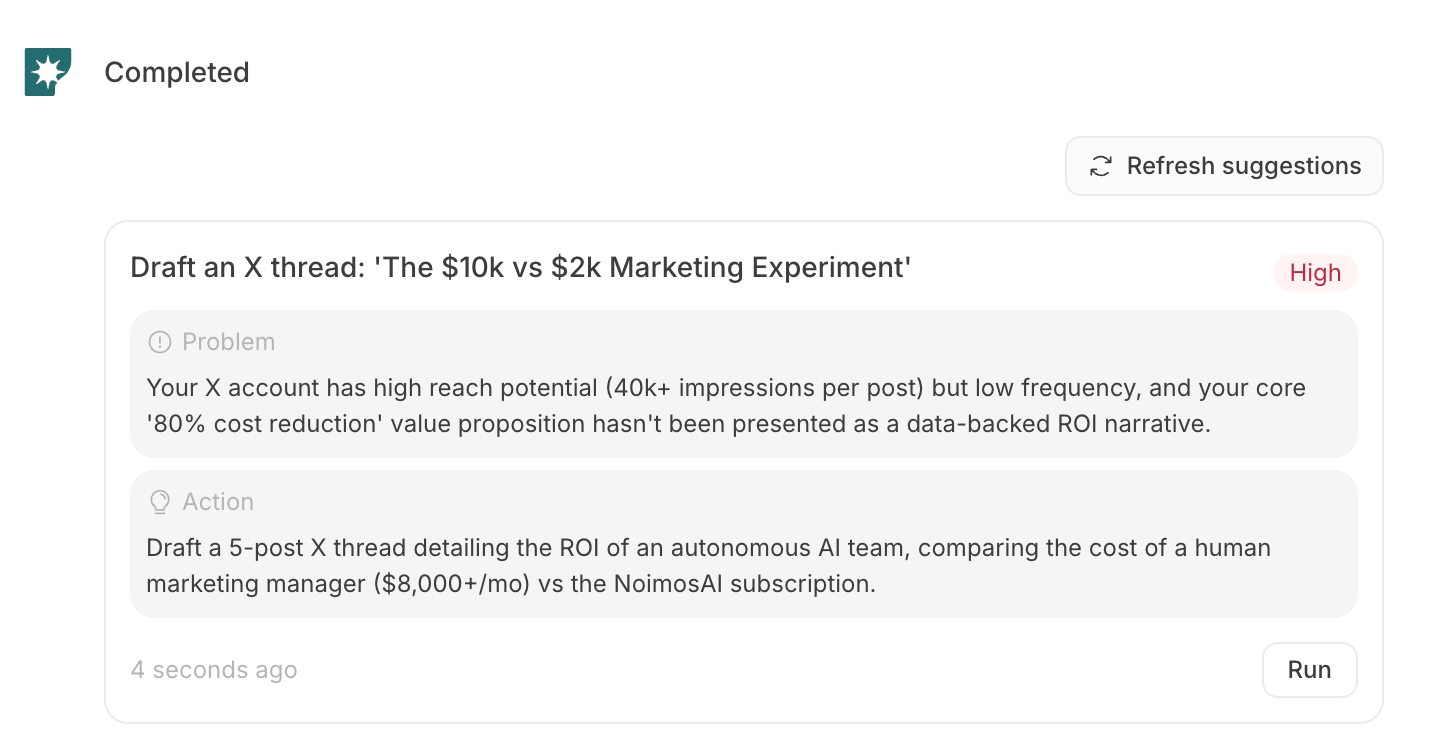 `Refresh recommendations` करने पर unhandled suggestions के साथ in-progress suggestions भी archived हो जाते हैं। यदि कोई task चल रहा है, तो refresh करने से पहले content और task chat जाँच लें।
Suggestions इन समयों पर भी generate या replenish होते हैं:
* जब workspace initial setup पूरा हो और analyze किए जा सकने वाले apps connected हों
* जब किसी suggestion को `Mark as complete` या `Archive` किया जाए और active suggestions में खाली slot बने
वर्तमान Advisor Agent में normal agent की तरह execution frequency सेट करने की सुविधा नहीं है। ज़रूरत के समय latest analysis चलाना हो तो `Refresh recommendations` का उपयोग करें।
आमतौर पर अधिकतम 5 active suggestions दिखते हैं। `Refresh recommendations` नए suggestions का batch generate करता है, जबकि `Mark as complete` या `Archive` खाली slot भरने के लिए 1 नया suggestion generate कर सकता है।
## Credit usage
Advisor Agent suggestions generate करते समय credits का उपयोग करता है।
Credit usage fixed नहीं है। यह suggestion generation में उपयोग हुए AI model की actual usage के आधार पर settle होता है। analysis target में जितने अधिक connected apps या accounts होंगे, उतना अधिक data और tool calls जाँचने पड़ सकते हैं, जिससे usage बढ़ सकता है।
मुख्य रूप से इन operations में credits उपयोग हो सकते हैं:
* initial suggestion generation
* `Refresh recommendations` से suggestions regenerate करना
* `Mark as complete` या `Archive` के बाद suggestions replenish करना
`Run` पर क्लिक करके task chat खोलने भर से suggestion prompt भेजा नहीं जाता। task chat में prompt भेजने के बाद की analysis, generation, website improvement आदि सामान्य chat या agent execution की तरह अलग से credits उपयोग करते हैं।
## Advisor Agent सेट करें
`Agents` में Advisor Agent की `Settings` खोलकर analysis targets और suggestion policy को adjust किया जा सकता है।
`Refresh recommendations` करने पर unhandled suggestions के साथ in-progress suggestions भी archived हो जाते हैं। यदि कोई task चल रहा है, तो refresh करने से पहले content और task chat जाँच लें।
Suggestions इन समयों पर भी generate या replenish होते हैं:
* जब workspace initial setup पूरा हो और analyze किए जा सकने वाले apps connected हों
* जब किसी suggestion को `Mark as complete` या `Archive` किया जाए और active suggestions में खाली slot बने
वर्तमान Advisor Agent में normal agent की तरह execution frequency सेट करने की सुविधा नहीं है। ज़रूरत के समय latest analysis चलाना हो तो `Refresh recommendations` का उपयोग करें।
आमतौर पर अधिकतम 5 active suggestions दिखते हैं। `Refresh recommendations` नए suggestions का batch generate करता है, जबकि `Mark as complete` या `Archive` खाली slot भरने के लिए 1 नया suggestion generate कर सकता है।
## Credit usage
Advisor Agent suggestions generate करते समय credits का उपयोग करता है।
Credit usage fixed नहीं है। यह suggestion generation में उपयोग हुए AI model की actual usage के आधार पर settle होता है। analysis target में जितने अधिक connected apps या accounts होंगे, उतना अधिक data और tool calls जाँचने पड़ सकते हैं, जिससे usage बढ़ सकता है।
मुख्य रूप से इन operations में credits उपयोग हो सकते हैं:
* initial suggestion generation
* `Refresh recommendations` से suggestions regenerate करना
* `Mark as complete` या `Archive` के बाद suggestions replenish करना
`Run` पर क्लिक करके task chat खोलने भर से suggestion prompt भेजा नहीं जाता। task chat में prompt भेजने के बाद की analysis, generation, website improvement आदि सामान्य chat या agent execution की तरह अलग से credits उपयोग करते हैं।
## Advisor Agent सेट करें
`Agents` में Advisor Agent की `Settings` खोलकर analysis targets और suggestion policy को adjust किया जा सकता है।
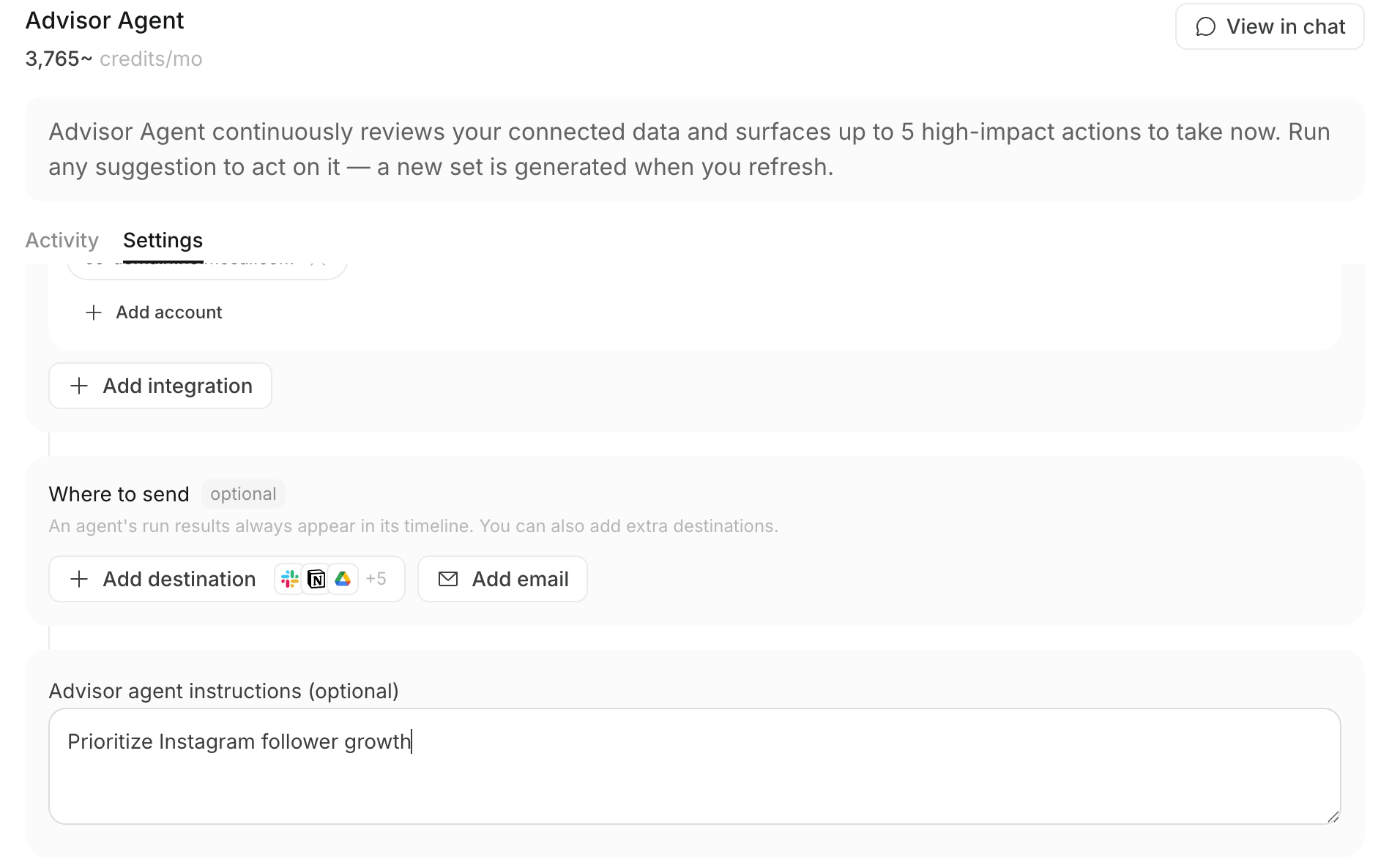 आप ये items configure कर सकते हैं:
* **Integrations**: analysis target बनने वाले apps और connected accounts
* **Destinations**: नए generated suggestions भेजने के स्थान
* **Advisor Agent instructions (optional)**: priority channels या goals
उदाहरण के लिए “Instagram followers growth को सबसे अधिक priority दें” लिखने पर, यदि data उस policy को support करता है, तो Instagram से जुड़े suggestions और priority में यह reflect होगा। यदि instruction actual data से मेल नहीं खाता, तो expected impact अधिक होने वाली actions को प्राथमिकता मिल सकती है।
Destinations सेट करने पर नए generated suggestions संबंधित destinations पर भेजे जा सकते हैं। यह destination से suggestion approve करने या task execute करने की सुविधा नहीं है।
### Chat से instructions बदलें
Advisor Agent chat में आप “Instagram को prioritize करें” या “SEO improvement suggestions ज़्यादा दिखाएँ” जैसे requests लिखकर `Advisor Agent instructions (optional)` बदलने का अनुरोध कर सकते हैं।
बदलाव confirmation card के रूप में दिखता है। user confirm करता है तो setting update हो जाती है। Instructions बदलने से existing suggestions अपने आप replace नहीं होते। नए focus के साथ suggestions दोबारा बनाने के लिए `Refresh recommendations` क्लिक करें।
आप ये items configure कर सकते हैं:
* **Integrations**: analysis target बनने वाले apps और connected accounts
* **Destinations**: नए generated suggestions भेजने के स्थान
* **Advisor Agent instructions (optional)**: priority channels या goals
उदाहरण के लिए “Instagram followers growth को सबसे अधिक priority दें” लिखने पर, यदि data उस policy को support करता है, तो Instagram से जुड़े suggestions और priority में यह reflect होगा। यदि instruction actual data से मेल नहीं खाता, तो expected impact अधिक होने वाली actions को प्राथमिकता मिल सकती है।
Destinations सेट करने पर नए generated suggestions संबंधित destinations पर भेजे जा सकते हैं। यह destination से suggestion approve करने या task execute करने की सुविधा नहीं है।
### Chat से instructions बदलें
Advisor Agent chat में आप “Instagram को prioritize करें” या “SEO improvement suggestions ज़्यादा दिखाएँ” जैसे requests लिखकर `Advisor Agent instructions (optional)` बदलने का अनुरोध कर सकते हैं।
बदलाव confirmation card के रूप में दिखता है। user confirm करता है तो setting update हो जाती है। Instructions बदलने से existing suggestions अपने आप replace नहीं होते। नए focus के साथ suggestions दोबारा बनाने के लिए `Refresh recommendations` क्लिक करें।
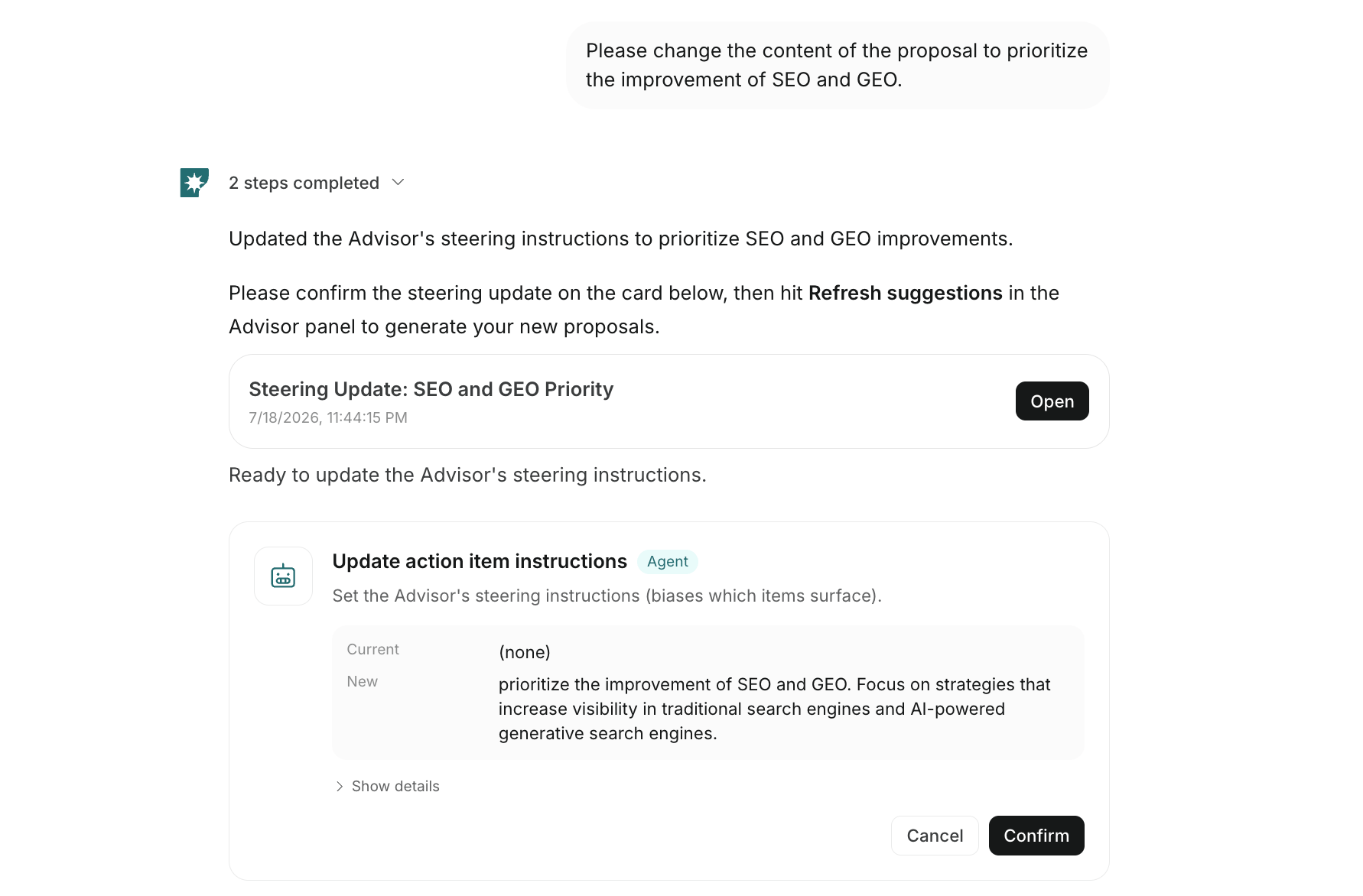 Chat से होने वाले changes मुख्य रूप से suggestion policy adjust करने वाली instructions update करते हैं। Analysis में इस्तेमाल होने वाले connected apps/accounts या suggestion destinations बदलने के लिए Advisor Agent की `Settings` से save करें।
## सुझाव text की भाषा
Suggestion titles, problems, actions आदि की भाषा app display language से अलग निर्धारित होती है।
Language यह priority order follow करती है:
1. `Advisor Agent instructions (optional)` में लिखी गई भाषा
2. Brand description, products/services, value proposition, target audience, business goals आदि से अनुमानित brand operating language
3. यदि दोनों से तय न हो सके, तो English
यदि आप Hindi में suggestions पाना चाहते हैं, तो brand information Hindi में तैयार करें और Advisor Agent instructions भी Hindi में लिखें।
## Results review करते समय ध्यान दें
Advisor Agent priority tasks तय करने और execution शुरू करने में मदद करता है, लेकिन generated results या published content की accuracy को अपने आप guarantee नहीं करता।
Website, article, SNS post आदि को externally publish करने से पहले ये जाँचें:
* analysis में उपयोग हुआ period और numbers उद्देश्य से मेल खाते हैं या नहीं
* suggested action वर्तमान business goals से मेल खाती है या नहीं
* generated text, image, video, website content में errors हैं या नहीं
* external publishing, sending, budget changes आदि पर अंतिम निर्णय human कर रहा है या नहीं
## संबंधित पेज
App connection और agent operation के लिए ये पेज भी देखें:
* [NoimosAI क्या है?](/hi/help-center/getting-started/what-is-noimosai)
* [Quickstart Guide](/hi/help-center/getting-started/quickstart-guide)
* [AI Agent Basics](/hi/help-center/ai-team/ai-agent-basics)
* [Agent Capabilities](/hi/help-center/ai-team/agent-types)
* [Workspace में apps connect करें](/hi/help-center/workspace/integrate-apps)
Chat से होने वाले changes मुख्य रूप से suggestion policy adjust करने वाली instructions update करते हैं। Analysis में इस्तेमाल होने वाले connected apps/accounts या suggestion destinations बदलने के लिए Advisor Agent की `Settings` से save करें।
## सुझाव text की भाषा
Suggestion titles, problems, actions आदि की भाषा app display language से अलग निर्धारित होती है।
Language यह priority order follow करती है:
1. `Advisor Agent instructions (optional)` में लिखी गई भाषा
2. Brand description, products/services, value proposition, target audience, business goals आदि से अनुमानित brand operating language
3. यदि दोनों से तय न हो सके, तो English
यदि आप Hindi में suggestions पाना चाहते हैं, तो brand information Hindi में तैयार करें और Advisor Agent instructions भी Hindi में लिखें।
## Results review करते समय ध्यान दें
Advisor Agent priority tasks तय करने और execution शुरू करने में मदद करता है, लेकिन generated results या published content की accuracy को अपने आप guarantee नहीं करता।
Website, article, SNS post आदि को externally publish करने से पहले ये जाँचें:
* analysis में उपयोग हुआ period और numbers उद्देश्य से मेल खाते हैं या नहीं
* suggested action वर्तमान business goals से मेल खाती है या नहीं
* generated text, image, video, website content में errors हैं या नहीं
* external publishing, sending, budget changes आदि पर अंतिम निर्णय human कर रहा है या नहीं
## संबंधित पेज
App connection और agent operation के लिए ये पेज भी देखें:
* [NoimosAI क्या है?](/hi/help-center/getting-started/what-is-noimosai)
* [Quickstart Guide](/hi/help-center/getting-started/quickstart-guide)
* [AI Agent Basics](/hi/help-center/ai-team/ai-agent-basics)
* [Agent Capabilities](/hi/help-center/ai-team/agent-types)
* [Workspace में apps connect करें](/hi/help-center/workspace/integrate-apps)