> ## Documentation Index
> Fetch the complete documentation index at: https://docs.noimosai.com/llms.txt
> Use this file to discover all available pages before exploring further.

# SNSを運用する

> NoimosAIを活用して、ソフトウェアやアプリの機能、使い方、更新情報を継続的に発信し、認知、登録、利用を増やします。

NoimosAIを活用して、ソフトウェアやアプリの価値が伝わる投稿を企画し、投稿文、画像、動画を作成して公開します。公開後は、反応と登録・利用への貢献を確認し、次の投稿へ反映します。

SNS運用で行うことは、主に次の4つです。

1. 利用するSNSと発信方針を決める
2. 製品とユーザーの情報から投稿を企画する
3. SNSコンテンツを作成して公開する
4. パフォーマンスをもとに改善する

まず[SNS運用の基本を理解する](#basics)で必要な考え方を確認し、その後[NoimosAIでSNSを運用する](#practice)で具体的な設定と進め方を説明します。

<a id="basics" />

## SNS運用の基本を理解する

SNSでは、まだ製品を知らない方へ価値を伝えるだけでなく、検討中の方へ機能を実演し、既存ユーザーへ更新情報や使い方を届けられます。対象ユーザーと継続して作れる形式をもとに運用するSNSを選び、公開後の結果から発信方針を改善します。

### 1. 利用するSNSと発信方針を決める

最初からすべてのSNSを運用せず、対象ユーザーが情報を得る場所、製品を見せやすい形式、継続して用意できる素材をもとに優先するSNSを決めます。

| SNS                                                                                                                                                                                                                                                                                                                                                                                                                                                                                                                                                                                                                                                                                                                                                                                                                                                                                                                                                                                                                                                                                                                                                                                                                                                                                                                                                                                                                                                                                                                                                                                                                                                                                                                                                                                                                                                                                                                                                                                            | 主な性質と形式                      | ソフトウェア・アプリでの活用例                   |
| ---------------------------------------------------------------------------------------------------------------------------------------------------------------------------------------------------------------------------------------------------------------------------------------------------------------------------------------------------------------------------------------------------------------------------------------------------------------------------------------------------------------------------------------------------------------------------------------------------------------------------------------------------------------------------------------------------------------------------------------------------------------------------------------------------------------------------------------------------------------------------------------------------------------------------------------------------------------------------------------------------------------------------------------------------------------------------------------------------------------------------------------------------------------------------------------------------------------------------------------------------------------------------------------------------------------------------------------------------------------------------------------------------------------------------------------------------------------------------------------------------------------------------------------------------------------------------------------------------------------------------------------------------------------------------------------------------------------------------------------------------------------------------------------------------------------------------------------------------------------------------------------------------------------------------------------------------------------------------------------------- | ---------------------------- | --------------------------------- |
| <span style={{ display: "inline-flex", alignItems: "center", gap: "6px", whiteSpace: "nowrap" }}><img src="https://mintcdn.com/agoslabstechnologiesfzco/TJAdFLdMxSC5eSdh/public/help-center/integrations/icons/x.png?fit=max&auto=format&n=TJAdFLdMxSC5eSdh&q=85&s=8c358316d7c5a67d603637b823f1996f" alt="" aria-hidden="true" style={{ width: "16px", height: "16px", display: "inline-block", objectFit: "contain", margin: "0" }} width="80" height="80" data-path="public/help-center/integrations/icons/x.png" />X</span>                                                                                                                                            | リアルタイムのテキスト、画像、動画、公開された会話    | リリース情報、短い使い方、障害・復旧情報、ユーザーとの会話     |
| <span style={{ display: "inline-flex", alignItems: "center", gap: "6px", whiteSpace: "nowrap" }}><img src="https://mintcdn.com/agoslabstechnologiesfzco/TJAdFLdMxSC5eSdh/public/help-center/integrations/icons/facebook.png?fit=max&auto=format&n=TJAdFLdMxSC5eSdh&q=85&s=4139a36ac43b31ea2c4a00243445e52c" alt="" aria-hidden="true" style={{ width: "16px", height: "16px", display: "inline-block", objectFit: "contain", margin: "0" }} width="68" height="68" data-path="public/help-center/integrations/icons/facebook.png" />Facebook</span>                                                                             | ページを中心とした画像、動画、リンク、コミュニティ    | アプリの利用例、イベント、ユーザー事例、コミュニティ向けのお知らせ |
| <span style={{ display: "inline-flex", alignItems: "center", gap: "6px", whiteSpace: "nowrap" }}><img src="https://mintcdn.com/agoslabstechnologiesfzco/TJAdFLdMxSC5eSdh/public/help-center/integrations/icons/instagram.png?fit=max&auto=format&n=TJAdFLdMxSC5eSdh&q=85&s=374d4ee4d3dd4d95ad552c4bda45eb2c" alt="" aria-hidden="true" style={{ width: "16px", height: "16px", display: "inline-block", objectFit: "contain", margin: "0" }} width="73" height="72" data-path="public/help-center/integrations/icons/instagram.png" />Instagram</span>                                                                    | 画像、複数枚の投稿、リール、ストーリーズ         | 画面を使った短い実演、利用前後の変化、テンプレート、開発の舞台裏  |
| <span style={{ display: "inline-flex", alignItems: "center", gap: "6px", whiteSpace: "nowrap" }}><img src="https://mintcdn.com/agoslabstechnologiesfzco/TJAdFLdMxSC5eSdh/public/help-center/integrations/icons/threads.png?fit=max&auto=format&n=TJAdFLdMxSC5eSdh&q=85&s=b511507a488416e7419ed3d433b6d150" alt="" aria-hidden="true" style={{ width: "16px", height: "16px", display: "inline-block", objectFit: "contain", margin: "0" }} width="73" height="72" data-path="public/help-center/integrations/icons/threads.png" />Threads</span>                                                                                      | テキストを中心とした話題と会話              | 製品づくりの考え方、短い活用法、更新の背景、ユーザーとの会話    |
| <span style={{ display: "inline-flex", alignItems: "center", gap: "6px", whiteSpace: "nowrap" }}><img src="https://mintcdn.com/agoslabstechnologiesfzco/TJAdFLdMxSC5eSdh/public/help-center/integrations/icons/tiktok.png?fit=max&auto=format&n=TJAdFLdMxSC5eSdh&q=85&s=7dcf0cd22a760b2cfac4b01c5aa37479" alt="" aria-hidden="true" style={{ width: "16px", height: "16px", display: "inline-block", objectFit: "contain", margin: "0" }} width="500" height="500" data-path="public/help-center/integrations/icons/tiktok.png" />TikTok</span>                                                                                           | おすすめから発見される縦型の短尺動画           | 1つの機能を見せる短い実演、操作のコツ、作業の変化         |
| <span style={{ display: "inline-flex", alignItems: "center", gap: "6px", whiteSpace: "nowrap" }}><img src="https://mintcdn.com/agoslabstechnologiesfzco/TJAdFLdMxSC5eSdh/public/help-center/integrations/icons/youtube.png?fit=max&auto=format&n=TJAdFLdMxSC5eSdh&q=85&s=1826c7e658de5d708405a6c035634a0b" alt="" aria-hidden="true" style={{ width: "16px", height: "16px", display: "inline-block", objectFit: "contain", margin: "0" }} width="144" height="144" data-path="public/help-center/integrations/icons/youtube.png" />YouTube</span>                                                                                  | 検索やおすすめから継続して見つかる長尺動画とShorts | チュートリアル、製品デモ、比較、ウェビナー、問題解決        |
| <span style={{ display: "inline-flex", alignItems: "center", gap: "6px", whiteSpace: "nowrap" }}><img src="https://mintcdn.com/agoslabstechnologiesfzco/TJAdFLdMxSC5eSdh/public/help-center/integrations/icons/pinterest.svg?fit=max&auto=format&n=TJAdFLdMxSC5eSdh&q=85&s=af0839218ef3de2da0985351f2b07310" alt="" aria-hidden="true" style={{ width: "16px", height: "16px", display: "inline-block", objectFit: "contain", margin: "0" }} width="24" height="24" data-path="public/help-center/integrations/icons/pinterest.svg" />Pinterest</span>                                                                    | 画像や動画を検索・保存するPin             | テンプレート、作業手順、デザイン例、活用アイデア          |
| <span style={{ display: "inline-flex", alignItems: "center", gap: "6px", whiteSpace: "nowrap" }}><img src="https://mintcdn.com/agoslabstechnologiesfzco/TJAdFLdMxSC5eSdh/public/help-center/integrations/icons/linkedin-personal.png?fit=max&auto=format&n=TJAdFLdMxSC5eSdh&q=85&s=8d4b91eb130864a5f6aa0a2d6afa6523" alt="" aria-hidden="true" style={{ width: "16px", height: "16px", display: "inline-block", objectFit: "contain", margin: "0" }} width="83" height="72" data-path="public/help-center/integrations/icons/linkedin-personal.png" />LinkedIn（個人）</span> | 仕事や専門性に関するテキスト、画像、動画、資料      | 開発者や創業者の知見、業務での利用例、製品更新の背景        |
| <span style={{ display: "inline-flex", alignItems: "center", gap: "6px", whiteSpace: "nowrap" }}><img src="https://mintcdn.com/agoslabstechnologiesfzco/TJAdFLdMxSC5eSdh/public/help-center/integrations/icons/mastodon.svg?fit=max&auto=format&n=TJAdFLdMxSC5eSdh&q=85&s=19b2cfe5742f8498ebd638b32ce85b0a" alt="" aria-hidden="true" style={{ width: "16px", height: "16px", display: "inline-block", objectFit: "contain", margin: "0" }} width="74" height="79" data-path="public/help-center/integrations/icons/mastodon.svg" />Mastodon</span>                                                                             | 関心の近いコミュニティごとのテキスト、画像、動画     | 技術的な更新、オープンソース、特定分野のコミュニティとの会話    |
| <span style={{ display: "inline-flex", alignItems: "center", gap: "6px", whiteSpace: "nowrap" }}><img src="https://mintcdn.com/agoslabstechnologiesfzco/TJAdFLdMxSC5eSdh/public/help-center/integrations/icons/bluesky.svg?fit=max&auto=format&n=TJAdFLdMxSC5eSdh&q=85&s=b4ef349448970a4d7fdc8851c9f7ba2c" alt="" aria-hidden="true" style={{ width: "16px", height: "16px", display: "inline-block", objectFit: "contain", margin: "0" }} width="568" height="501" data-path="public/help-center/integrations/icons/bluesky.svg" />Bluesky</span>                                                                                  | リアルタイムのテキスト主体の公開会話           | リリース情報、短い活用法、開発や業界への見解            |

優先するSNSを決めたら、誰に、何を理解または実行してもらうかを発信方針として整理します。認知、登録、利用開始、継続利用のうち、投稿ごとの目的を一つ決めます。

### 2. 製品とユーザーの情報から投稿を企画する

投稿は、外部の話題だけでなく、自社の製品とユーザーから得られる情報を起点に企画します。

主な企画の材料は次のとおりです。

* 新機能、改善、連携、料金やプランの変更
* 1つの仕事を完了する操作、テンプレート、ショートカット
* 登録前によくある質問、利用中のつまずき、サポートへの問い合わせ
* ユーザー事例、レビュー、製品を使って得られた結果
* 記事、ヘルプ、動画、イベントなど、公開済みのコンテンツ
* 過去に成果が高かった自社投稿
* 参考にする他社投稿や動画のテーマ、形式、冒頭の見せ方

参考投稿はそのまま模倣せず、反応を集めた理由を分解します。自社の画面、データ、利用例、意見を加え、対象ユーザーに役立つ新しい企画へ変えます。

ブランド名や製品名への言及が一定数ある場合は、<Tooltip tip="SNSやWeb上のブランドや製品への言及を継続的に収集し、内容や傾向を分析することです。">**ソーシャルリスニング**</Tooltip>を使い、要望、不満、誤解を投稿、ヘルプ、製品改善のどれへ反映するか決めます。

### 3. SNSコンテンツを作成して公開する

企画を決めたら、SNSに合う投稿文、画像、動画を作成します。同じ内容を複数のSNSへ出す場合も、文章量、冒頭、画面比率、タイトル、リンク先を調整します。

製品の投稿では、次の点を確認します。

* どのユーザーの、どの仕事に役立つかが分かる
* 機能名だけでなく、操作と得られる結果を示している
* 現在の画面、機能、料金、対応環境と一致している
* 登録、機能ページ、ヘルプ、アプリストアなど、投稿目的に合うリンク先がある
* ユーザーの投稿、画像、レビューを使う権利がある

### 4. パフォーマンスをもとに改善する

公開後は、投稿を見てもらえたか、関心を持ってもらえたか、製品の利用へ進んだかを確認します。

| 確認する成果      | 主な指標                           | 次に見直す内容                   |
| ----------- | ------------------------------ | ------------------------- |
| 見てもらえたか     | リーチ、表示回数、動画再生数                 | テーマ、投稿形式、冒頭の見せ方           |
| 関心を持ってもらえたか | いいね、コメント、保存、共有、エンゲージメント率、視聴維持率 | 説明、構成、画像、動画、実演の内容         |
| 製品へ進んだか     | プロフィール表示、リンククリック、Webサイト訪問、登録   | CTA、プロフィール、リンク先、投稿とページの一致 |
| 利用につながったか   | 登録後の利用開始、機能の利用、継続利用            | 投稿で伝えた価値と、製品内の最初の体験       |

指標の定義はSNSごとに異なるため、異なるSNSの数字をそのまま比べません。まず各SNS内で成果が高い投稿を特定し、複数の投稿に共通するテーマ、形式、冒頭、CTAを次の企画へ反映します。

### SNS運用で使えるアプリ

NoimosAIでは、利用するSNSを接続して投稿の作成、公開、分析に使います。各アプリ名から接続条件と利用方法を確認できます。

<div style={{ display: "flex", flexDirection: "column", gap: "12px", margin: "18px 0" }}>
  <div style={{ display: "flex", alignItems: "flex-start", gap: "10px" }}><img src="https://mintcdn.com/agoslabstechnologiesfzco/TJAdFLdMxSC5eSdh/public/help-center/integrations/icons/x.png?fit=max&auto=format&n=TJAdFLdMxSC5eSdh&q=85&s=8c358316d7c5a67d603637b823f1996f" alt="" aria-hidden="true" style={{ width: "16px", height: "16px", objectFit: "contain", flex: "0 0 16px", margin: "4px 0 0" }} width="80" height="80" data-path="public/help-center/integrations/icons/x.png" /><div><strong><a href="/ja/help-center/integrations/social-media/x">X</a></strong>：投稿、公開された会話、反応、アカウントの実績を企画、公開、分析に使います。</div></div>
  <div style={{ display: "flex", alignItems: "flex-start", gap: "10px" }}><img src="https://mintcdn.com/agoslabstechnologiesfzco/TJAdFLdMxSC5eSdh/public/help-center/integrations/icons/facebook.png?fit=max&auto=format&n=TJAdFLdMxSC5eSdh&q=85&s=4139a36ac43b31ea2c4a00243445e52c" alt="" aria-hidden="true" style={{ width: "16px", height: "16px", objectFit: "contain", flex: "0 0 16px", margin: "4px 0 0" }} width="68" height="68" data-path="public/help-center/integrations/icons/facebook.png" /><div><strong><a href="/ja/help-center/integrations/social-media/facebook">Facebook</a></strong>：Facebookページの投稿、コメント、ページの実績を公開と分析に使います。</div></div>
  <div style={{ display: "flex", alignItems: "flex-start", gap: "10px" }}><img src="https://mintcdn.com/agoslabstechnologiesfzco/TJAdFLdMxSC5eSdh/public/help-center/integrations/icons/instagram.png?fit=max&auto=format&n=TJAdFLdMxSC5eSdh&q=85&s=374d4ee4d3dd4d95ad552c4bda45eb2c" alt="" aria-hidden="true" style={{ width: "16px", height: "16px", objectFit: "contain", flex: "0 0 16px", margin: "4px 0 0" }} width="73" height="72" data-path="public/help-center/integrations/icons/instagram.png" /><div><strong><a href="/ja/help-center/integrations/social-media/instagram">Instagram</a></strong>：投稿、画像、動画、コメント、アカウントの実績を作成、公開、分析に使います。</div></div>
  <div style={{ display: "flex", alignItems: "flex-start", gap: "10px" }}><img src="https://mintcdn.com/agoslabstechnologiesfzco/TJAdFLdMxSC5eSdh/public/help-center/integrations/icons/threads.png?fit=max&auto=format&n=TJAdFLdMxSC5eSdh&q=85&s=b511507a488416e7419ed3d433b6d150" alt="" aria-hidden="true" style={{ width: "16px", height: "16px", objectFit: "contain", flex: "0 0 16px", margin: "4px 0 0" }} width="73" height="72" data-path="public/help-center/integrations/icons/threads.png" /><div><strong><a href="/ja/help-center/integrations/social-media/threads">Threads</a></strong>：投稿、公開された会話、反応を企画、公開、分析に使います。</div></div>
  <div style={{ display: "flex", alignItems: "flex-start", gap: "10px" }}><img src="https://mintcdn.com/agoslabstechnologiesfzco/TJAdFLdMxSC5eSdh/public/help-center/integrations/icons/tiktok.png?fit=max&auto=format&n=TJAdFLdMxSC5eSdh&q=85&s=7dcf0cd22a760b2cfac4b01c5aa37479" alt="" aria-hidden="true" style={{ width: "16px", height: "16px", objectFit: "contain", flex: "0 0 16px", margin: "4px 0 0" }} width="500" height="500" data-path="public/help-center/integrations/icons/tiktok.png" /><div><strong><a href="/ja/help-center/integrations/social-media/tiktok">TikTok</a></strong>：動画、コメント、アカウントの実績を作成、公開、分析に使います。</div></div>
  <div style={{ display: "flex", alignItems: "flex-start", gap: "10px" }}><img src="https://mintcdn.com/agoslabstechnologiesfzco/TJAdFLdMxSC5eSdh/public/help-center/integrations/icons/youtube.png?fit=max&auto=format&n=TJAdFLdMxSC5eSdh&q=85&s=1826c7e658de5d708405a6c035634a0b" alt="" aria-hidden="true" style={{ width: "16px", height: "16px", objectFit: "contain", flex: "0 0 16px", margin: "4px 0 0" }} width="144" height="144" data-path="public/help-center/integrations/icons/youtube.png" /><div><strong><a href="/ja/help-center/integrations/social-media/youtube">YouTube</a></strong>：動画、Shorts、コメント、チャンネルの実績を企画、公開準備、分析に使います。</div></div>
  <div style={{ display: "flex", alignItems: "flex-start", gap: "10px" }}><img src="https://mintcdn.com/agoslabstechnologiesfzco/TJAdFLdMxSC5eSdh/public/help-center/integrations/icons/pinterest.svg?fit=max&auto=format&n=TJAdFLdMxSC5eSdh&q=85&s=af0839218ef3de2da0985351f2b07310" alt="" aria-hidden="true" style={{ width: "16px", height: "16px", objectFit: "contain", flex: "0 0 16px", margin: "4px 0 0" }} width="24" height="24" data-path="public/help-center/integrations/icons/pinterest.svg" /><div><strong><a href="/ja/help-center/integrations/social-media/pinterest">Pinterest</a></strong>：Pin、保存、クリックの実績を作成、公開、分析に使います。</div></div>
  <div style={{ display: "flex", alignItems: "flex-start", gap: "10px" }}><img src="https://mintcdn.com/agoslabstechnologiesfzco/TJAdFLdMxSC5eSdh/public/help-center/integrations/icons/linkedin-personal.png?fit=max&auto=format&n=TJAdFLdMxSC5eSdh&q=85&s=8d4b91eb130864a5f6aa0a2d6afa6523" alt="" aria-hidden="true" style={{ width: "16px", height: "16px", objectFit: "contain", flex: "0 0 16px", margin: "4px 0 0" }} width="83" height="72" data-path="public/help-center/integrations/icons/linkedin-personal.png" /><div><strong><a href="/ja/help-center/integrations/social-media/linkedin-personal">LinkedIn（個人）</a></strong>：個人プロフィールの投稿と実績を公開と分析に使います。</div></div>
  <div style={{ display: "flex", alignItems: "flex-start", gap: "10px" }}><img src="https://mintcdn.com/agoslabstechnologiesfzco/TJAdFLdMxSC5eSdh/public/help-center/integrations/icons/mastodon.svg?fit=max&auto=format&n=TJAdFLdMxSC5eSdh&q=85&s=19b2cfe5742f8498ebd638b32ce85b0a" alt="" aria-hidden="true" style={{ width: "16px", height: "16px", objectFit: "contain", flex: "0 0 16px", margin: "4px 0 0" }} width="74" height="79" data-path="public/help-center/integrations/icons/mastodon.svg" /><div><strong><a href="/ja/help-center/integrations/social-media/mastodon">Mastodon</a></strong>：投稿と反応をコミュニティ向けの公開と分析に使います。</div></div>
  <div style={{ display: "flex", alignItems: "flex-start", gap: "10px" }}><img src="https://mintcdn.com/agoslabstechnologiesfzco/TJAdFLdMxSC5eSdh/public/help-center/integrations/icons/bluesky.svg?fit=max&auto=format&n=TJAdFLdMxSC5eSdh&q=85&s=b4ef349448970a4d7fdc8851c9f7ba2c" alt="" aria-hidden="true" style={{ width: "16px", height: "16px", objectFit: "contain", flex: "0 0 16px", margin: "4px 0 0" }} width="568" height="501" data-path="public/help-center/integrations/icons/bluesky.svg" /><div><strong><a href="/ja/help-center/integrations/social-media/bluesky">Bluesky</a></strong>：投稿、公開された会話、反応を企画、公開、分析に使います。</div></div>
  <div style={{ display: "flex", alignItems: "flex-start", gap: "10px" }}><img src="https://mintcdn.com/agoslabstechnologiesfzco/TJAdFLdMxSC5eSdh/public/help-center/integrations/icons/google-analytics.webp?fit=max&auto=format&n=TJAdFLdMxSC5eSdh&q=85&s=5decc2b46e733583d74874463cb8ffb6" alt="" aria-hidden="true" style={{ width: "16px", height: "16px", objectFit: "contain", flex: "0 0 16px", margin: "4px 0 0" }} width="80" height="80" data-path="public/help-center/integrations/icons/google-analytics.webp" /><div><strong><a href="/ja/help-center/integrations/analytics-and-data/google-analytics">Google Analytics</a></strong>：SNSから訪れたユーザーの登録、利用開始、有料化への進み方を確認します。</div></div>
</div>

<Note>FacebookはFacebookページを使用します。InstagramはFacebookページに接続されたInstagram Businessアカウントと必要な権限を用意します。詳しい条件は各アプリのHelp Centerで確認してください。</Note>

<a id="practice" />

## NoimosAIでSNSを運用する

ここからは、SNSと発信方針を決め、製品とユーザーの情報から投稿を企画し、コンテンツを公開して、結果を次の投稿へ反映します。

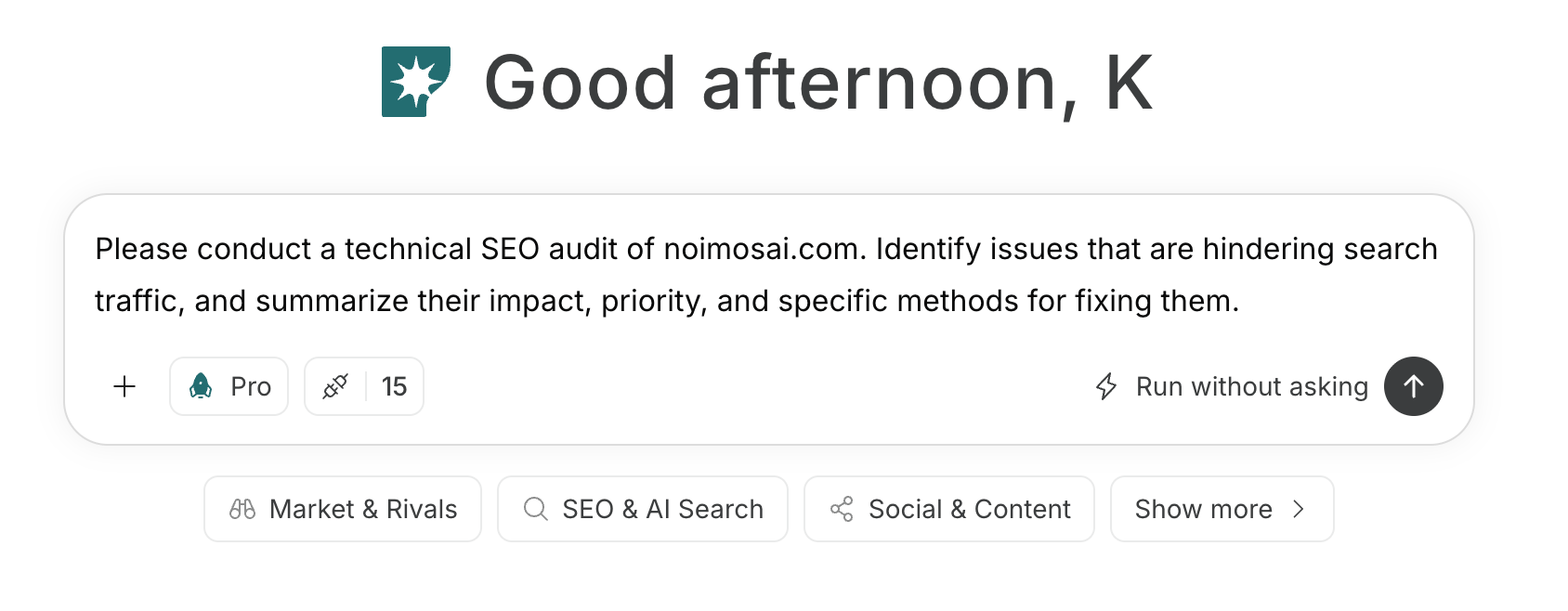
チャットで指示を入力する方法は、[独自プロンプトを入力する](/ja/help-center/chat/enter-your-own-prompt)を参照してください。

<img src="https://mintcdn.com/agoslabstechnologiesfzco/nVMsHgQOcR2qTlLN/public/playbooks/consumer/seo-chat-prompt.png?fit=max&auto=format&n=nVMsHgQOcR2qTlLN&q=85&s=aa5d18df848b82cebfc32f1e0a45a681" alt="NoimosAIのチャットにSNS運用の指示を入力する画面" style={{ width: "100%", border: "1px solid #e5e7eb", borderRadius: "8px", margin: "18px 0" }} width="1688" height="658" data-path="public/playbooks/consumer/seo-chat-prompt.png" />

プロンプトで目的と条件を伝えてエージェントを作成する場合は、[チャットからエージェントを作成する](/ja/help-center/ai-team/create-a-trigger-from-chat)を参照してください。設定画面で各項目を手動で入力する場合は、[ゼロからエージェントを作成する](/ja/help-center/ai-team/create-an-agent-from-scratch)で確認できます。
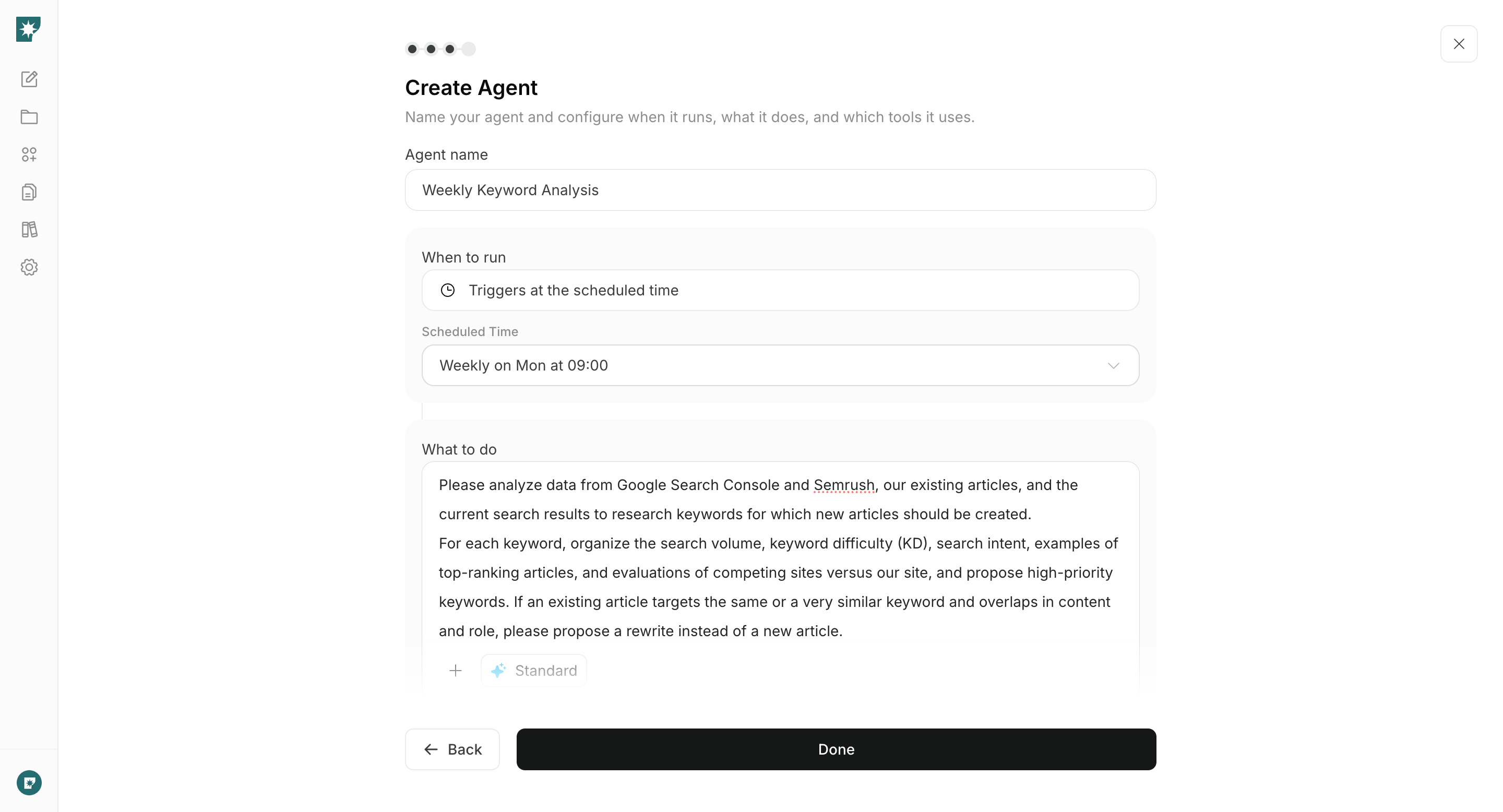
<img src="https://mintcdn.com/agoslabstechnologiesfzco/nVMsHgQOcR2qTlLN/public/playbooks/consumer/seo-create-keyword-agent.png?fit=max&auto=format&n=nVMsHgQOcR2qTlLN&q=85&s=cd302b05ae7bfeaddd3bdf6c45978f1a" alt="SNS運用エージェントのトリガーと実行内容を設定する画面" style={{ width: "100%", border: "1px solid #e5e7eb", borderRadius: "8px", margin: "18px 0" }} width="2880" height="1556" data-path="public/playbooks/consumer/seo-create-keyword-agent.png" />

### 1. 利用するSNSと発信方針を決める

対象ユーザー、製品、運用目的、用意できる素材をチャットへ入力し、優先するSNSと発信テーマを整理します。SNSごとの形式と発見方法を比較し、登録、インストール、利用開始など投稿から案内する行動を決めます。

#### チャットに入力するプロンプト

```text theme={null}
[製品名]のSNS運用方針を作成してください。

対象ユーザーは[対象ユーザー]で、目的は[認知・登録・利用開始・継続利用]です。公開できる素材は[製品画面・動画・記事・テンプレート・ユーザー事例など]です。

各SNSの情報の流れ方、適する形式、対象ユーザーとの相性、継続して制作できるかを比較し、優先するSNSを提案してください。各SNSについて、発信テーマ、投稿形式、次に案内する行動、確認する指標を整理してください。
```

提案の中から、対象ユーザーが利用し、週単位で素材を用意できるSNSを優先します。接続したSNSで運用を始め、実際の反応から方針を見直します。

### 2. 製品とユーザーの情報から投稿を企画する

新機能、使い方、質問、既存コンテンツ、参考投稿のいずれかをチャットへ入力し、企画を作ります。対象ユーザー、伝える価値、使う事実・素材、適するSNSと形式を整理し、公開できる根拠がある企画を選びます。

#### チャットに入力するプロンプト

```text theme={null}
[新機能・使い方・ユーザーの質問・既存コンテンツのURL・参考投稿のURL]をもとに、[SNS名]の投稿企画を3案作成してください。

[対象ユーザー]にとって役立つ理由を整理し、各案について目的、伝える内容、冒頭の見せ方、投稿形式、必要な画面・画像・動画、CTAを示してください。参考投稿を使う場合は反応を集めた要素を分析し、当社の製品画面、データ、利用例を使った独自の企画にしてください。
```

参考投稿の表現をコピーせず、自社だけが示せる画面、操作、結果、知見がある企画を選びます。

ブランドや製品への言及が十分ある場合は、要望、不満、誤解を毎日確認するエージェントを追加できます。

#### ソーシャルリスニングの設定

**トリガー：** スケジュール／毎日

**実行内容：**

```text theme={null}
YouTube、X、Web上の過去24時間における[ブランド名・製品名]への言及を収集してください。要望、不満、質問、誤解、好意的な利用例に分け、根拠URLを示してください。影響が大きい内容を1つ選び、返信、説明投稿、ヘルプ更新、製品改善のうち適切な対応を提案してください。
```

**使う連携：** <span style={{ display: "inline-flex", alignItems: "center", lineHeight: "24px" }}><img src="https://mintcdn.com/agoslabstechnologiesfzco/TJAdFLdMxSC5eSdh/public/help-center/integrations/icons/x.png?fit=max&auto=format&n=TJAdFLdMxSC5eSdh&q=85&s=8c358316d7c5a67d603637b823f1996f" alt="" aria-hidden="true" style={{ width: "16px", height: "16px", display: "inline-block", objectFit: "contain", margin: "0 6px 0 0" }} width="80" height="80" data-path="public/help-center/integrations/icons/x.png" />X</span>、<span style={{ display: "inline-flex", alignItems: "center", lineHeight: "24px" }}><img src="https://mintcdn.com/agoslabstechnologiesfzco/TJAdFLdMxSC5eSdh/public/help-center/integrations/icons/youtube.png?fit=max&auto=format&n=TJAdFLdMxSC5eSdh&q=85&s=1826c7e658de5d708405a6c035634a0b" alt="" aria-hidden="true" style={{ width: "16px", height: "16px", display: "inline-block", objectFit: "contain", margin: "0 6px 0 0" }} width="144" height="144" data-path="public/help-center/integrations/icons/youtube.png" />YouTube</span>

### 3. SNSコンテンツを作成して公開する

選んだ企画をチャットへ入力し、投稿文と必要な画像・動画を作成します。対象SNSの形式に合わせ、製品ページ、アプリストア、登録、利用方法など次に案内する場所まで含む完成コンテンツにします。

#### チャットに入力するプロンプト

```text theme={null}
[選んだ投稿企画]をもとに、[SNS名]へ公開するコンテンツを作成してください。

対象ユーザーは[対象ユーザー]、目的は[認知・登録・利用開始・継続利用]です。冒頭で得られる結果を伝え、[製品機能・操作・利用例]を具体的に説明してください。投稿文、必要な画像または動画の構成、CTA、リンク先を作成し、[製品の公式URL]にある現在の機能と表現を一致させてください。
```
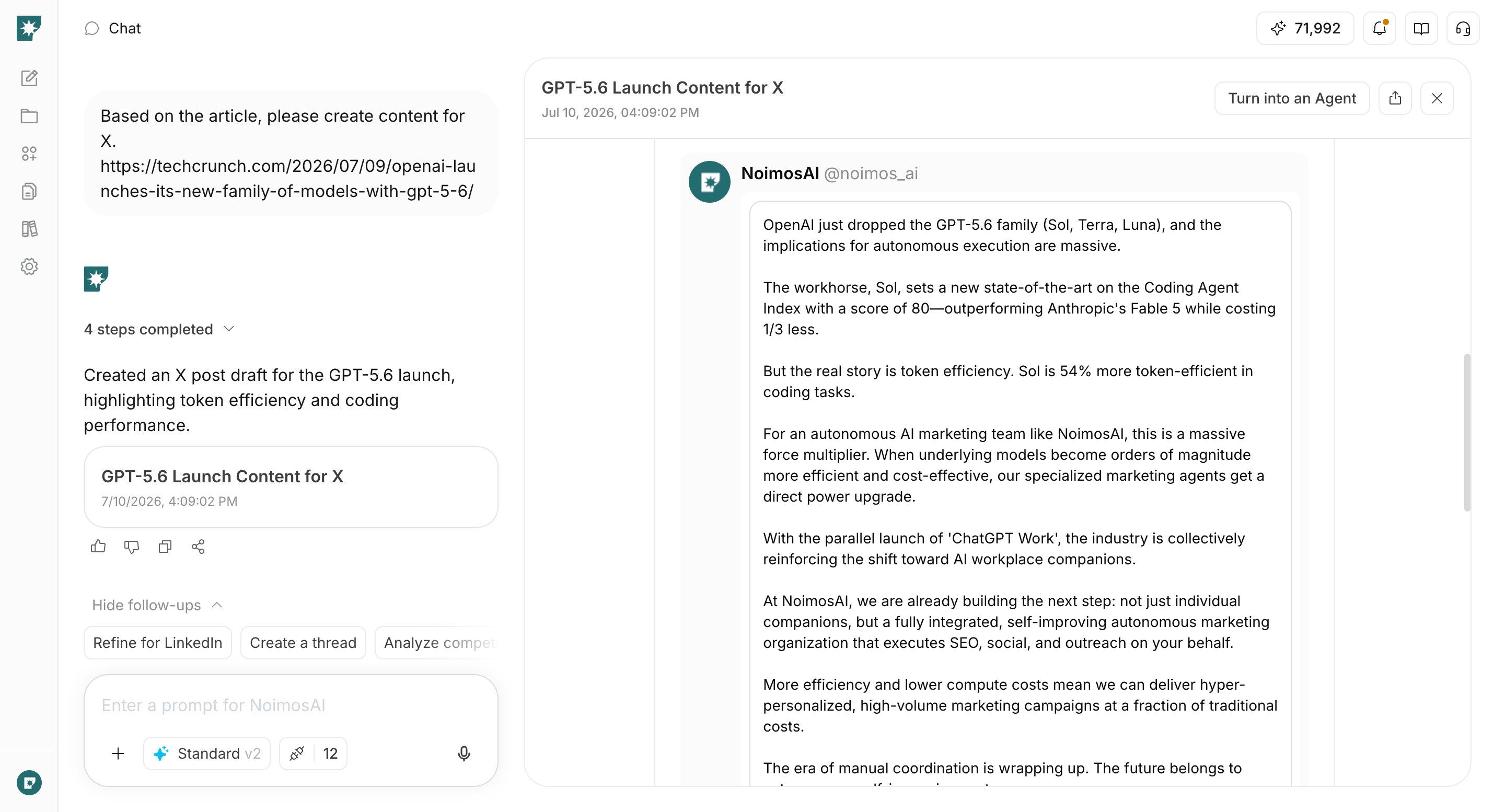
<img src="https://mintcdn.com/agoslabstechnologiesfzco/WUdTSmFBnDccnDQ0/public/help-center/use-cases/channels/social-media-content-creation.png?fit=max&auto=format&n=WUdTSmFBnDccnDQ0&q=85&s=f90a66a7a093a91aa6abd9eb89ad95c5" alt="NoimosAIがWebページをもとにSNS投稿を作成した画面" style={{ width: "100%", border: "1px solid #e5e7eb", borderRadius: "8px", margin: "18px 0" }} width="2880" height="1554" data-path="public/help-center/use-cases/channels/social-media-content-creation.png" />

機能、料金、画面、リンク、素材の権利を確認します。問題がなければ、接続したSNSで公開または予約します。
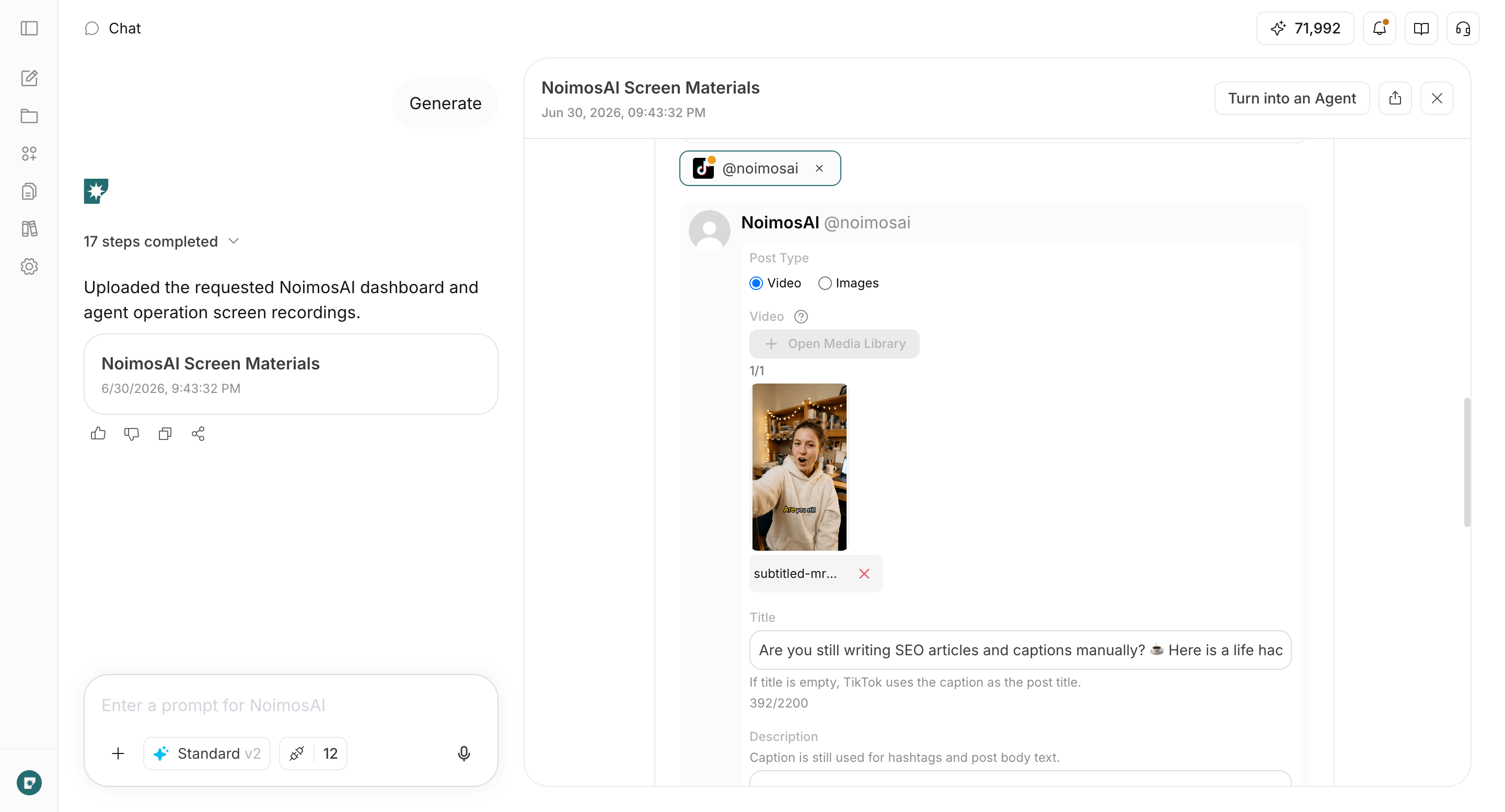
<img src="https://mintcdn.com/agoslabstechnologiesfzco/WUdTSmFBnDccnDQ0/public/help-center/use-cases/channels/social-media-media-creation.png?fit=max&auto=format&n=WUdTSmFBnDccnDQ0&q=85&s=e33143ef207eea15ae8bc1cc5475e4c9" alt="NoimosAIがSNS投稿に使う動画を作成した画面" style={{ width: "100%", border: "1px solid #e5e7eb", borderRadius: "8px", margin: "18px 0" }} width="2880" height="1554" data-path="public/help-center/use-cases/channels/social-media-media-creation.png" />

### 4. パフォーマンスをもとに改善する

各SNS内で成果が高い投稿を特定し、次の企画を作るエージェントを設定します。テーマ、形式、冒頭、製品の見せ方、次の行動を比較し、継続、改善、停止する企画を決めます。

#### エージェントの設定

**トリガー：** スケジュール／毎週

**実行内容：**

```text theme={null}
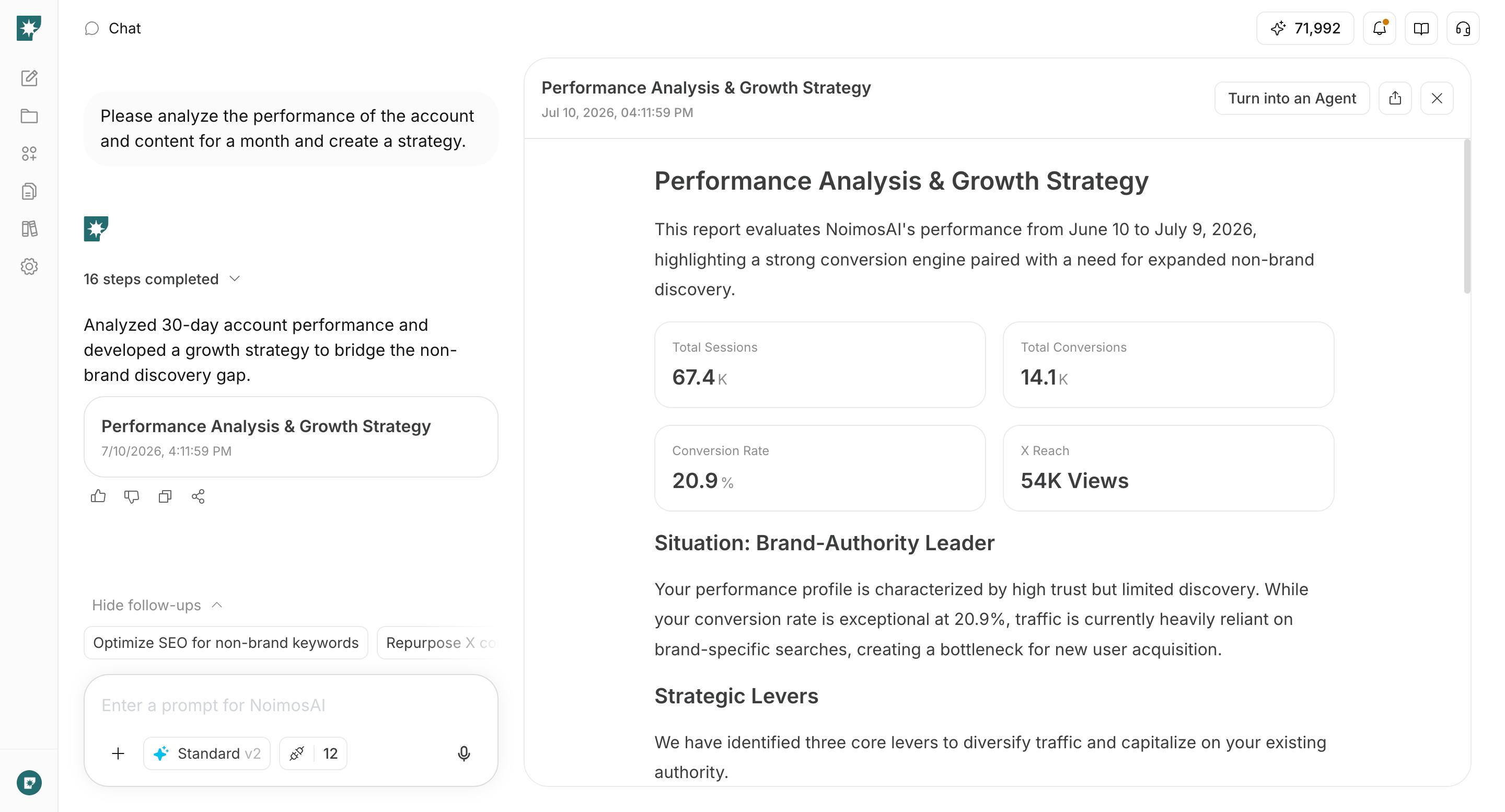
接続した各SNSについて、過去1週間の投稿結果を分析してください。

各SNSの中で、リーチまたは表示、反応、動画視聴、リンククリックの成果が高い投稿と低い投稿を特定してください。異なるSNSの数値をそのまま比較せず、成果が高い複数の投稿に共通するテーマ、形式、冒頭、製品の見せ方、CTAを整理してください。

分析をもとに、次の1週間で作成する投稿企画を3案作成し、各案の対象ユーザー、目的、投稿形式、必要な素材、確認する指標を示してください。
```

**使う連携：** 分析対象のSNS

<img src="https://mintcdn.com/agoslabstechnologiesfzco/WUdTSmFBnDccnDQ0/public/help-center/use-cases/channels/social-media-performance-review.png?fit=max&auto=format&n=WUdTSmFBnDccnDQ0&q=85&s=6b27ddeb708306181ee05062019a6d73" alt="NoimosAIが複数のSNSの投稿結果を分析した画面" style={{ width: "100%", border: "1px solid #e5e7eb", borderRadius: "8px", margin: "18px 0" }} width="2880" height="1554" data-path="public/help-center/use-cases/channels/social-media-performance-review.png" />

提案された企画を次の投稿として作成し、同じ指標で結果を確認します。Google Analyticsを利用している場合は、SNSから訪れたユーザーの登録、利用開始、有料化も確認し、反応だけが高く製品利用につながらない企画を見直します。

## 関連ページ

* [競合を調査する](/ja/playbooks/software-apps/research-competitors)
* [Webサイトを作成・改善する](/ja/playbooks/software-apps/build-website)
* [登録・利用開始・有料化のCVRを改善する](/ja/playbooks/software-apps/improve-conversion)
* [SNS連携の一覧](/ja/help-center/integrations/social-media/social-media-integrations)