> ## Documentation Index
> Fetch the complete documentation index at: https://docs.noimosai.com/llms.txt
> Use this file to discover all available pages before exploring further.

# Build and Improve Your Website

> Use NoimosAI to create and improve a website that drives inquiries, resource requests, consultations, and demo bookings from business buyers.

Use NoimosAI to help target accounts determine whether your product or service matches their needs and to guide them toward inquiries, resource requests, consultations, and demo bookings. This can be used not only when building a new website but also when you want to refine the content and user flows of an existing site.

Work through three stages.

1. Create and improve a website that leads to inquiries and sales conversations
2. Build a foundation that search engines and AI can read
3. Improve based on prospective customers’ behavior

The first half, [Understand website fundamentals](#understand-website-fundamentals), explains what each stage should accomplish. The second half, [Build and improve your website with NoimosAI](#build-and-improve-your-website-with-noimosai), provides a practical workflow.

## Understand website fundamentals

When building a new website, decide on the target accounts, the people involved in the evaluation, the value you communicate, and the action you want visitors to take before you start. If a website already exists, review its content and user flows with the same perspective and add missing pages or explanations.

After that, configure technical settings so search engines and AI can read the content, and continue improving the site based on post-publication data.

### 1. Create and improve a website that leads to inquiries and sales conversations

First, clarify the target accounts and what visitors reading the website need to determine. Even for the same product or service, the information required differs between end users, people who will implement the solution, and those who approve budgets and contracts.

Before writing content or building pages, decide whose problems you address and what action you want them to take. Work through the table below from top to bottom so the target account, value proposition, implementation requirements, and next action can be explained in a continuous flow.

| Item to decide before creating the website | Details to define                                                                                                   |
| ------------------------------------------ | ------------------------------------------------------------------------------------------------------------------- |
| Target accounts                            | Industry, company size, region, business characteristics                                                            |
| Target departments/roles                   | Departments that will use the product/service, personnel who will drive implementation, decision-makers who approve |
| Problems to solve                          | Problems occurring in current operations and their impact                                                           |
| Value provided                             | Operations, time, cost, quality, and outcomes that can be improved by implementation                                |
| Next action                                | Inquiry, resource request, consultation, demo booking, or other actions you want completed on the website           |

Especially in the <Tooltip tip="This is the area visible immediately when the page opens, without scrolling.">**above-the-fold area**</Tooltip>, make sure the following three points are conveyed:

* Which companies or roles the product/service is for
* What operational problems it solves and what it can improve
* What to do next (inquiry, resource request, consultation, demo booking, etc.)

To help visitors determine whether they can implement the solution and to enable them to explain it to stakeholders internally, provide the following content.

| Content to prepare                                                                                                                                                                                | What to communicate specifically                                                                |
| ------------------------------------------------------------------------------------------------------------------------------------------------------------------------------------------------- | ----------------------------------------------------------------------------------------------- |
| Product/service description                                                                                                                                                                       | Show not only features and offerings but also how and which operational problems are solved     |
| Target industries/uses                                                                                                                                                                            | Indicate supported industries, departments, operations, and use cases                           |
| Implementation benefits                                                                                                                                                                           | Show improvements and outcomes with verifiable numbers and concrete examples                    |
| Case studies and customer results                                                                                                                                                                 | Show pre-implementation issues, usage, and changes after implementation                         |
| Implementation process                                                                                                                                                                            | Show steps, timelines, and required preparations from inquiry to start of use                   |
| Terms of use                                                                                                                                                                                      | Show pricing, contract terms, scope of coverage, support, and security                          |
| <Tooltip tip="Abbreviation for frequently asked questions. A section that summarizes questions and answers commonly asked during evaluation.">**FAQ (frequently asked questions)**</Tooltip>      | Answer questions that arise during consideration about implementation, contracts, and operation |
| <Tooltip tip="Buttons or links that prompt the next action such as inquiry, resource request, consultation, or demo booking. Abbreviation for call to action.">**CTA (call to action)**</Tooltip> | Present the next action that matches the visitor’s evaluation stage                             |

Pick one primary CTA—the single action you most want to increase on the website. For visitors who want immediate consultation, prioritize inquiry or demo booking; for those gathering information first, offer brochures or case studies. Avoid asking for actions that don’t match the visitor’s evaluation stage.

If there’s a lot of information, don’t cram everything onto one page. Split content into pages for product/service, industries/uses, case studies, pricing, brochures, and inquiries. Use navigation and internal links so visitors can reach the information they need without confusion.

### 2. Make your website easy for search engines and AI to understand

Next, configure your site’s settings and structure so search engines and AI can discover important pages and correctly understand the company, product/service, and supported industries or uses. This applies both to new websites and to existing sites.

To ensure important pages are discovered and understood, check the pathways between pages, retrievable information, URLs, and usability separately. Reviewing the items in the table below from top to bottom helps separate issues where pages aren’t discovered from issues where discovered pages aren’t read correctly.

| Areas to prepare for discovery by search engines and AI | What to do on public pages                                                                                                                                                                                                                                                                                                                                                                                                                                             |
| ------------------------------------------------------- | ---------------------------------------------------------------------------------------------------------------------------------------------------------------------------------------------------------------------------------------------------------------------------------------------------------------------------------------------------------------------------------------------------------------------------------------------------------------------- |
| Paths to important pages                                | Organize navigation and <Tooltip tip="Links that connect pages within the same website.">**internal links**</Tooltip> so important pages like product/service, industries/uses, case studies, pricing, and contact are reachable from the homepage. Also list public pages in the <Tooltip tip="A file that lists the site’s main URLs and update information to tell search engines about available pages.">**sitemap.xml**</Tooltip>.                                |
| Page retrieval settings                                 | Check <Tooltip tip="A file that tells crawlers which areas of the site may be accessed or should be restricted.">**robots.txt**</Tooltip> and <Tooltip tip="A setting that tells search engines not to include the page in search results.">**noindex**</Tooltip> so pages you want public can be retrieved by search engines and AI.                                                                                                                                  |
| Correct URL designation                                 | Use <Tooltip tip="A setting that tells search engines the preferred URL when similar content exists at multiple URLs.">**canonical settings**</Tooltip> to manage duplicate URLs, and fix issues with <Tooltip tip="The method of encrypting communications between browser and website for secure publishing.">**HTTPS**</Tooltip>, broken links, and <Tooltip tip="A setting that automatically forwards access from old URLs to new URLs.">**redirects**</Tooltip>. |
| Page content organization                               | Structure page titles, headings, and body text clearly, and standardize references to company name, product/service name, pricing, features, and scope.                                                                                                                                                                                                                                                                                                                |
| Structured information                                  | Where appropriate, configure <Tooltip tip="Data that describes companies, products, articles, etc., in a format search engines and AI can easily understand.">**structured data**</Tooltip> and <Tooltip tip="A text file that guides AI to important information and pages within the website.">**llms.txt**</Tooltip>.                                                                                                                                               |
| Readability and usability                               | Ensure readability on both desktop and mobile, make CTAs and forms easy to use, and fix major issues that slow page loading.                                                                                                                                                                                                                                                                                                                                           |

After preparing the site-wide foundation, expand pages and articles tailored to search keywords and continue operations to be discoverable by search engines and AI.

### 3. Improve based on prospective customers’ behavior

After publication, check where visitors come from, which pages they read, and whether they proceeded to inquiries, resource requests, consultations, or demo bookings. Don’t judge by visit counts alone—verify that target accounts read the pages needed to evaluate implementation and complete the desired next action.

Key data to check include:

* Sources of traffic: search, social, ads, AI services, external sites
* Views of main pages such as product/service, industries/uses, case studies, pricing
* CTA click counts
* Form starts and completions
* Number of <Tooltip tip="A completion of the action set as the website’s goal, such as an inquiry or resource request.">**conversions**</Tooltip>, like inquiries, resource requests, consultations, and demo bookings
* Impressions, clicks, and rankings in search results

The following table shows situations you may find in the data and where to first check.

| What the data shows                                                        | Possible cause and response                                                                                                                                                                                                                         |
| -------------------------------------------------------------------------- | --------------------------------------------------------------------------------------------------------------------------------------------------------------------------------------------------------------------------------------------------- |
| The website receives few visits from target accounts                       | Important pages may not be indexed or visible for the problems buyers search, and active channels may not link to them. Check search and AI visibility, referral sources, and whether content exists for the relevant industry, role, and use case. |
| Product or service pages are viewed but CTAs are rarely clicked            | Buyers may not see a clear fit, business outcome, implementation requirement, or reason to trust the claim. Review the opening message, target account, expected value, supporting evidence, and what the consultation or demo will provide.        |
| CTAs are clicked but forms are not completed                               | The form may request too much information, fail on a device, or leave response time and next steps unclear. Test the flow, inspect errors and field-level drop-off, and remove or explain every required field.                                     |
| Visitors do not continue to case studies, pricing, or implementation pages | The entry page may not link to the evidence needed for the buyer’s next decision. Add contextual links and explain what each destination helps the buyer evaluate instead of relying on generic navigation.                                         |
| A specific page has a high exit rate                                       | The page may not match the source message, may omit decision information, or may load poorly. Compare the query or referring content with the page, then review the opening, structure, missing evidence, links, and performance.                   |

Website data alone cannot confirm post-inquiry sales conversations or closed deals. First, improve actions that complete within the website; if you can track inquiry content and sales activity results, correlate which pages and traffic sources produced promising opportunities.

Avoid changing many items at once; otherwise, it will be hard to determine which change produced results. Fix the most impactful issues first and compare metrics before and after changes.

### Apps you can connect for website analysis

If you only use NoimosAI to create the website, no app integrations are required. To analyze post-publication behavior and search performance, connect the following apps.

<div style={{ display: "flex", flexDirection: "column", gap: "12px", margin: "18px 0" }}>
  <div style={{ display: "flex", alignItems: "flex-start", gap: "10px" }}>
    <img src="https://mintcdn.com/agoslabstechnologiesfzco/TJAdFLdMxSC5eSdh/public/help-center/integrations/icons/google-analytics.webp?fit=max&auto=format&n=TJAdFLdMxSC5eSdh&q=85&s=5decc2b46e733583d74874463cb8ffb6" alt="" aria-hidden="true" style={{ width: "16px", height: "16px", display: "inline-block", objectFit: "contain", flex: "0 0 16px", margin: "4px 0 0" }} width="80" height="80" data-path="public/help-center/integrations/icons/google-analytics.webp" />

    <div><strong><a href="/help-center/integrations/analytics-and-data/google-analytics">Google Analytics</a></strong>: Collects behavior within the website such as traffic sources, viewed pages, CTAs, forms, and inquiries or resource requests. Used in the step that improves based on prospective customer behavior.</div>
  </div>

  <div style={{ display: "flex", alignItems: "flex-start", gap: "10px" }}>
    <img src="https://mintcdn.com/agoslabstechnologiesfzco/TJAdFLdMxSC5eSdh/public/help-center/integrations/icons/google-search-console.png?fit=max&auto=format&n=TJAdFLdMxSC5eSdh&q=85&s=dea6b216368968e3a75e560af0cd6374" alt="" aria-hidden="true" style={{ width: "16px", height: "16px", display: "inline-block", objectFit: "contain", flex: "0 0 16px", margin: "4px 0 0" }} width="573" height="512" data-path="public/help-center/integrations/icons/google-search-console.png" />

    <div><strong><a href="/help-center/integrations/analytics-and-data/google-search-console">Google Search Console</a></strong>: Retrieves <Tooltip tip="The words actually entered into search engines.">**search queries**</Tooltip>, impressions, clicks, rankings, and whether pages are <Tooltip tip="The process of registering a page so search engines can list it in search results.">**indexed**</Tooltip>. Used for building the website foundation and for post-publication improvements.</div>
  </div>
</div>

## Build and improve your website with NoimosAI

With NoimosAI you can perform website creation and analysis via chat and run scheduled post-publication analyses with agents.

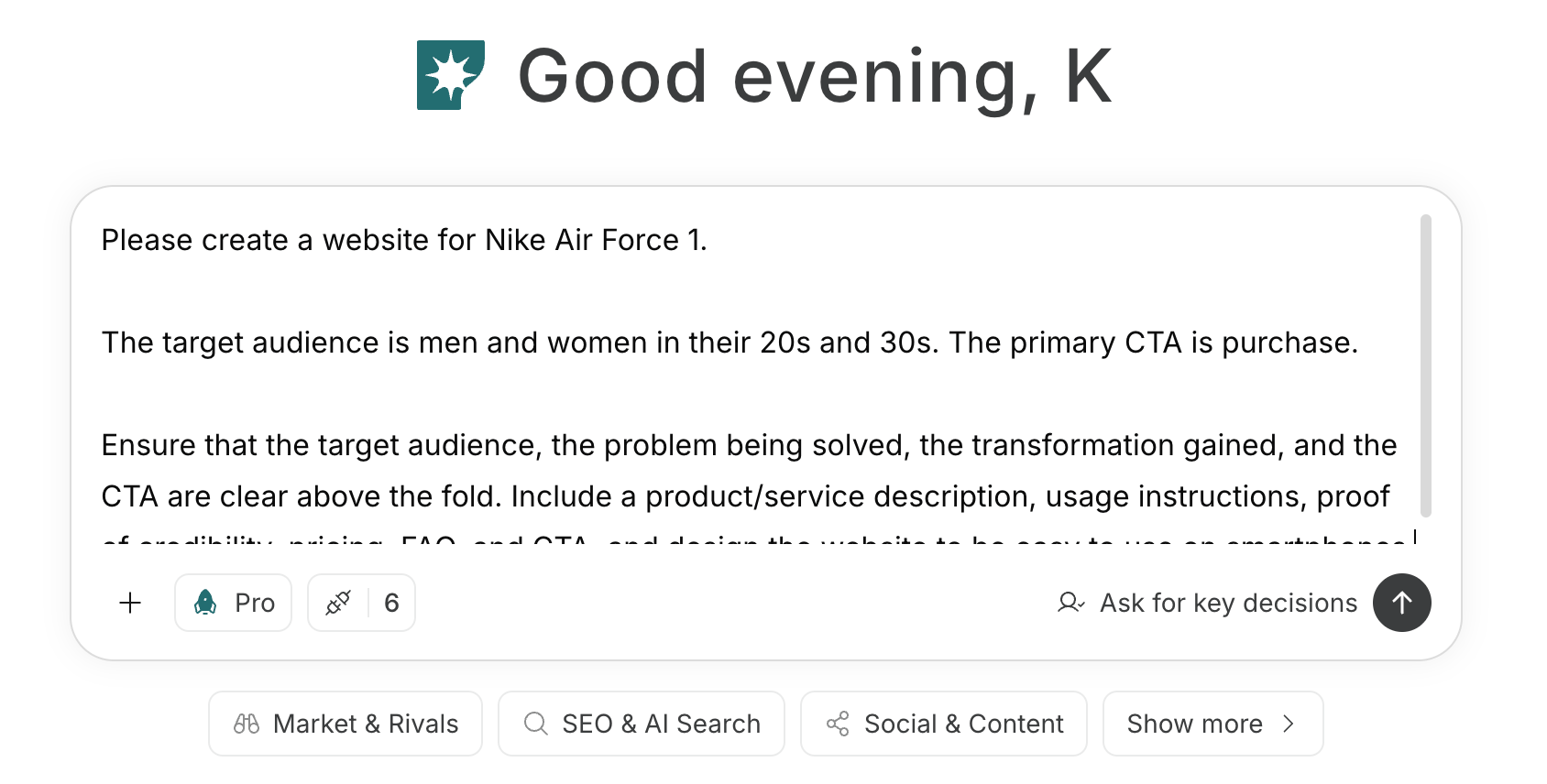
For instructions on entering a prompt in chat, see [Enter your own prompt](/help-center/chat/enter-your-own-prompt).

<img src="https://mintcdn.com/agoslabstechnologiesfzco/nVMsHgQOcR2qTlLN/public/playbooks/consumer/website-chat-prompt.png?fit=max&auto=format&n=nVMsHgQOcR2qTlLN&q=85&s=469c7742929a2ffeac20a3f77eed2862" alt="Screen for entering website creation instructions in NoimosAI chat" style={{ width: "100%", border: "1px solid #e5e7eb", borderRadius: "8px", margin: "18px 0" }} width="1688" height="856" data-path="public/playbooks/consumer/website-chat-prompt.png" />

To create an agent by providing goals and conditions in a prompt, see [Create an agent from chat](/help-center/ai-team/create-a-trigger-from-chat). To fill in fields manually on the settings screen, see [Create an agent from scratch](/help-center/ai-team/create-an-agent-from-scratch).
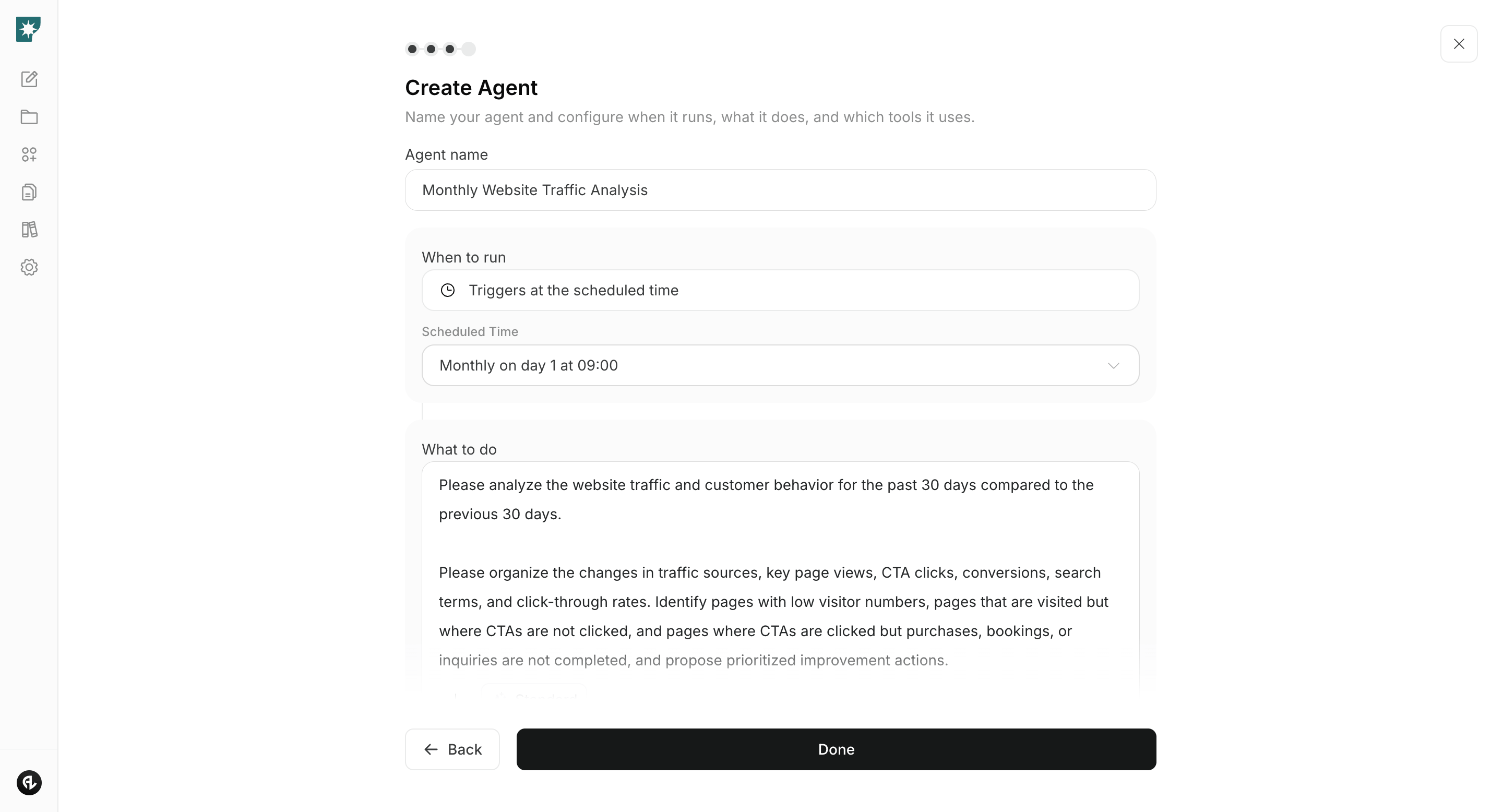
<img src="https://mintcdn.com/agoslabstechnologiesfzco/nVMsHgQOcR2qTlLN/public/playbooks/consumer/website-create-agent.png?fit=max&auto=format&n=nVMsHgQOcR2qTlLN&q=85&s=5b5ac8da5362b21c0bb9b64b22a9d423" alt="Screen for creating a monthly website analysis agent in NoimosAI" style={{ width: "100%", border: "1px solid #e5e7eb", borderRadius: "8px", margin: "18px 0" }} width="2880" height="1556" data-path="public/playbooks/consumer/website-create-agent.png" />

### 1. Create and improve a website that leads to inquiries and sales conversations

When building a new website, enter the target accounts, the people involved in evaluation, the problems to solve, the value provided, and the main CTA into chat. NoimosAI will create page structure, copy, and design; preview the generated website and refine it as needed.

#### Prompt for chat

```text theme={null}
Create a website for [product/service].

Our target accounts are [industry, company size, region, etc.], and the main evaluators are [departments/roles]. Explain how the offering solves [current operational problems] and improves [expected business outcome after implementation]. The primary CTAs are [inquiry, resource request, consultation, demo booking, etc.].

Ensure the above-the-fold area identifies the intended audience, the problem you solve, the expected outcome, and the primary CTA. Include the product or service description, target industries and use cases, implementation benefits, case studies, implementation process, pricing and contract terms, security and support, FAQ, and CTAs. Make the website easy to use on both desktop and mobile.
```

Before publishing, confirm that the above-the-fold area identifies the target accounts and problem, that the page includes the information needed for evaluation, and that buyers can find the primary CTA. Verify figures, case studies, pricing, and scope, then preview the page on desktop and mobile. For the editing workflow, see [Create a new website](/help-center/website/create-and-edit-website).

If you already have a website, enter the URL into chat to check how well value is conveyed and how clear the path to inquiry is.

#### Prompt for chat

```text theme={null}
Analyze [website URL] and verify whether the target accounts, evaluators, problems solved, benefits after implementation, and primary CTAs are clearly communicated.

Identify missing information among product/service, target industries/uses, implementation benefits, case studies, implementation process, pricing/contract terms, security, support, and FAQ. Organize unclear areas that hinder progress to inquiry, resource request, consultation, or demo booking, and propose prioritized page structure and copy for improvement.
```
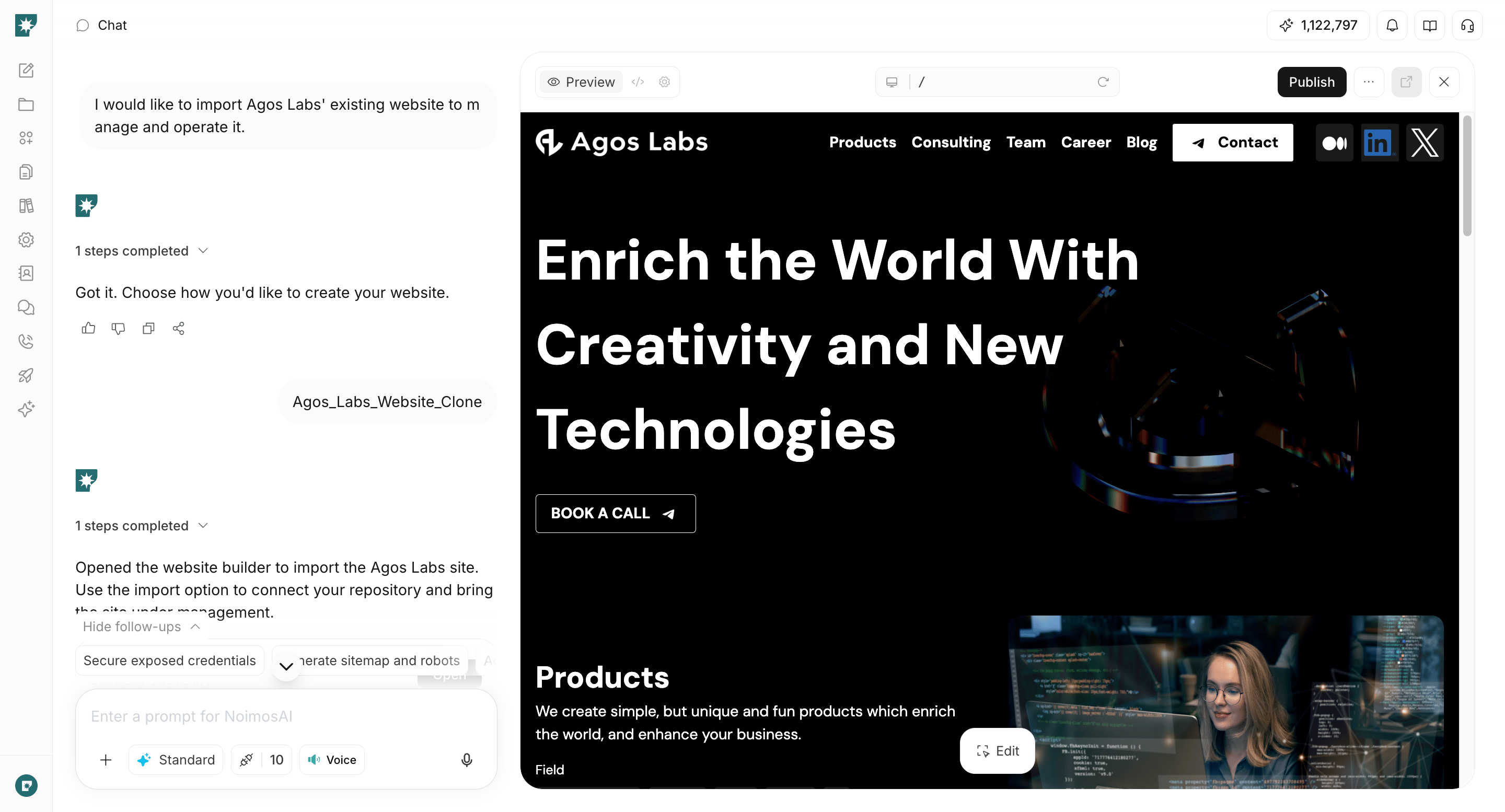
<img src="https://mintcdn.com/agoslabstechnologiesfzco/WUdTSmFBnDccnDQ0/public/help-center/website/website-builder-overview.png?fit=max&auto=format&n=WUdTSmFBnDccnDQ0&q=85&s=be6b42ecd9918acf5958b9f9d8f415e1" alt="Screen for reviewing and editing a B2B website in NoimosAI" style={{ width: "100%", border: "1px solid #e5e7eb", borderRadius: "8px", margin: "18px 0" }} width="2880" height="1554" data-path="public/help-center/website/website-builder-overview.png" />

You can generate analysis and improvement suggestions by entering just the URL. To directly edit and operate an existing site within NoimosAI, see [Create from an existing website](/help-center/website/import-existing-website).

### 2. Make your website easy for search engines and AI to understand

For both new and existing websites, audit technical conditions before publication or during improvements. Entering the URL in chat lets you check for issues that prevent search engines and AI from retrieving and understanding pages.

#### Prompt for chat

```text theme={null}
For [website URL], audit whether search engines and AI can easily retrieve and understand the company, product/service, target industries, use cases, and implementation requirements.

Check site structure, internal links, sitemap.xml, robots.txt, noindex, canonical settings, page titles and headings, structured data, llms.txt, mobile display, and load speed. Identify problems that prevent search engines and AI from retrieving and understanding important pages, and summarize the impact, priority, and specific fixes.
```

Address issues first that prevent retrieval of important pages, incorrect URLs being indexed in search results, and failures to correctly understand company or product/service information.

For sites managed with NoimosAI, you can review page titles, descriptions, sitemap.xml, llms.txt, and structured data under Management > SEO and GEO. Request fixes via chat, preview, and publish the changes.
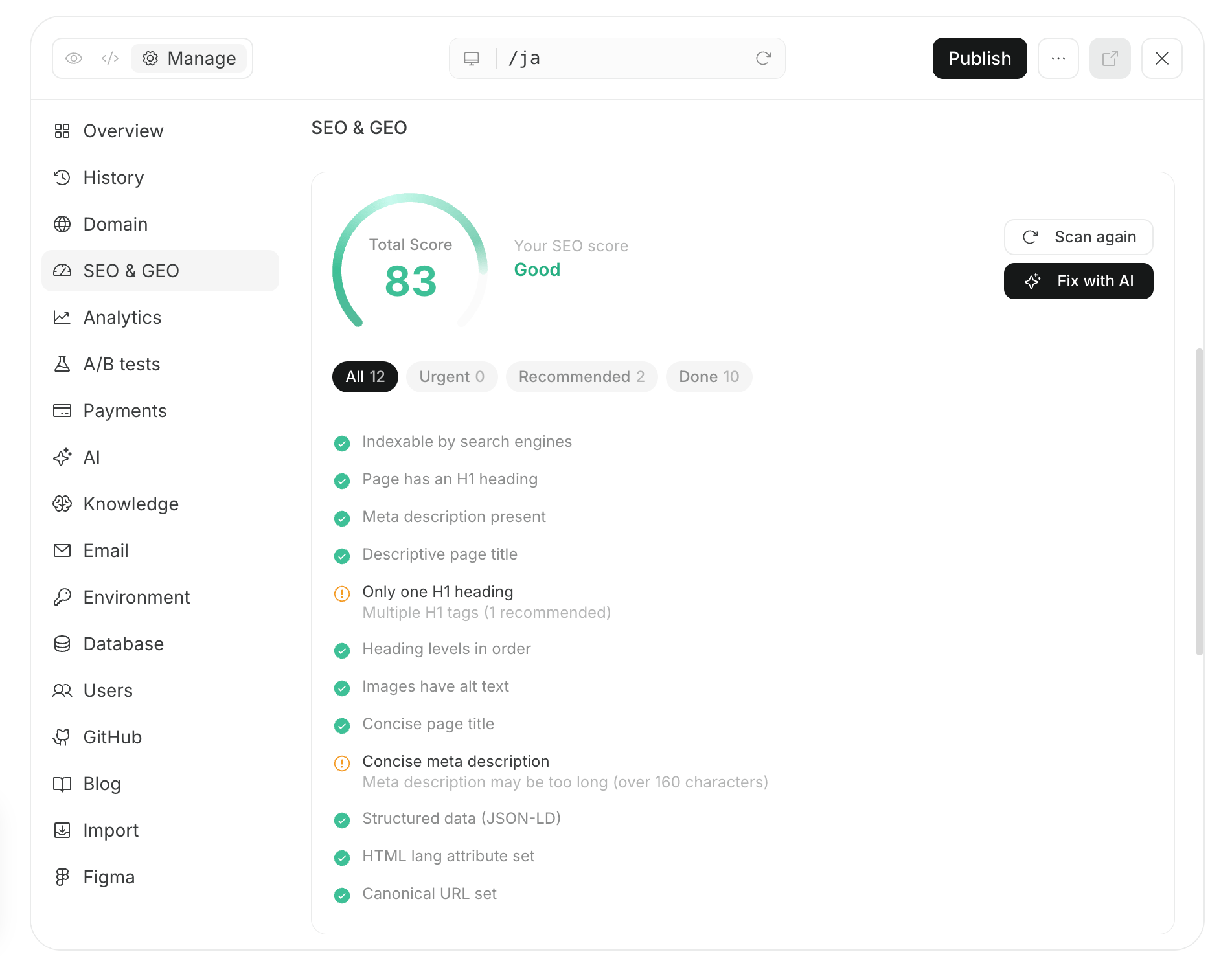
<img src="https://mintcdn.com/agoslabstechnologiesfzco/nVMsHgQOcR2qTlLN/public/playbooks/consumer/seo-site-audit-and-fix.png?fit=max&auto=format&n=nVMsHgQOcR2qTlLN&q=85&s=1b2052465f23bcaed379e3a724bd1bb0" alt="Screen for checking and fixing SEO and GEO settings in NoimosAI" style={{ width: "100%", border: "1px solid #e5e7eb", borderRadius: "8px", margin: "18px 0" }} width="1902" height="1504" data-path="public/playbooks/consumer/seo-site-audit-and-fix.png" />

After publication, confirm that important pages are listed in sitemap.xml. Request indexing for new or significantly changed pages using Google Search Console’s <Tooltip tip="A tool to check whether Google can access and has indexed a given public URL.">**URL Inspection**</Tooltip>, and check later whether they appear in search results.
### 3. Improve based on prospective customers’ behavior

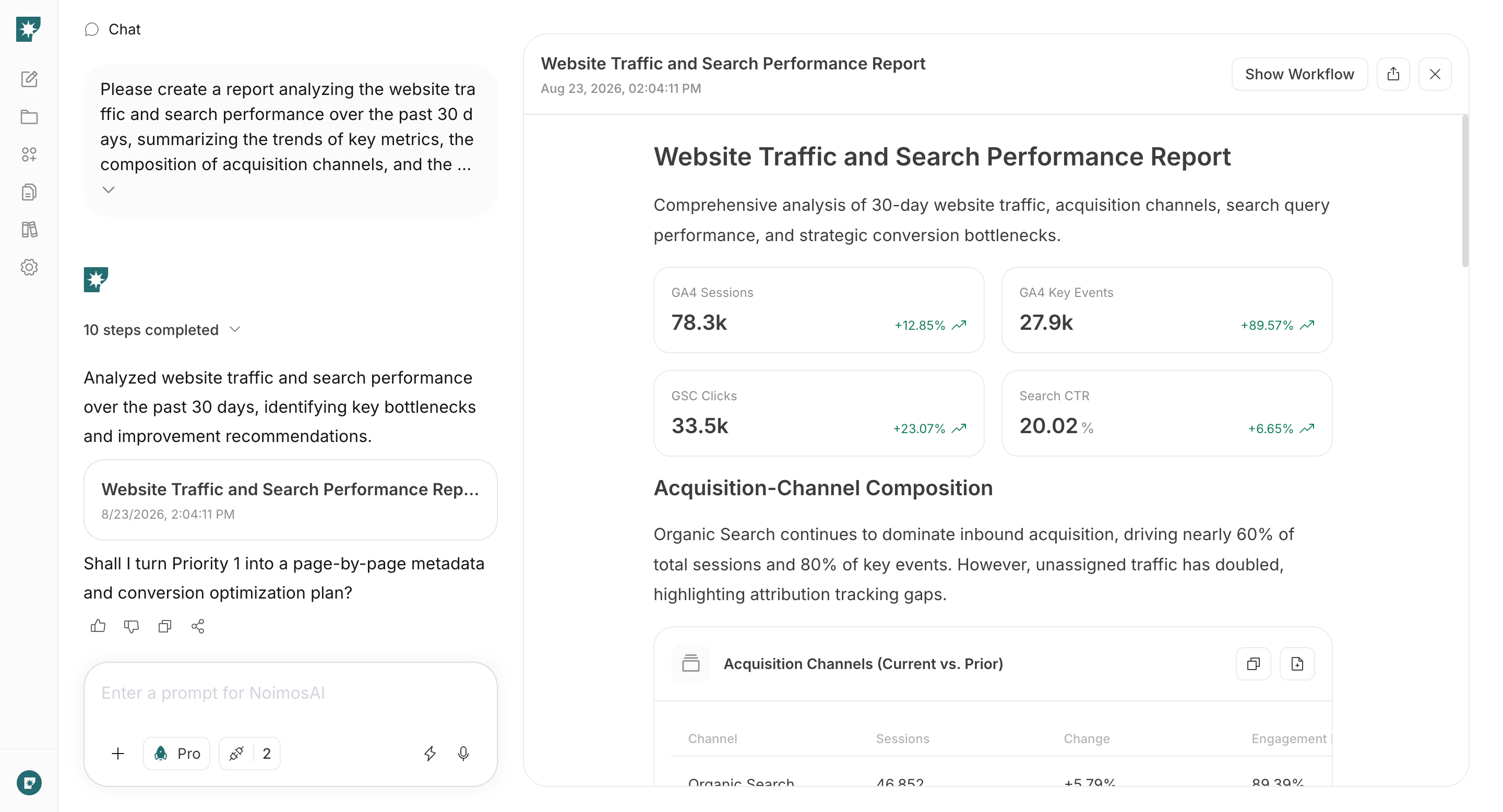
After publication, connect Google Analytics and Google Search Console and create an agent that analyzes monthly traffic, search performance, and actions leading to inquiries and resource requests. Comparing the most recent 30 days with the previous 30 days makes it easier to spot pages and issues that need improvement.

#### Agent setup

**Trigger:** Schedule / Monthly

**Instructions:**

```text theme={null}
Analyze website traffic and prospective customer behavior over the past 30 days compared to the previous 30 days.

Summarize changes in traffic sources, search queries, views of major pages, CTA clicks, form starts and completions, inquiries, resource requests, consultations, and demo bookings. Identify important pages with low visits, pages that are visited but not generating CTA clicks, and pages where CTAs are clicked but forms aren’t completed, and propose prioritized improvements.
```

**Integrations:** <span style={{ display: "inline-flex", alignItems: "center", lineHeight: "24px" }}><img src="https://mintcdn.com/agoslabstechnologiesfzco/TJAdFLdMxSC5eSdh/public/help-center/integrations/icons/google-analytics.webp?fit=max&auto=format&n=TJAdFLdMxSC5eSdh&q=85&s=5decc2b46e733583d74874463cb8ffb6" alt="" aria-hidden="true" style={{ width: "16px", height: "16px", display: "inline-block", objectFit: "contain", margin: "0 6px 0 0" }} width="80" height="80" data-path="public/help-center/integrations/icons/google-analytics.webp" />Google Analytics</span>, <span style={{ display: "inline-flex", alignItems: "center", lineHeight: "24px" }}><img src="https://mintcdn.com/agoslabstechnologiesfzco/TJAdFLdMxSC5eSdh/public/help-center/integrations/icons/google-search-console.png?fit=max&auto=format&n=TJAdFLdMxSC5eSdh&q=85&s=dea6b216368968e3a75e560af0cd6374" alt="" aria-hidden="true" style={{ width: "16px", height: "16px", display: "inline-block", objectFit: "contain", margin: "0 6px 0 0" }} width="573" height="512" data-path="public/help-center/integrations/icons/google-search-console.png" />Google Search Console</span>

<img src="https://mintcdn.com/agoslabstechnologiesfzco/nVMsHgQOcR2qTlLN/public/playbooks/consumer/seo-monthly-performance-report.png?fit=max&auto=format&n=nVMsHgQOcR2qTlLN&q=85&s=38907aa91388559fab0e75ff4dec6049" alt="Monthly NoimosAI report analyzing website traffic and search performance" style={{ width: "100%", border: "1px solid #e5e7eb", borderRadius: "8px", margin: "18px 0" }} width="2880" height="1556" data-path="public/playbooks/consumer/seo-monthly-performance-report.png" />

From the agent’s analysis, select the page where a fix is most likely to affect qualified inquiries, then improve that page in chat.

#### Prompt for chat

```text theme={null}
Based on the monthly analysis created in this chat, improve [URL of page to improve].

Review visitor behavior after target accounts visit the page and identify which of the descriptions of target accounts and their problems, implementation benefits, trust signals, page structure, CTA, or form are preventing inquiries or resource requests. Prioritize fixes for the most impactful issues, and summarize the changes and the metrics to check after changes.
```

Preview and publish the fixes, then check metric changes in the next month’s analysis. Don’t change many elements at once, and record the changed pages, content, and dates so it’s easier to identify which improvements produced results.

## Related pages

* [Enter your own prompt](/help-center/chat/enter-your-own-prompt)
* [Create a new website](/help-center/website/create-and-edit-website)
* [Create from an existing website](/help-center/website/import-existing-website)
* [Publish and update website](/help-center/website/publish-and-update-website)
* [Create an agent from scratch](/help-center/ai-team/create-an-agent-from-scratch)
* [Check agent execution results](/help-center/ai-team/check-agent-execution-results)