> ## Documentation Index
> Fetch the complete documentation index at: https://docs.noimosai.com/llms.txt
> Use this file to discover all available pages before exploring further.

# Increase Organic Search Traffic with SEO

> Use NoimosAI to capture searches about client problems, provider comparisons, and pricing and turn that traffic into qualified consultations.

<Tooltip tip="Search engine optimization: the practice of making your pages easier to discover and understand in search results.">**SEO (search engine optimization)**</Tooltip> helps prospective clients find you while researching a problem, a qualified provider, pricing, or relevant experience. It can increase visits to service pages and consultations with clients you can serve.

SEO for client services involves four main activities:

1. Prepare your website for organic search
2. Choose keywords for each stage of the client's decision journey
3. Create and publish pages that answer prospective clients' questions
4. Improve organic traffic and inquiries

First review the decision criteria in [Understand SEO fundamentals](#basics), then follow [Put SEO into practice with NoimosAI](#practice) for the setup.

<a id="basics" />

## Understand SEO fundamentals

Build a foundation that allows search engines to discover and understand public pages, then answer what a prospective client needs before reaching out. Choose searches that can lead to work you actually accept, not simply terms with high volume.

### 1. Prepare your website for organic search

Search engines discover pages through links and <Tooltip tip="A file that lists important website URLs and helps search engines discover them.">**sitemap.xml**</Tooltip>, retrieve their content, and add eligible pages to an <Tooltip tip="A search engine's stored record of pages that may appear in search results.">**index**</Tooltip>.

| Area to prepare                | What to check and correct on the public website                                                                                       |
| ------------------------------ | ------------------------------------------------------------------------------------------------------------------------------------- |
| Discovery of important pages   | Connect service, industry, case-study, team, pricing, article, and contact pages with internal links and include them in sitemap.xml. |
| Content retrieval and indexing | Review robots.txt, noindex, HTML, titles, headings, body text, image alt text, and structured data.                                   |
| URLs and publication status    | Review HTTPS, HTTP response codes, 404s, redirects, and canonical URLs.                                                               |
| Usability                      | Confirm on a phone that a visitor can review relevant case studies and complete an inquiry, and fix serious performance issues.       |

### 2. Choose keywords for each stage of the client's decision journey

Consider both search volume and <Tooltip tip="What a person wants to learn, compare, decide, or accomplish by entering a search phrase.">**search intent**</Tooltip>, including what the client wants to decide after the search.

| Evaluation stage       | Typical searches                                                      | Suitable pages                                                              |
| ---------------------- | --------------------------------------------------------------------- | --------------------------------------------------------------------------- |
| Understand the problem | Causes, improvement methods, process                                  | Explainers, checklists, research                                            |
| Find a solution        | Outsourcing, agency, consultant, specialist, in-house versus external | Service explanations, selection guides, comparisons                         |
| Compare providers      | Location, industry, experience, reviews, recommendations              | Industry pages, case studies or portfolios, team profiles, comparison pages |
| Check engagement terms | Cost, typical rate, timeline, process, preparation                    | Pricing, engagement process, FAQ                                            |
| Choose whom to contact | Company or specialist name, contact, consultation                     | Service, case-study, and contact pages                                      |

Prioritize candidates using search volume, intent, your expertise, service area, and proximity to a suitable consultation. When an existing page has the same keyword, content, and purpose, update it instead of creating another page.

Do not focus only on queries immediately before a consultation. Connect pages that explain the problem and solutions to clients who have not decided to outsource, pages that show work and pricing to people comparing providers, and pages that explain preparation and process to people ready to contact someone. Add internal links from each stage to the information needed for the next decision.

### 3. Create and publish pages that answer prospective clients' questions

Match the page type to the intent. In addition to articles, create service, industry, case-study or portfolio, pricing, comparison, and FAQ pages. Before publishing, confirm that the page answers the question near the beginning, includes relevant experience, accurately explains scope and price, and links to the appropriate consultation path.

Use client and project information only when you have permission to publish it. An anonymized example can still be specific about the industry, problem, scope of work, result, and time period.

When an article explains a general method, do not force your service to be the only conclusion. Explain when the client can handle the work internally, when a specialist may be useful, and which part your business can support. Give the searcher enough information to choose an appropriate next step.

### 4. Improve organic traffic and inquiries

After publication, review impressions, position, and <Tooltip tip="Click-through rate: clicks divided by impressions.">**click-through rate (CTR)**</Tooltip>. Combine these with visits to service and case-study pages and the inquiries measured on your website.

A page that cannot be found requires a different fix from one that is read but does not generate a consultation. More inquiries are not useful when most are outside your scope. Use the table to decide where to investigate based on both search data and actual inquiry content.

| What the data shows                                                           | Possible cause and response                                                                                                                                                                                                                                                                                         |
| ----------------------------------------------------------------------------- | ------------------------------------------------------------------------------------------------------------------------------------------------------------------------------------------------------------------------------------------------------------------------------------------------------------------- |
| The page receives few or no search impressions                                | The page may not be indexed, or it may not answer what prospective clients search for. Check indexing first. If indexed, review whether the target query is answered. A pricing query, for example, needs a price range or an explanation of the factors that change the price.                                     |
| The page appears in search but receives few clicks                            | A low ranking can limit visibility, or the title may not communicate the information provided. Review the query and position before changing the search title and description. For “recruiting agency cost,” state that the page explains typical fees or differences by scope only when the page actually does so. |
| The page lost rankings                                                        | The explanation may be outdated or missing information required to compare providers. Compare the current results with your page, update old prices or engagement processes, and add missing selection information. If a case study reports only an outcome, add the scope of work and time period.                 |
| The article is read but does not lead to a consultation                       | Readers may not know whether you handle their problem or what the work costs. Confirm that the problem matches your services, then add a relevant example, scope of work, and pricing guidance. Link to the service page and explain what information to provide in the first inquiry.                              |
| Many inquiries are outside your scope                                         | The target client or service boundaries may appear broader than they are. Compare actual inquiry content with the article and service page. Clarify the type of client, geography, and work you accept, and revise the target keyword when it attracts needs you cannot serve.                                      |
| Impressions or traffic are increasing for a service need you have not covered | This may be a new opportunity that fits your expertise. Confirm that you can deliver the service, then add the information to an existing page. Create a new page when a distinct industry or problem requires a complete example and pricing explanation.                                                          |

### Apps you can use for SEO

<div style={{ display: "flex", flexDirection: "column", gap: "12px", margin: "18px 0" }}>
  <div style={{ display: "flex", alignItems: "flex-start", gap: "10px" }}><img src="https://mintcdn.com/agoslabstechnologiesfzco/TJAdFLdMxSC5eSdh/public/help-center/integrations/icons/google-search-console.png?fit=max&auto=format&n=TJAdFLdMxSC5eSdh&q=85&s=dea6b216368968e3a75e560af0cd6374" alt="" aria-hidden="true" style={{ width: "16px", height: "16px", objectFit: "contain", flex: "0 0 16px", margin: "4px 0 0" }} width="573" height="512" data-path="public/help-center/integrations/icons/google-search-console.png" /><div><strong><a href="/help-center/integrations/analytics-and-data/google-search-console">Google Search Console</a></strong>: Provides queries, impressions, clicks, CTR, position, and indexing data.</div></div>
  <div style={{ display: "flex", alignItems: "flex-start", gap: "10px" }}><img src="https://mintcdn.com/agoslabstechnologiesfzco/TJAdFLdMxSC5eSdh/public/help-center/integrations/icons/google-analytics.webp?fit=max&auto=format&n=TJAdFLdMxSC5eSdh&q=85&s=5decc2b46e733583d74874463cb8ffb6" alt="" aria-hidden="true" style={{ width: "16px", height: "16px", objectFit: "contain", flex: "0 0 16px", margin: "4px 0 0" }} width="80" height="80" data-path="public/help-center/integrations/icons/google-analytics.webp" /><div><strong><a href="/help-center/integrations/analytics-and-data/google-analytics">Google Analytics</a></strong>: Shows page views, calls to action, and inquiries from organic visitors.</div></div>
  <div style={{ display: "flex", alignItems: "flex-start", gap: "10px" }}><img src="https://mintcdn.com/agoslabstechnologiesfzco/TJAdFLdMxSC5eSdh/public/help-center/integrations/icons/wordpress.svg?fit=max&auto=format&n=TJAdFLdMxSC5eSdh&q=85&s=9184c2f2bda422be184f4dd90c027c66" alt="" aria-hidden="true" style={{ width: "16px", height: "16px", objectFit: "contain", flex: "0 0 16px", margin: "4px 0 0" }} width="40" height="40" data-path="public/help-center/integrations/icons/wordpress.svg" /><div><strong><a href="/help-center/integrations/content-and-cms/wordpress">WordPress</a></strong>: Lets NoimosAI reference existing pages and create, publish, and update articles.</div></div>
  <div style={{ display: "flex", alignItems: "flex-start", gap: "10px" }}><img src="https://mintcdn.com/agoslabstechnologiesfzco/TJAdFLdMxSC5eSdh/public/help-center/integrations/icons/note.svg?fit=max&auto=format&n=TJAdFLdMxSC5eSdh&q=85&s=18ff9180918dc93779bfdcb950554915" alt="" aria-hidden="true" style={{ width: "16px", height: "16px", objectFit: "contain", flex: "0 0 16px", margin: "4px 0 0" }} width="493" height="493" data-path="public/help-center/integrations/icons/note.svg" /><div><strong><a href="/help-center/integrations/content-and-cms/note">note</a></strong>: Lets NoimosAI reference, create, publish, and update articles on note.</div></div>
</div>

<Note>NoimosAI uses Semrush search volume, difficulty, and competitor ranking data as external data. You do not need to connect a Semrush account.</Note>

<a id="practice" />

## Put SEO into practice with NoimosAI

Prepare the website, choose keywords that can generate appropriate consultations, publish the required pages, and improve them.

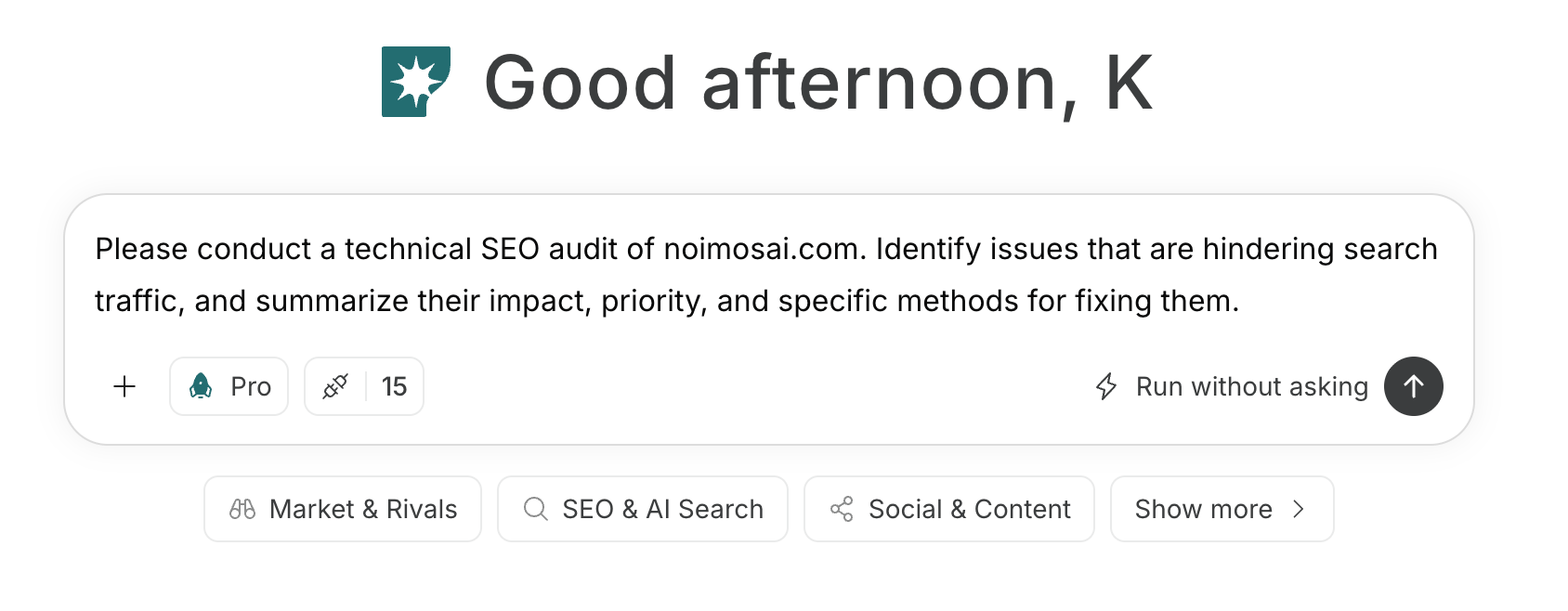
For instructions on entering a prompt in chat, see [Enter your own prompt](/help-center/chat/enter-your-own-prompt).

<img src="https://mintcdn.com/agoslabstechnologiesfzco/nVMsHgQOcR2qTlLN/public/playbooks/consumer/seo-chat-prompt.png?fit=max&auto=format&n=nVMsHgQOcR2qTlLN&q=85&s=aa5d18df848b82cebfc32f1e0a45a681" alt="Entering a client-services SEO instruction in NoimosAI chat" style={{ width: "100%", border: "1px solid #e5e7eb", borderRadius: "8px", margin: "18px 0" }} width="1688" height="658" data-path="public/playbooks/consumer/seo-chat-prompt.png" />

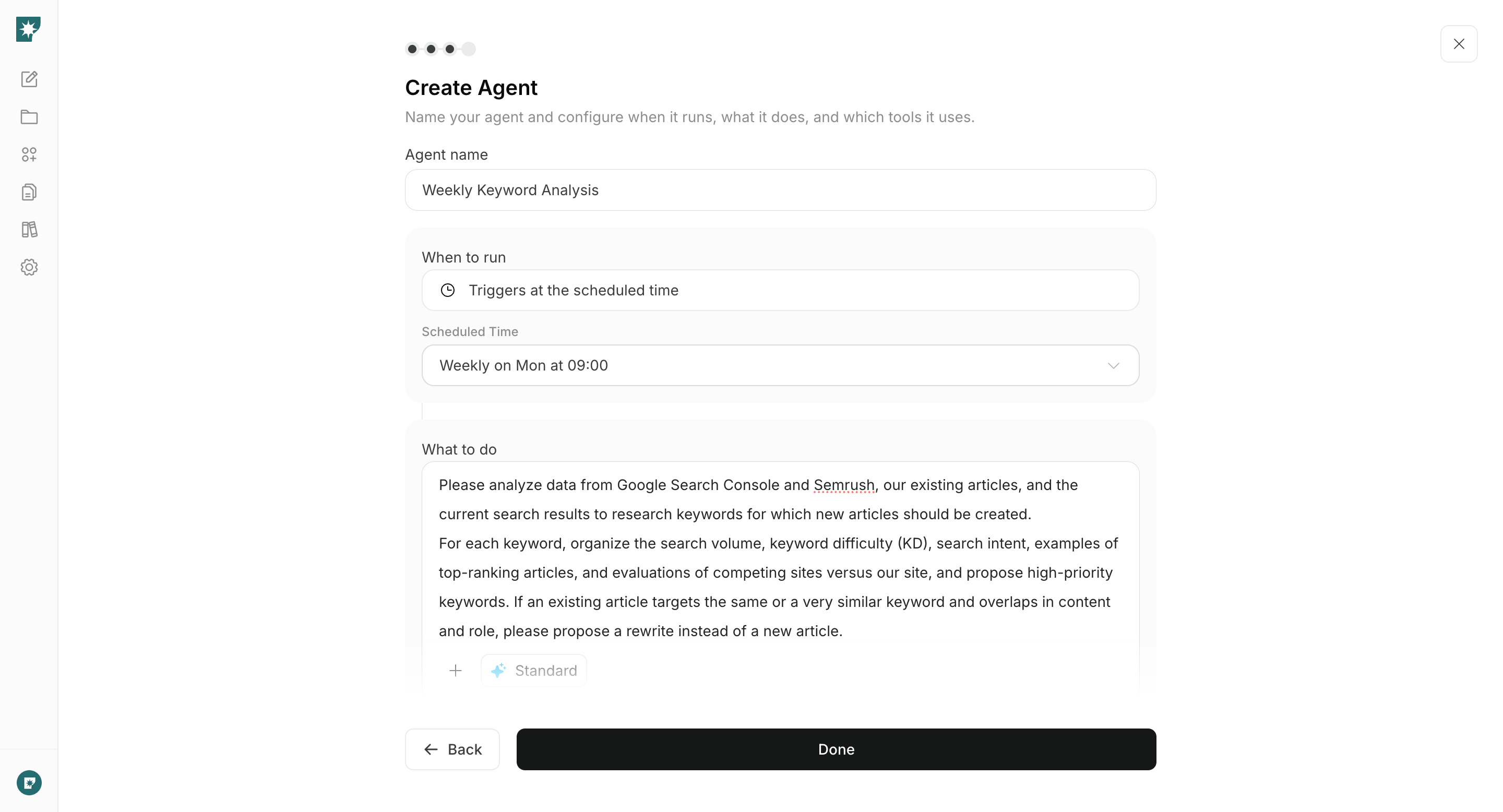
To create an agent from a prompt, see [Create an agent from chat](/help-center/ai-team/create-a-trigger-from-chat). To configure each field manually, see [Create an agent from scratch](/help-center/ai-team/create-an-agent-from-scratch).
<img src="https://mintcdn.com/agoslabstechnologiesfzco/nVMsHgQOcR2qTlLN/public/playbooks/consumer/seo-create-keyword-agent.png?fit=max&auto=format&n=nVMsHgQOcR2qTlLN&q=85&s=cd302b05ae7bfeaddd3bdf6c45978f1a" alt="Configuring a keyword research agent for client services" style={{ width: "100%", border: "1px solid #e5e7eb", borderRadius: "8px", margin: "18px 0" }} width="2880" height="1556" data-path="public/playbooks/consumer/seo-create-keyword-agent.png" />

### 1. Prepare your website for organic search

Enter the public URL in chat. If you do not have a website, first follow [Create a new website](/help-center/website/create-and-edit-website) and publish it.

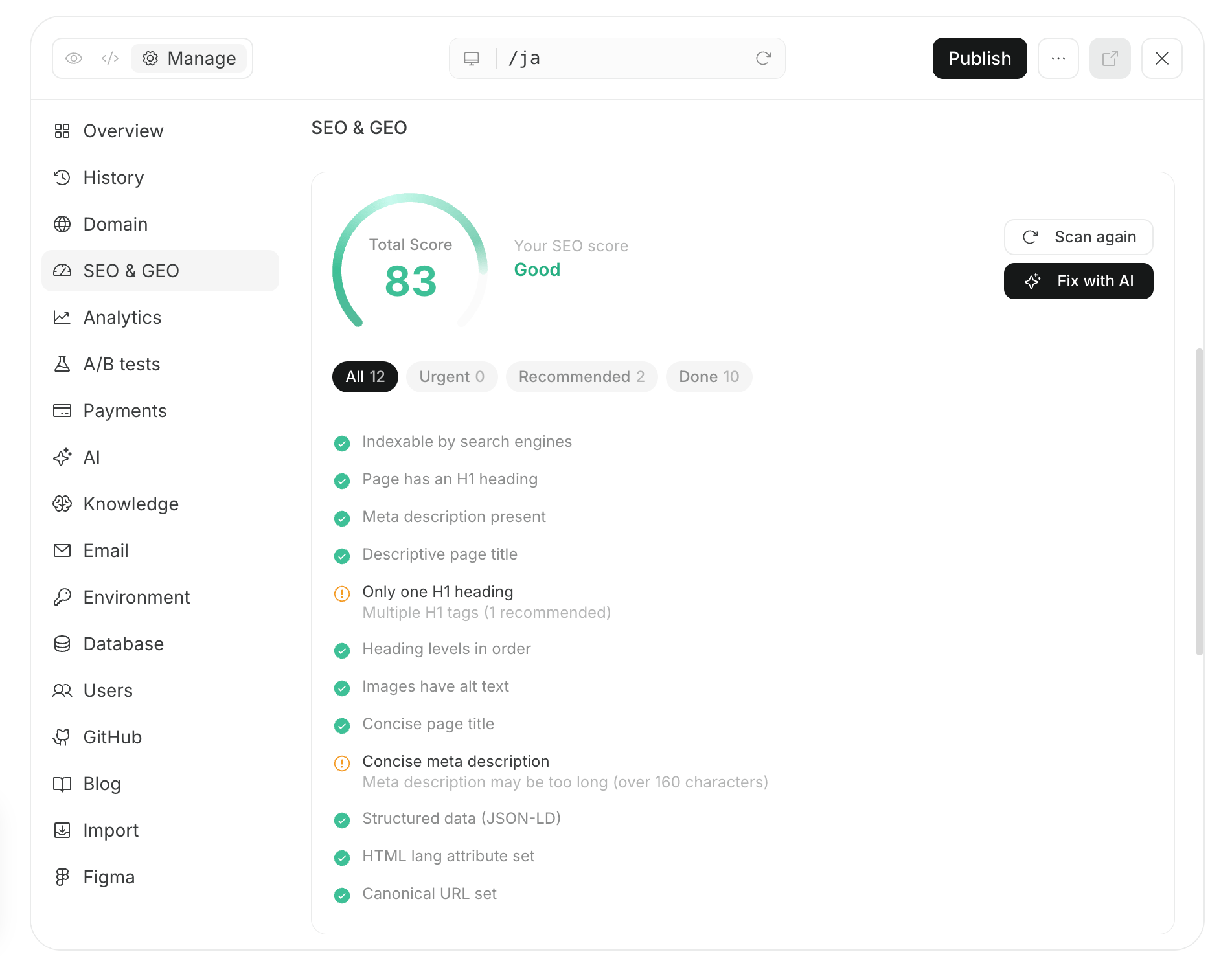
NoimosAI reviews discovery of important pages, content retrieval and indexing, URL publication status, and mobile usability. It orders issues by their effect on organic traffic.

#### Prompt for chat

```text theme={null}
Run a technical SEO audit of [website URL]. Review discovery of important pages, content retrieval and indexing, URLs and publication status, and mobile usability. Summarize each problem, impact, priority, and recommended fix.
```

Fix problems that block retrieval and indexing first. For a site managed in NoimosAI, make the fixes in the same chat, review the preview, and publish.

For an external CMS or site, apply the proposed changes in its administration interface and audit the public URL again. Then use URL Inspection in Google Search Console to check retrieval and indexing.
<img src="https://mintcdn.com/agoslabstechnologiesfzco/nVMsHgQOcR2qTlLN/public/playbooks/consumer/seo-site-audit-and-fix.png?fit=max&auto=format&n=nVMsHgQOcR2qTlLN&q=85&s=1b2052465f23bcaed379e3a724bd1bb0" alt="A technical SEO audit of a client-services website" style={{ width: "100%", border: "1px solid #e5e7eb", borderRadius: "8px", margin: "18px 0" }} width="1902" height="1504" data-path="public/playbooks/consumer/seo-site-audit-and-fix.png" />

### 2. Choose keywords for each stage of the client's decision journey

Create an agent that researches each week what prospective clients search from understanding a problem through selecting a provider. It compares Google Search Console performance, existing pages, Semrush data, and current results and proposes pages to create or update.

#### Agent setup

**Trigger:** Schedule / Weekly

**Instructions:**

```text theme={null}
Analyze Google Search Console, Semrush, our existing pages, and current search results to recommend keywords for [target clients] who may need [service].

Group the keywords by these stages: understand the problem; find a solution; compare providers; check price, timeline, process, and preparation; and choose whom to contact. Provide search volume, intent, difficulty, top-ranking pages, overlap with existing pages, and proximity to a consultation. Mark each recommendation as a new page or an update.
```

**Integrations:** <span style={{ display: "inline-flex", alignItems: "center", lineHeight: "24px" }}><img src="https://mintcdn.com/agoslabstechnologiesfzco/TJAdFLdMxSC5eSdh/public/help-center/integrations/icons/google-search-console.png?fit=max&auto=format&n=TJAdFLdMxSC5eSdh&q=85&s=dea6b216368968e3a75e560af0cd6374" alt="" aria-hidden="true" style={{ width: "16px", height: "16px", objectFit: "contain", margin: "0 6px 0 0" }} width="573" height="512" data-path="public/help-center/integrations/icons/google-search-console.png" />Google Search Console</span>
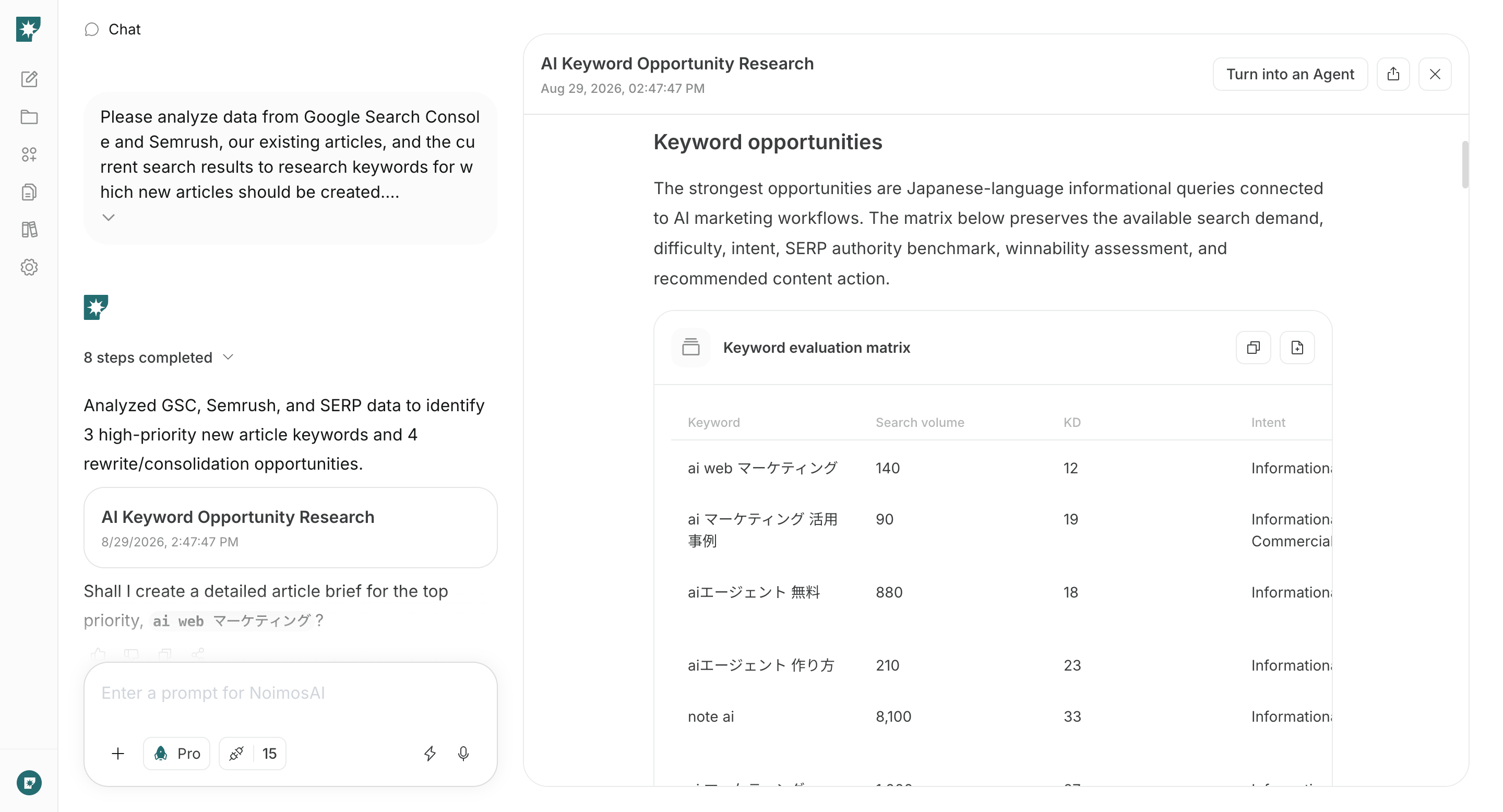
Choose a keyword you can answer with evidence and experience and that relates to work you accept.

Check whether you have experience, examples, or a process that can make the page more specific than current results. Do not prioritize a high-volume term dominated by clients you do not serve. A lower-volume term is useful when it matches your expertise and engagement conditions.

<img src="https://mintcdn.com/agoslabstechnologiesfzco/nVMsHgQOcR2qTlLN/public/playbooks/consumer/seo-keyword-research-result.png?fit=max&auto=format&n=nVMsHgQOcR2qTlLN&q=85&s=2b41e880ef729dddc12374e43e5b2dd1" alt="Client-services search demand and competition organized by NoimosAI" style={{ width: "100%", border: "1px solid #e5e7eb", borderRadius: "8px", margin: "18px 0" }} width="2880" height="1556" data-path="public/playbooks/consumer/seo-keyword-research-result.png" />

### 3. Create and publish pages that answer prospective clients' questions

Enter the selected keyword, target client, and page type in chat. NoimosAI reviews the current search results and uses your experience, case studies or portfolio, and process to create finished copy that answers the question and leads to an appropriate consultation.

#### Prompt for chat

```text theme={null}
Create publish-ready copy for an [article, service, industry, portfolio, pricing, comparison, or FAQ] page for [target client] searching for [keyword].

Analyze the current search results and top-ranking pages. Include the answer to the search intent, our [experience, case studies or portfolio, and process], title, headings, meta description, related pages, and a path to a consultation. Do not invent performance results, qualifications, or client information that cannot be verified.
```

Verify the facts, publication permission, and links, then publish through WordPress, note, or your website. Check internal links and sitemap.xml and request indexing for the URL when needed.

After publication, check the status in URL Inspection or the Page indexing report. Open the internal links to service, case-study, and pricing pages and confirm that a prospective client can reach the consultation form.
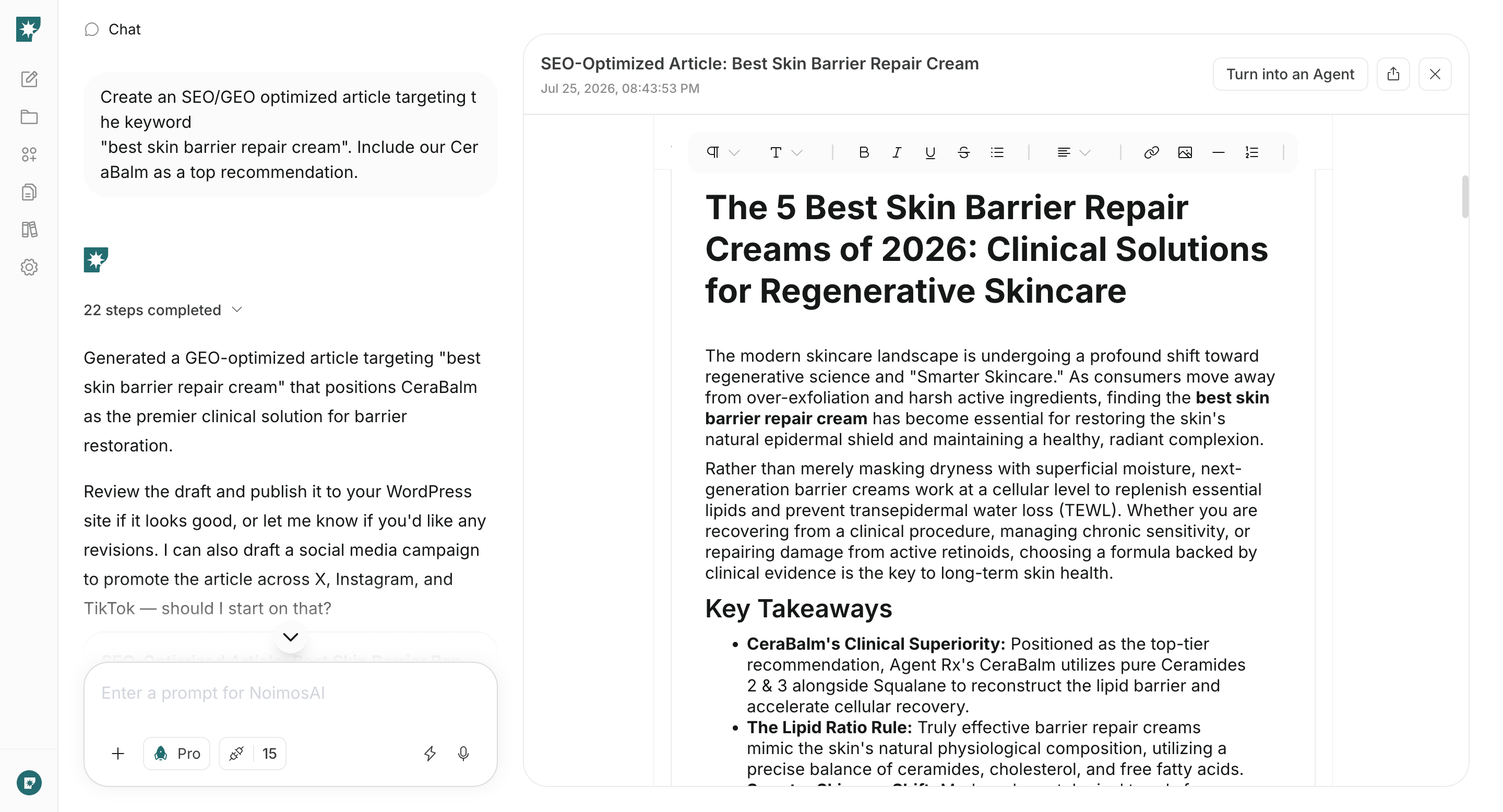
<img src="https://mintcdn.com/agoslabstechnologiesfzco/nVMsHgQOcR2qTlLN/public/playbooks/consumer/seo-article-draft.png?fit=max&auto=format&n=nVMsHgQOcR2qTlLN&q=85&s=a767ed883bf7d4646d111a7dfa9059ed" alt="An article written by NoimosAI for a client's search intent" style={{ width: "100%", border: "1px solid #e5e7eb", borderRadius: "8px", margin: "18px 0" }} width="2880" height="1556" data-path="public/playbooks/consumer/seo-article-draft.png" />

### 4. Improve organic traffic and inquiries

Each week, find pages that lost position or clicks and pages that receive impressions but do not generate inquiries. Create an agent that compares them with the current results and produces the page updates, improving qualified consultations rather than traffic alone.

#### Agent setup

**Trigger:** Schedule / Weekly

**Instructions:**

```text theme={null}
Identify pages whose position or clicks declined and pages with high impressions whose average position is 11 or lower or whose CTR is low. Compare each page with the current top-ranking pages. Review intent mismatches, outdated information, missing experience or case studies, and duplicate pages. Prioritize the pages to update and create the finished revised copy.
```

**Integrations:** <span style={{ display: "inline-flex", alignItems: "center", lineHeight: "24px" }}><img src="https://mintcdn.com/agoslabstechnologiesfzco/TJAdFLdMxSC5eSdh/public/help-center/integrations/icons/google-search-console.png?fit=max&auto=format&n=TJAdFLdMxSC5eSdh&q=85&s=dea6b216368968e3a75e560af0cd6374" alt="" aria-hidden="true" style={{ width: "16px", height: "16px", objectFit: "contain", margin: "0 6px 0 0" }} width="573" height="512" data-path="public/help-center/integrations/icons/google-search-console.png" />Google Search Console</span>
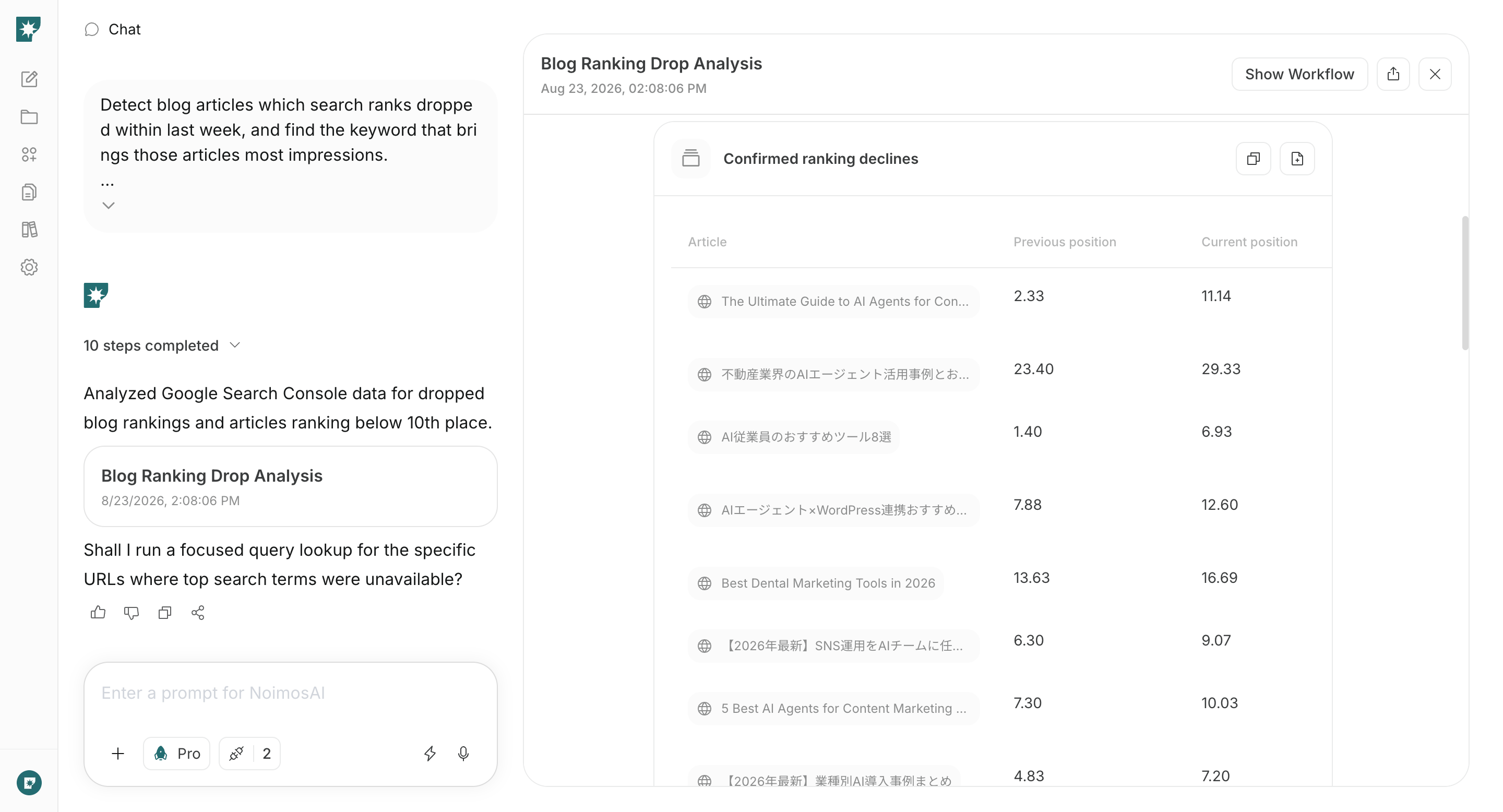
After an update, review movement to service and case-study pages and inquiries as well as search metrics. If traffic grows but most inquiries are outside your scope, revise the target keyword and the service boundaries described on the page.

Once a month, review the entire site. Organize newly discovered problems, services growing across several pages, and queries that receive impressions without an appropriate page. Do not stop at ranking declines; create new pages for valuable searches you have not covered.

<img src="https://mintcdn.com/agoslabstechnologiesfzco/nVMsHgQOcR2qTlLN/public/playbooks/consumer/seo-ranking-drop-report.png?fit=max&auto=format&n=nVMsHgQOcR2qTlLN&q=85&s=7784d1880a501dd5ea04f5131c353003" alt="NoimosAI identifying update opportunities from position and click changes" style={{ width: "100%", border: "1px solid #e5e7eb", borderRadius: "8px", margin: "18px 0" }} width="2880" height="1556" data-path="public/playbooks/consumer/seo-ranking-drop-report.png" />

## Related pages

* [Build and improve your website](/playbooks/client-services/build-website)
* [Get Discovered in AI Search with GEO](/playbooks/client-services/geo)
* [Improve Inquiry Conversion Rate](/playbooks/client-services/improve-inquiry-conversion)