> ## Documentation Index
> Fetch the complete documentation index at: https://docs.noimosai.com/llms.txt
> Use this file to discover all available pages before exploring further.

# Build and Improve Your Website

> Use NoimosAI to create and improve websites that lead to purchases, bookings, and inquiries.

Use NoimosAI to create and improve websites that clearly communicate the value of your products or services and lead to purchases, bookings, or inquiries. This can be used both when building a new website and when refining an existing one.

Work through three stages.

1. Create and improve a website that drives customer action
2. Build a foundation that search engines and AI can read
3. Improve based on customer behavior

The first half, [Understand website fundamentals](#understand-website-fundamentals), explains what each stage should accomplish. The second half, [Build and improve your website with NoimosAI](#build-and-improve-your-website-with-noimosai), provides a practical workflow.

## Understand website fundamentals

When creating a new website, decide who you are targeting, what you want to communicate, and what actions you want visitors to take before building. If you already have a website, review content and user flows from the same perspective and fill any gaps.

Then, configure technical settings so search engines and AI can read your content, and continue improving based on post-launch data.

### 1. Create and improve a website that drives customer action

First, define the target customers, the value you’ll deliver, and the actions you want visitors to complete on the site. Aim for pages where visitors immediately feel “this is relevant to me” and “this is helpful,” and know “what to do next.”

In particular, in the <Tooltip tip="This is the area visible immediately after opening the page without scrolling.">**above-the-fold area**</Tooltip>, make sure the following three things are communicated.

* Who the product or service is for
* What problem it solves and what change the user will experience
* What to do next (purchase, book, inquire, etc.)

Provide the following content so visitors who read further can resolve concerns and decide to act.

| Content to prepare                                                                                                                                                                        | What to communicate specifically                                                                     |
| ----------------------------------------------------------------------------------------------------------------------------------------------------------------------------------------- | ---------------------------------------------------------------------------------------------------- |
| Product or service description                                                                                                                                                            | Not just features, but what changes when someone uses it                                             |
| How to use / process                                                                                                                                                                      | Steps and time required from sign-up to usage                                                        |
| Trust signals                                                                                                                                                                             | Show proven results, testimonials, case studies, company or seller information, and security details |
| Pricing and terms                                                                                                                                                                         | Show price, contract period, shipping, cancellation policy, and other decision criteria              |
| <Tooltip tip="Abbreviation for frequently asked questions. A list of common customer questions and answers.">**FAQ (frequently asked questions)**</Tooltip>                               | Answer common questions before purchase or use                                                       |
| <Tooltip tip="Buttons or links that prompt the customer to take the next step such as purchase, booking, or inquiry. Abbreviation for call to action.">**CTA (call to action)**</Tooltip> | Place buttons or links that lead to purchase, booking, inquiry, or other next steps                  |

If content is light, combine it as sections on a single page; if you have many products or detailed explanations, split into multiple pages. The priority is clear structure so customers can easily reach the information they need, not simply increasing the number of pages.

### 2. Make your website easy for search engines and AI to understand

Next, configure the site’s settings and structure so search engines and AI can discover important pages and correctly understand their content. This applies to both new and existing sites.

Check site navigation, the information that can be accessed, URLs, and usability separately so search engines and AI can find and read important pages. Reviewing the table below from the top helps separate problems where pages aren’t discovered from problems where discovered pages aren’t read correctly.

| Items to prepare for discovery by search/AI | Actions to take on public pages                                                                                                                                                                                                                                                                                                                                                                                                        |
| ------------------------------------------- | -------------------------------------------------------------------------------------------------------------------------------------------------------------------------------------------------------------------------------------------------------------------------------------------------------------------------------------------------------------------------------------------------------------------------------------- |
| Paths to important pages                    | Organize navigation and <Tooltip tip="Links that connect pages within the same website.">**internal links**</Tooltip> so important pages are reachable from the homepage. Also include public pages in the <Tooltip tip="A list file that tells search engines the main site URLs and update information.">**sitemap.xml**</Tooltip>.                                                                                                  |
| Page fetch settings                         | Check <Tooltip tip="A file that tells crawlers which parts of the site can be accessed and which are restricted.">**robots.txt**</Tooltip> and <Tooltip tip="A setting that tells search engines not to include a page in search results.">**noindex**</Tooltip> so pages you want public are fetchable by search engines and AI.                                                                                                      |
| Correct URL specification                   | Use <Tooltip tip="A setting that tells search engines the preferred URL when multiple similar URLs exist.">**canonical**</Tooltip> to resolve duplicate URLs, and fix issues with <Tooltip tip="A way to publish using encrypted communication between browser and website.">**HTTPS**</Tooltip>, broken links, and <Tooltip tip="A setting that automatically forwards access from an old URL to a new URL.">**redirects**</Tooltip>. |
| Organize page content                       | Structure page titles, headings, and body copy clearly, and set up <Tooltip tip="Data written in a specific format so search engines and AI can better understand companies, products, articles, etc.">**structured data**</Tooltip> where needed.                                                                                                                                                                                     |
| Official information for AI reference       | Standardize product names, pricing, features, and usage instructions, and provide guidance to AI via <Tooltip tip="A text file that guides AI to important information and pages on your site.">**llms.txt**</Tooltip> when needed.                                                                                                                                                                                                    |
| Readability and usability                   | Make reading and operations easy on smartphones and speed up page loading.                                                                                                                                                                                                                                                                                                                                                             |

After building the site foundation, continue with content creation and ranking improvements in [Increase search traffic with SEO](/playbooks/consumer/seo), and efforts to increase mentions and citations in AI answers in [Get found in AI search with GEO](/playbooks/consumer/geo).

### 3. Improve based on customer behavior

After launch, analyze where visitors came from, which pages they viewed, and whether they progressed to purchase, booking, or inquiry, then iterate. Use data to find problem areas based on actual behavior.

Key data to check includes:

* Channels visitors used: search, social, ads, AI services, etc.
* Pages frequently viewed and pages rarely viewed
* CTA click counts
* Number of <Tooltip tip="The completion of an intended action on the website such as purchase, booking, or inquiry.">**conversions**</Tooltip>
* Pages or forms where visitors drop off
* Impressions, clicks, and ranking positions in search results

Common situations identified from data and where to check first are:

| What the data shows                                                      | Possible cause and response                                                                                                                                                                                                                                               |
| ------------------------------------------------------------------------ | ------------------------------------------------------------------------------------------------------------------------------------------------------------------------------------------------------------------------------------------------------------------------- |
| The website receives few visits                                          | The site may not appear for relevant searches, be mentioned in AI answers, or receive links from active channels. Check indexing and search visibility first, then review whether social profiles, ads, listings, and other public pages link to the correct destination. |
| Product or service pages are viewed but CTAs are rarely clicked          | Visitors may not understand who the offer is for, why it is valuable, or what happens after clicking. Review the above-the-fold message, price and purchase terms, trust signals, and CTA copy on the actual page.                                                        |
| CTAs are clicked but purchases, bookings, or inquiries are not completed | The final flow may contain unexpected fees, too many fields, unclear availability, payment problems, or errors. Complete the form, booking, or checkout on real devices and fix the first point of friction.                                                              |
| A specific page has a high exit rate                                     | The page may not match the promise in the search result, post, or ad, or it may omit information needed for the next decision. Compare the source message with the page, then review the opening, missing details, internal links, and load speed.                        |
| Mobile visitors convert at a much lower rate                             | Text, buttons, forms, sticky elements, or page speed may fail on smaller screens. Test the complete journey on common phones and fix device-specific display and interaction problems before changing the offer.                                                          |

Avoid changing many areas at once because it becomes hard to determine which change produced results. Fix high-impact issues first and compare metrics before and after changes.

### Apps you can connect for website analysis

If you only use NoimosAI to create a website, app integrations aren’t required. To analyze post-launch behavior and search performance, connect the following apps.

<div style={{ display: "flex", flexDirection: "column", gap: "12px", margin: "18px 0" }}>
  <div style={{ display: "flex", alignItems: "flex-start", gap: "10px" }}>
    <img src="https://mintcdn.com/agoslabstechnologiesfzco/TJAdFLdMxSC5eSdh/public/help-center/integrations/icons/google-analytics.webp?fit=max&auto=format&n=TJAdFLdMxSC5eSdh&q=85&s=5decc2b46e733583d74874463cb8ffb6" alt="" aria-hidden="true" style={{ width: "16px", height: "16px", display: "inline-block", objectFit: "contain", flex: "0 0 16px", margin: "4px 0 0" }} width="80" height="80" data-path="public/help-center/integrations/icons/google-analytics.webp" />

    <div><strong>Google Analytics</strong>: Collects visitor paths, viewed pages, CTAs, and purchase/booking/inquiry behavior on your site. Used for the stage of improving based on customer behavior.</div>
  </div>

  <div style={{ display: "flex", alignItems: "flex-start", gap: "10px" }}>
    <img src="https://mintcdn.com/agoslabstechnologiesfzco/TJAdFLdMxSC5eSdh/public/help-center/integrations/icons/google-search-console.png?fit=max&auto=format&n=TJAdFLdMxSC5eSdh&q=85&s=dea6b216368968e3a75e560af0cd6374" alt="" aria-hidden="true" style={{ width: "16px", height: "16px", display: "inline-block", objectFit: "contain", flex: "0 0 16px", margin: "4px 0 0" }} width="573" height="512" data-path="public/help-center/integrations/icons/google-search-console.png" />

    <div><strong>Google Search Console</strong>: Retrieves <Tooltip tip="The actual words users typed into search engines.">**search queries**</Tooltip>, impressions, clicks, rankings, and whether pages are indexed (<Tooltip tip="The process of registering pages so search engines can organize and show them in search results.">**indexing**</Tooltip>). Used for both the foundation setup stage and post-launch improvements.</div>
  </div>
</div>

## Build and improve your website with NoimosAI

Use chat to create or audit the website, then use an agent to analyze post-launch performance on a recurring schedule.

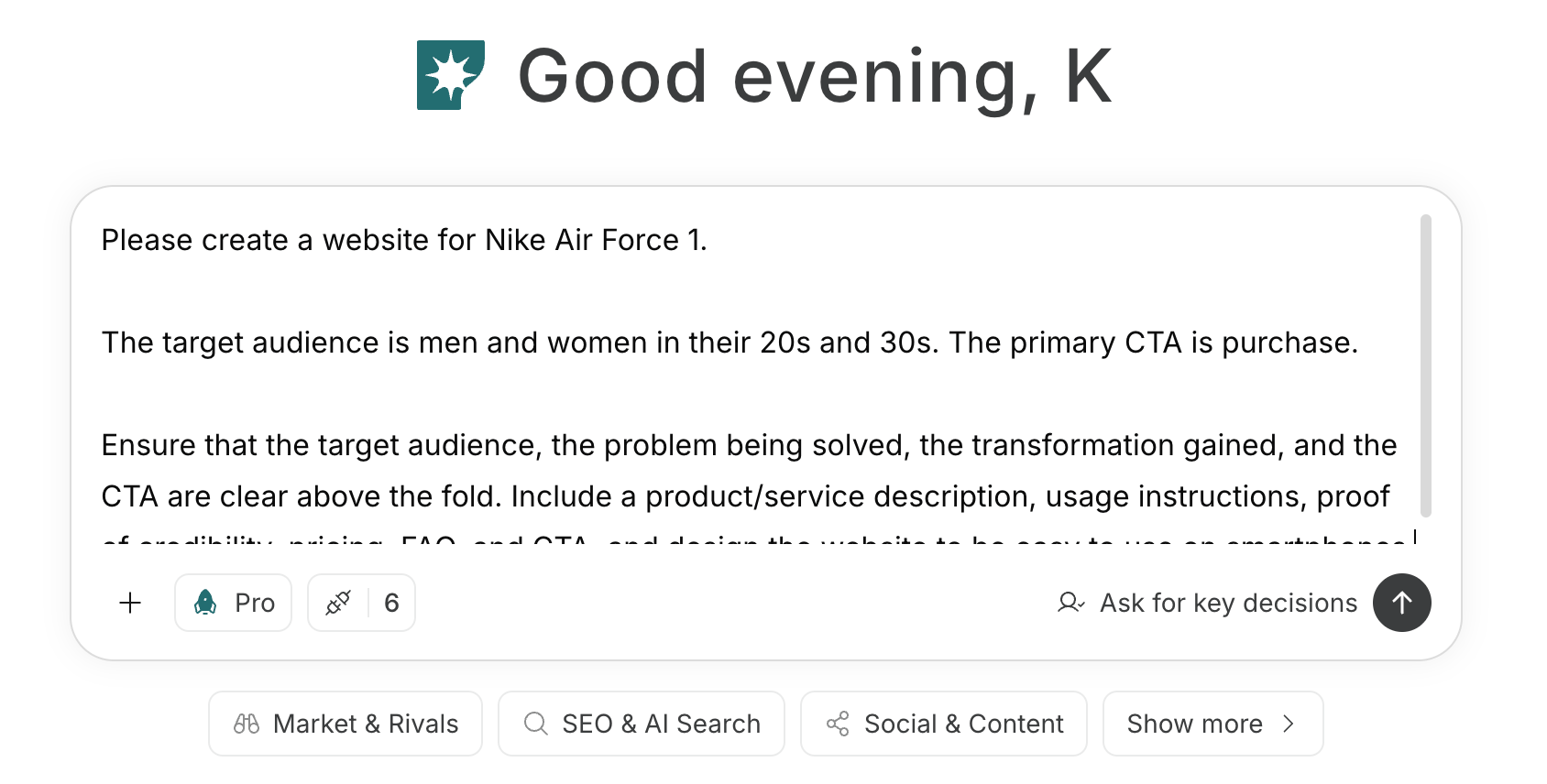
For instructions on entering a prompt in chat, see [Enter your own prompt](/help-center/chat/enter-your-own-prompt).

<img src="https://mintcdn.com/agoslabstechnologiesfzco/nVMsHgQOcR2qTlLN/public/playbooks/consumer/website-chat-prompt.png?fit=max&auto=format&n=nVMsHgQOcR2qTlLN&q=85&s=469c7742929a2ffeac20a3f77eed2862" alt="Screen for entering website creation instructions in NoimosAI chat" style={{ width: "100%", border: "1px solid #e5e7eb", borderRadius: "8px", margin: "18px 0" }} width="1688" height="856" data-path="public/playbooks/consumer/website-chat-prompt.png" />

To create an agent by providing goals and conditions in a prompt, see [Create an agent from chat](/help-center/ai-team/create-a-trigger-from-chat). To manually enter settings in the setup screen, see [Create an agent from scratch](/help-center/ai-team/create-an-agent-from-scratch).
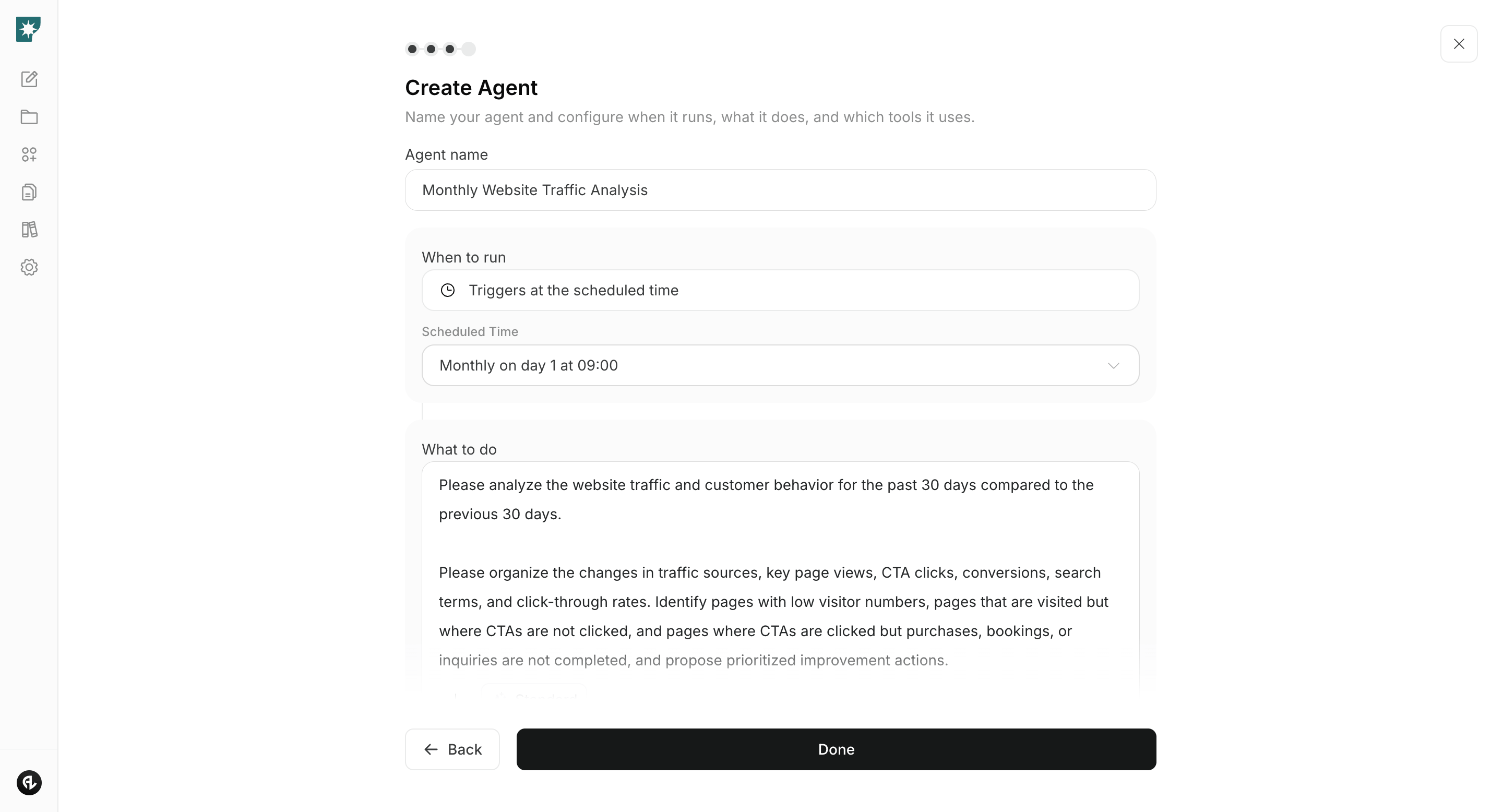
<img src="https://mintcdn.com/agoslabstechnologiesfzco/nVMsHgQOcR2qTlLN/public/playbooks/consumer/website-create-agent.png?fit=max&auto=format&n=nVMsHgQOcR2qTlLN&q=85&s=5b5ac8da5362b21c0bb9b64b22a9d423" alt="Screen for creating a monthly website analysis agent in NoimosAI" style={{ width: "100%", border: "1px solid #e5e7eb", borderRadius: "8px", margin: "18px 0" }} width="2880" height="1556" data-path="public/playbooks/consumer/website-create-agent.png" />

### 1. Create and improve a website that drives customer action

If you’re building a new website, enter the target customer, the value offered, and the main CTA into chat. NoimosAI will generate page structure, copy, and design; preview and refine the generated site as needed.

#### Prompt for creating a new site

```text theme={null}
Create a website for [product or service].

The target customers are [target customers]. Communicate how [customer pain points] are solved and what changes users will see after using the product ([changes after use]). The main CTA is [purchase, booking, inquiry, etc.].

In the above-the-fold area, make it clear who the target customers are, the problem that can be solved, the changes users will experience, and the CTA. Include product/service description, usage process, trust signals, pricing, FAQ, and CTAs, and make the website easy to use on smartphones.
```

Before publishing, check that the above-the-fold area identifies the target customer and value, the page contains the information needed to decide, and the CTA is easy to find. Edit the copy and structure, preview the page on desktop and mobile, and then publish. For detailed steps, see [Create a new website](/help-center/website/create-and-edit-website).

If you have an existing site, input the URL in chat to review how value is communicated and the user flow leading to conversions.

#### Prompt for improving an existing site

```text theme={null}
Analyze [website URL] and check whether the target customers, the value offered, and the main CTA are communicated clearly.

Identify missing explanations, trust signals, FAQs, and unclear user flows, and propose page structure and copy that more easily lead to purchases, bookings, or inquiries.
```
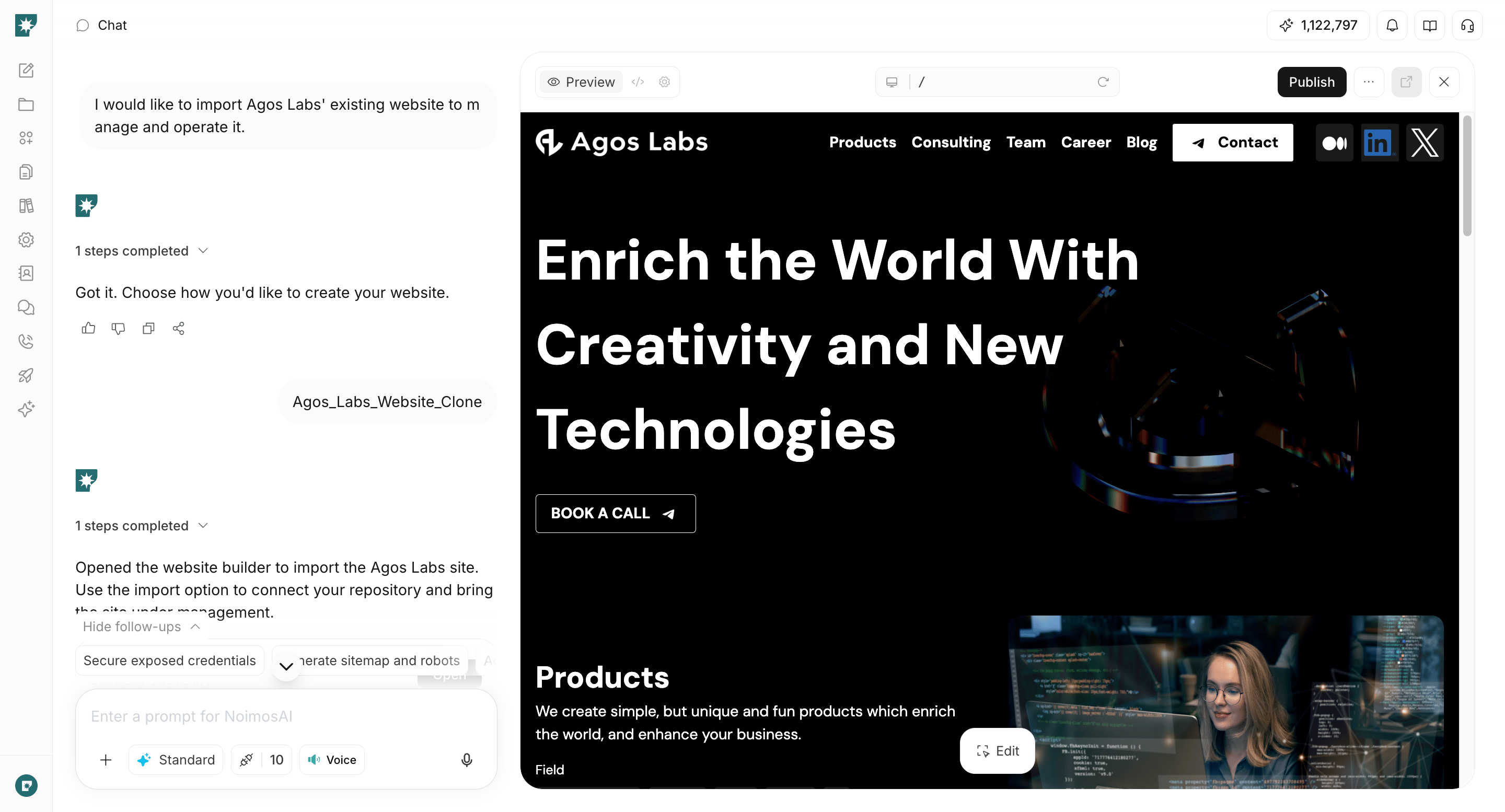
<img src="https://mintcdn.com/agoslabstechnologiesfzco/WUdTSmFBnDccnDQ0/public/help-center/website/website-builder-overview.png?fit=max&auto=format&n=WUdTSmFBnDccnDQ0&q=85&s=be6b42ecd9918acf5958b9f9d8f415e1" alt="NoimosAI website builder screen" style={{ width: "100%", border: "1px solid #e5e7eb", borderRadius: "8px", margin: "18px 0" }} width="2880" height="1554" data-path="public/help-center/website/website-builder-overview.png" />

Entering the URL alone is sufficient for analysis and improvement suggestions. If you want to directly edit and operate an existing site within NoimosAI, see [Create from an existing website](/help-center/website/import-existing-website).

### 2. Make your website easy for search engines and AI to understand

For both new and existing sites, audit technical conditions before publishing or when improving. Enter your URL in chat to find issues that prevent page fetching and understanding by search engines and AI.

#### Prompt for chat

```text theme={null}
Audit [website URL] to determine if search engines and AI can easily fetch and understand the pages.

Check site structure, internal links, sitemap.xml, robots.txt, noindex, canonical settings, structured data, llms.txt, mobile display, and load speed. Summarize priority issues to fix and specific remediation steps.
```

In audit results, prioritize fixes for issues that prevent fetching important pages, cause incorrect URLs to be indexed, or make product and service information unreadable.

For sites managed in NoimosAI, you can check page titles, descriptions, sitemap.xml, llms.txt, and structured data under Management > SEO and GEO. Request necessary fixes via chat, preview changes, and publish.
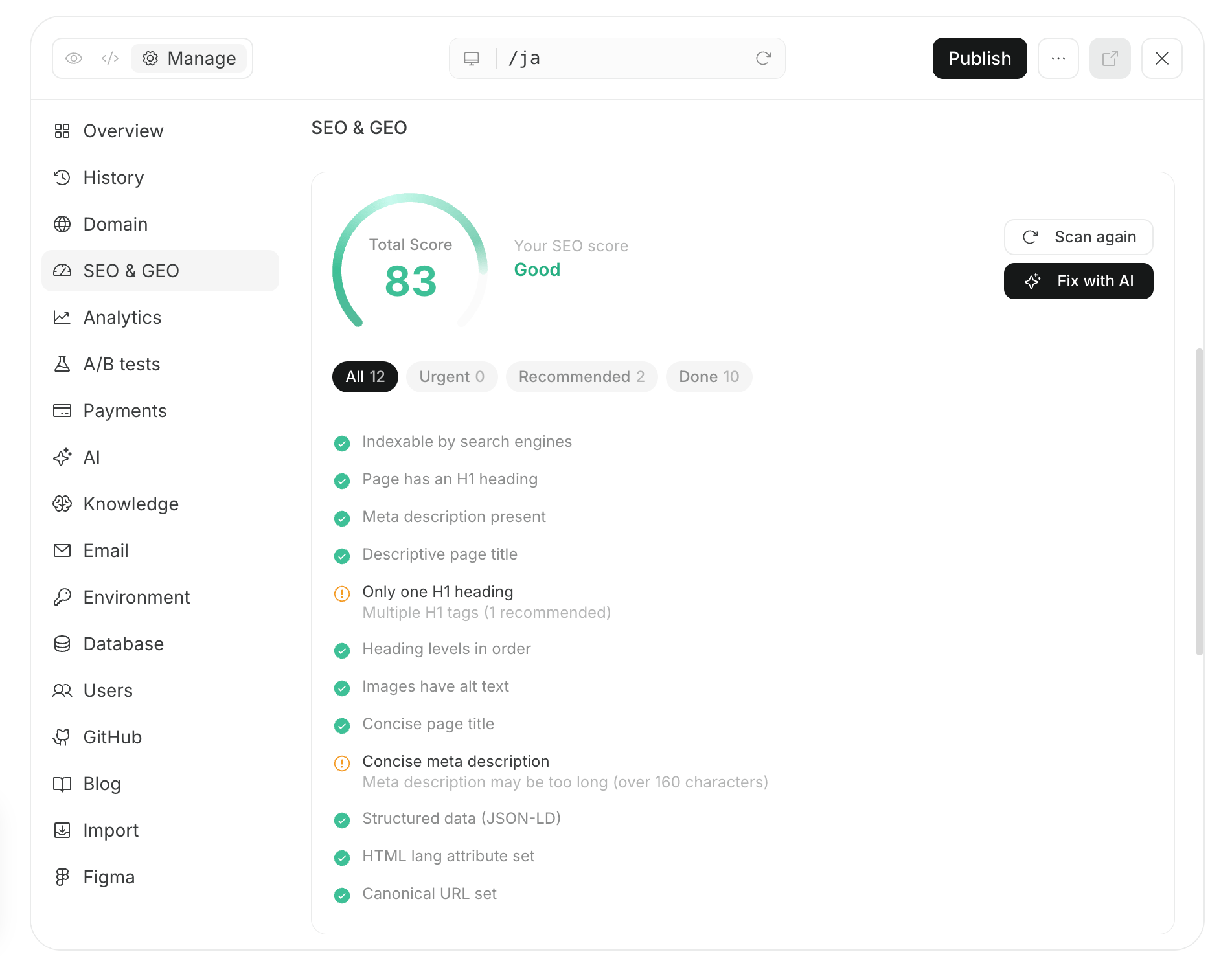
<img src="https://mintcdn.com/agoslabstechnologiesfzco/nVMsHgQOcR2qTlLN/public/playbooks/consumer/seo-site-audit-and-fix.png?fit=max&auto=format&n=nVMsHgQOcR2qTlLN&q=85&s=1b2052465f23bcaed379e3a724bd1bb0" alt="Screen for auditing and fixing a website in NoimosAI" style={{ width: "100%", border: "1px solid #e5e7eb", borderRadius: "8px", margin: "18px 0" }} width="1902" height="1504" data-path="public/playbooks/consumer/seo-site-audit-and-fix.png" />

After publishing, confirm important pages are listed in sitemap.xml. For new or significantly changed pages, request indexing from Google Search Console’s URL Inspection and check later whether they appear in search results.

After building the site foundation, continue content creation and ongoing improvement in [Increase search traffic with SEO](/playbooks/consumer/seo) and [Get found in AI search with GEO](/playbooks/consumer/geo).

### 3. Improve based on customer behavior

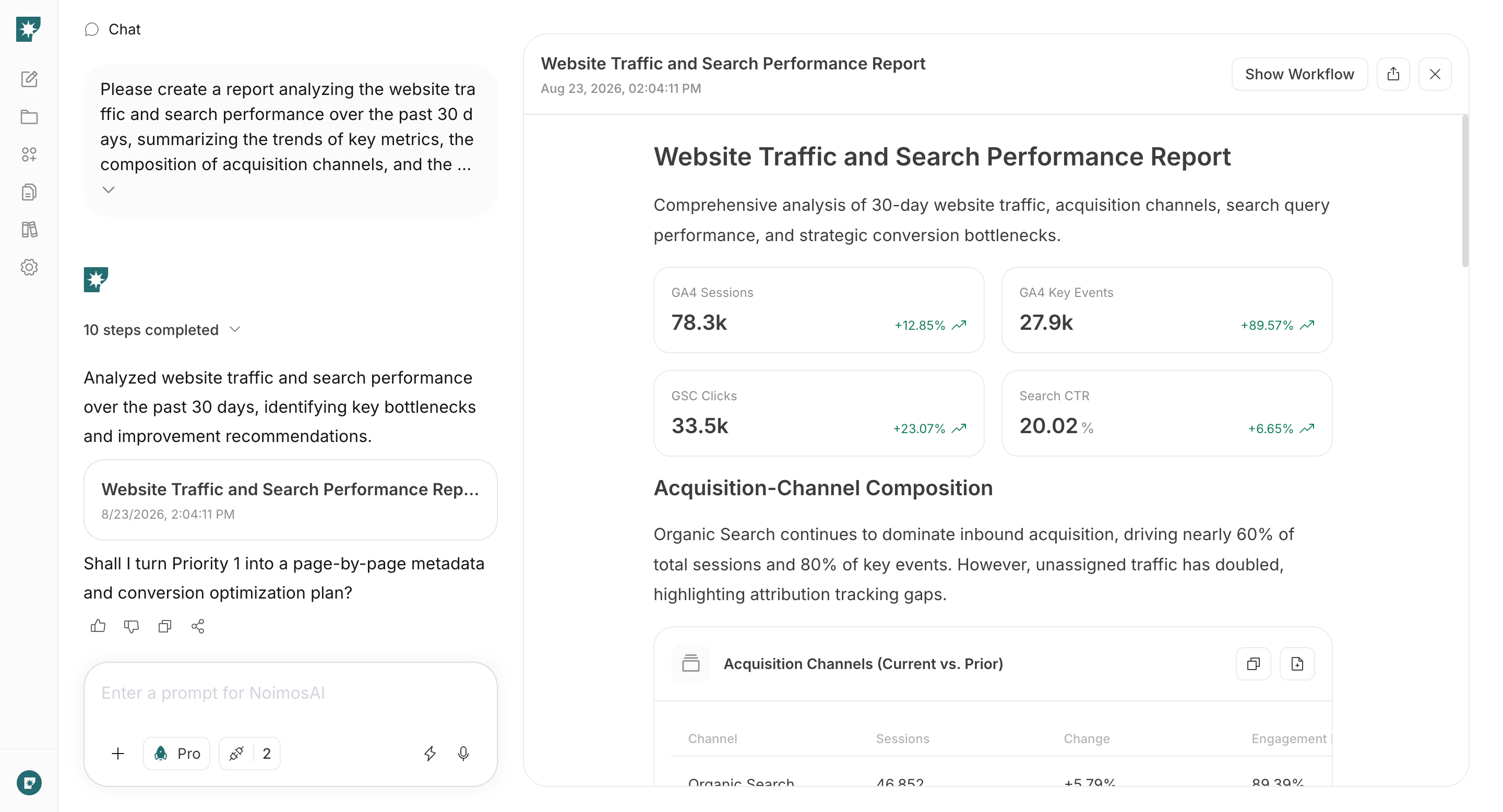
After launch, connect Google Analytics and Google Search Console and create an agent to analyze site traffic, search performance, and behavior leading to purchases, bookings, and inquiries on a monthly schedule. Comparing the most recent 30 days to the previous 30 days makes it easier to find pages and issues to improve.

#### Agent setup

* **Trigger**: Run on a schedule once per month.
* **Tasks**:

```text theme={null}
Analyze website traffic and customer behavior for the past 30 days compared to the previous 30 days.

Organize sources of traffic, top page views, CTA clicks, conversions, search queries, and changes in click-through rate. Identify pages with low visits, pages that are visited but where CTAs are not clicked, and pages where CTAs are clicked but purchases/bookings/inquiries are not completed. Propose prioritized improvements.
```

* **Integrations used**: <span style={{ display: "inline-flex", alignItems: "center", lineHeight: "24px" }}><img src="https://mintcdn.com/agoslabstechnologiesfzco/TJAdFLdMxSC5eSdh/public/help-center/integrations/icons/google-analytics.webp?fit=max&auto=format&n=TJAdFLdMxSC5eSdh&q=85&s=5decc2b46e733583d74874463cb8ffb6" alt="" aria-hidden="true" style={{ width: "16px", height: "16px", display: "inline-block", objectFit: "contain", margin: "0 6px 0 0" }} width="80" height="80" data-path="public/help-center/integrations/icons/google-analytics.webp" />Google Analytics</span>, <span style={{ display: "inline-flex", alignItems: "center", lineHeight: "24px" }}><img src="https://mintcdn.com/agoslabstechnologiesfzco/TJAdFLdMxSC5eSdh/public/help-center/integrations/icons/google-search-console.png?fit=max&auto=format&n=TJAdFLdMxSC5eSdh&q=85&s=dea6b216368968e3a75e560af0cd6374" alt="" aria-hidden="true" style={{ width: "16px", height: "16px", display: "inline-block", objectFit: "contain", margin: "0 6px 0 0" }} width="573" height="512" data-path="public/help-center/integrations/icons/google-search-console.png" />Google Search Console</span>
<img src="https://mintcdn.com/agoslabstechnologiesfzco/nVMsHgQOcR2qTlLN/public/playbooks/consumer/seo-monthly-performance-report.png?fit=max&auto=format&n=nVMsHgQOcR2qTlLN&q=85&s=38907aa91388559fab0e75ff4dec6049" alt="Screen for setting up a monthly website analysis agent in NoimosAI" style={{ width: "100%", border: "1px solid #e5e7eb", borderRadius: "8px", margin: "18px 0" }} width="2880" height="1556" data-path="public/playbooks/consumer/seo-monthly-performance-report.png" />

From the agent’s analysis, pick one page with the largest impact on results and improve it via chat.

#### Prompt for chat

```text theme={null}
Based on the attached monthly analysis, improve [URL of the page to improve].

Review visitor behavior after they land on the page and identify which of the value explanation, trust signals, page structure, CTA, or form is hindering results. Prioritize fixes for the most impactful issues and summarize the changes and reasons.
```

Preview the fixes, publish them, and check the metrics in the next month’s analysis. Avoid changing many elements at once and record what you changed to more easily identify improvements that drove results.

## Related pages

* [Grow awareness](/playbooks/consumer/grow-awareness)
* [Increase search traffic with SEO](/playbooks/consumer/seo)
* [Get found in AI search with GEO](/playbooks/consumer/geo)
* [Create a new website](/help-center/website/create-and-edit-website)
* [Create from an existing website](/help-center/website/import-existing-website)
* [Publish and update website](/help-center/website/publish-and-update-website)