> ## Documentation Index
> Fetch the complete documentation index at: https://docs.noimosai.com/llms.txt
> Use this file to discover all available pages before exploring further.

# Get Discovered in AI Search with GEO

> Use NoimosAI to increase the likelihood that your products and services are mentioned and cited in AI search results from services such as ChatGPT and Gemini.

<Tooltip tip="Short for Generative Engine Optimization. It helps your products and information get discovered in AI-generated answers from services such as ChatGPT and Gemini.">**GEO (generative engine optimization)**</Tooltip> helps <Tooltip tip="A way of searching by asking a generative AI a question and receiving an answer based on information available on the web and other sources.">**AI search**</Tooltip> systems accurately mention your products and cite your official pages when consumers research needs, compare options, or look for instructions and troubleshooting help.

Consumers increasingly use AI search alongside search engines such as Google when researching products and services. Accurate answers can introduce your brand during evaluation and help existing users find current usage and troubleshooting information.

Use this four-step workflow:

1. Measure your visibility in AI search
2. Make your website easy for AI systems to access and cite
3. Create content that AI answers can cite
4. Monitor and improve visibility over time

Start with [Understand GEO fundamentals](#understand-geo-fundamentals), then follow [Put GEO into practice with NoimosAI](#put-geo-into-practice-with-noimosai) for the specific setup and workflow.

## Understand GEO fundamentals

GEO is the practice of increasing accurate mentions and citations of your company in AI-generated answers. It applies not only when customers are choosing a product, but also when they look for usage instructions or troubleshooting after purchase.

GEO involves measuring your current visibility, improving your website, publishing the missing content, and tracking changes after publication. The following sections explain the decisions required at each stage.

### 1. Check your visibility in AI search

First, investigate how your company and products are being mentioned or cited in AI search. Use the actual questions customers and users would enter to AI, and verify whether your company appears in the answers and whether your website is shown as a source.

Build the test set from questions customers actually ask about product categories, problems, selection criteria, comparisons, usage, and troubleshooting. For product-selection research, run the same unbranded question across multiple AI search services to compare your visibility with competitors.

Measure both how often your company appears and how often your own website is cited. The following table explains what each metric reveals.

| Indicator for judging visibility in AI answers                                                                                                                                      | What this indicator reveals                                  |
| ----------------------------------------------------------------------------------------------------------------------------------------------------------------------------------- | ------------------------------------------------------------ |
| <Tooltip tip="Abbreviation of Share of Voice. Indicates how often your company is mentioned in investigated AI answers compared to competitors.">**SOV (Share of Voice)**</Tooltip> | How frequently your company or products appear in AI answers |
| <Tooltip tip="Abbreviation of AI Citation Share. Indicates the proportion of citations in AI answers that point to your website.">**ACS (AI Citation Share)**</Tooltip>             | How often your website is cited as a source in AI answers    |

In addition to the numbers, check which questions do not return your company, how competitors are presented, and which sources AI answers cite. This lets you decide what information to correct on your website and what new content to create.

<Tooltip tip="Systems trained on large collections of text, images, and other data to recognize patterns and generate responses.">**AI models**</Tooltip> generate answers from learned patterns and, when search is available, web pages, videos, and other material retrieved at the time of the request. Search-enabled answers may show those sources as citations. Publish clear, consistent official information in accessible formats so AI systems can retrieve it, understand it, and support claims with the correct source.

### 2. Make your website easy for AI systems to access and cite

Improve your website's technical setup and information structure so AI systems can retrieve accurate company and product information. Google's AI search features use pages from the web as sources, so the same website improvements that support <Tooltip tip="Abbreviation for Search Engine Optimization. Efforts to make it easier for people to find your pages in search results.">**SEO (search engine optimization)**</Tooltip> also provide a foundation for GEO.

AI systems can use public pages only when they can access the URL, read the content, and identify the correct version of the page. Work through the table from top to bottom to distinguish access problems from content, URL, and rendering problems.

| What AI systems need                                     | What to check or change on public pages                                                                                                                                                                                                                                                                                                                                                                                                                                                             |
| -------------------------------------------------------- | --------------------------------------------------------------------------------------------------------------------------------------------------------------------------------------------------------------------------------------------------------------------------------------------------------------------------------------------------------------------------------------------------------------------------------------------------------------------------------------------------- |
| Make the page available for retrieval                    | Check whether <Tooltip tip="A program that automatically fetches web pages for search engines and AI services.">**Crawler**</Tooltip> is blocked by <Tooltip tip="A file that specifies which parts of a website are allowed or restricted for crawlers to fetch.">**robots.txt**</Tooltip> or distribution settings. Important pages will be published as <Tooltip tip="A method of publishing websites with encrypted communication.">**HTTPS**</Tooltip> so that they can be displayed normally. |
| Make it easy to find important pages                     | Create a site structure that allows you to move from the top page to products, services, company information, articles, and FAQs. Arrange <Tooltip tip="A file that tells search engines about important URLs on a website.">**sitemap.xml**</Tooltip> and <Tooltip tip="Links that connect pages within the same website.">**Internal links**</Tooltip> to eliminate pages that cannot be accessed from any page.                                                                                  |
| Indicate the correct URL and content                     | If the same content is published in multiple URLs, indicate the representative URL in <Tooltip tip="A setting that specifies which of duplicate URLs you want search engines to treat as the canonical URL.">**canonical setting**</Tooltip>. Clean up old and duplicate pages to avoid cluttering up the information referenced by AI.                                                                                                                                                             |
| Make the content of the page easier to understand        | Post the title, heading, and body text as text on <Tooltip tip="A format for describing the structure and content of a web page.">**HTML**</Tooltip>. Clearly write the company name, product name, price, features, etc., and match <Tooltip tip="Data that describes company, product, article, FAQ, and other information in a format that search engines can more easily recognize.">**Structured Data**</Tooltip> with the content on the screen.                                              |
| Indicate the accuracy and reliability of the information | Indicate the operating company, author, publication date, update date, and supporting materials. Important information such as product names, prices, features, terms of use, etc. will be displayed uniformly on official pages and articles.                                                                                                                                                                                                                                                      |

Once these elements are in place, AI systems can retrieve your pages and interpret key information about your company and products. Next, publish clear, verifiable content that gives AI answers reliable information to cite.

### 3. Create content that AI answers can cite

Decide which questions you want official content to answer and how your company or product should be described. Publish not only awareness content but also accurate information about product selection, correct use, pricing, terms, and common problems.

Create the types of content that give AI systems reliable information for each user need.

| Content to be created                                                                                                                                             | Main role                                                                                                            |
| ----------------------------------------------------------------------------------------------------------------------------------------------------------------- | -------------------------------------------------------------------------------------------------------------------- |
| Product/service page                                                                                                                                              | Indicates official information such as product name, target customers, features, fees, terms of use, etc.            |
| Article                                                                                                                                                           | Detailed answers to customer concerns, how to choose, compare, how to use, and other questions                       |
| <Tooltip tip="Abbreviation for frequently asked questions. A compilation of questions and answers that are frequently received from customers.">**FAQ**</Tooltip> | Organize frequently asked questions and answers in one place                                                         |
| Help and Documentation                                                                                                                                            | Showing you exactly how to set it up, how to use it correctly, specifications, limitations, and how to troubleshoot  |
| Research, examples, data                                                                                                                                          | Show information that supports your answer, such as your company's own experience, numbers, and verification results |
| Video                                                                                                                                                             | Explaining content that is difficult to convey through text alone, such as demonstrations and procedures             |

In articles and pages, answer the question at the beginning, then explain the reasoning and steps. To make the content clear to both customers and AI systems, check the following:

* A clear answer is written for one question.
* You can determine what you can learn from each section by reading just the headings.
* Information is organized with FAQs, comparison tables, procedures, and lists as necessary.
* The basis for the answer is provided, including numbers, dates, specific examples, and sources.
* The author and operating company are clearly identified and the information is updated.
* Facts such as product name, price, features, etc. are consistent with other official pages

### 4. Monitor and improve visibility over time

Use the questions you initially researched to continuously measure visibility in AI search. AI model updates, search feature changes, competitors’ communications, and updates to your own information can cause answers and cited sources to change for the same questions.

In continuous measurement, check changes in SOV and ACS trends as well as changes in answer content and cited sources. Key improvement actions based on observed changes are as follows.

| What AI answers show                                     | Possible cause and response                                                                                                                                                                                                                 |
| -------------------------------------------------------- | ------------------------------------------------------------------------------------------------------------------------------------------------------------------------------------------------------------------------------------------- |
| Your company or product does not appear                  | The question may not fit your offering, or AI systems may lack a public page that answers it. Confirm relevance first, then create or improve the product page, article, FAQ, or documentation with a direct answer and verifiable details. |
| Competitors appear and receive citations, but you do not | Review the cited competitor pages to identify the evidence the answer relies on. Add missing first-party information, examples, data, or selection criteria to the most relevant existing page instead of copying their wording.            |
| The answer describes your company or product incorrectly | Official pages may be outdated, vague, or inconsistent. Correct the source page, standardize names, pricing, specifications, and terms across pages, and state the last update where freshness matters.                                     |
| Your company is mentioned without a citation             | The answer may recognize the brand without finding a page that supports the claim. Publish concrete facts, methodology, data, terms, and source links in accessible HTML on the page that should serve as evidence.                         |
| SOV or ACS declines compared with the previous check     | Answers, cited sources, competitor content, or your own pages may have changed. Compare the same questions and conditions, inspect newly cited pages, and update missing or outdated information before changing the query set.             |

### Apps you can use for GEO

GEO provides the following apps depending on the content you create and the outcomes you want to verify.

<div style={{ display: "flex", flexDirection: "column", gap: "12px", margin: "18px 0" }}>
  <div style={{ display: "flex", alignItems: "flex-start", gap: "10px" }}>
    <img src="https://mintcdn.com/agoslabstechnologiesfzco/TJAdFLdMxSC5eSdh/public/help-center/integrations/icons/google-search-console.png?fit=max&auto=format&n=TJAdFLdMxSC5eSdh&q=85&s=dea6b216368968e3a75e560af0cd6374" alt="" aria-hidden="true" style={{ width: "16px", height: "16px", objectFit: "contain", flex: "0 0 16px", margin: "4px 0 0" }} width="573" height="512" data-path="public/help-center/integrations/icons/google-search-console.png" />

    <div><strong><a href="/help-center/integrations/analytics-and-data/google-search-console">Google Search Console</a></strong>: Check whether Google has <Tooltip tip="Added a page to its searchable index so the page can appear in search results.">**indexed**</Tooltip> each page after you update the website.</div>
  </div>

  <div style={{ display: "flex", alignItems: "flex-start", gap: "10px" }}>
    <img src="https://mintcdn.com/agoslabstechnologiesfzco/TJAdFLdMxSC5eSdh/public/help-center/integrations/icons/google-analytics.webp?fit=max&auto=format&n=TJAdFLdMxSC5eSdh&q=85&s=5decc2b46e733583d74874463cb8ffb6" alt="" aria-hidden="true" style={{ width: "16px", height: "16px", objectFit: "contain", flex: "0 0 16px", margin: "4px 0 0" }} width="80" height="80" data-path="public/help-center/integrations/icons/google-analytics.webp" />

    <div><strong><a href="/help-center/integrations/analytics-and-data/google-analytics">Google Analytics</a></strong>: Review how visitors from AI search and other sources behave on your website and whether they complete <Tooltip tip="The completion of an action on the website that you’ve defined as a goal, such as a purchase, booking, or inquiry.">**conversions**</Tooltip> such as purchases, bookings, or inquiries.</div>
  </div>

  <div style={{ display: "flex", alignItems: "flex-start", gap: "10px" }}>
    <img src="https://mintcdn.com/agoslabstechnologiesfzco/TJAdFLdMxSC5eSdh/public/help-center/integrations/icons/wordpress.svg?fit=max&auto=format&n=TJAdFLdMxSC5eSdh&q=85&s=9184c2f2bda422be184f4dd90c027c66" alt="" aria-hidden="true" style={{ width: "16px", height: "16px", objectFit: "contain", flex: "0 0 16px", margin: "4px 0 0" }} width="40" height="40" data-path="public/help-center/integrations/icons/wordpress.svg" />

    <div><strong><a href="/help-center/integrations/content-and-cms/wordpress">WordPress</a></strong>: Reference existing posts and pages and create, publish, and update new posts and FAQs.</div>
  </div>

  <div style={{ display: "flex", alignItems: "flex-start", gap: "10px" }}>
    <img src="https://mintcdn.com/agoslabstechnologiesfzco/TJAdFLdMxSC5eSdh/public/help-center/integrations/icons/note.svg?fit=max&auto=format&n=TJAdFLdMxSC5eSdh&q=85&s=18ff9180918dc93779bfdcb950554915" alt="" aria-hidden="true" style={{ width: "16px", height: "16px", objectFit: "contain", flex: "0 0 16px", margin: "4px 0 0" }} width="493" height="493" data-path="public/help-center/integrations/icons/note.svg" />

    <div><strong><a href="/help-center/integrations/content-and-cms/note">note</a></strong>: Use this to reference, create, publish, and update articles published on note.</div>
  </div>
</div>

<Note>
  App integrations are not required for SOV and ACS research or for a public URL <Tooltip tip="The process of checking whether AI can easily retrieve, understand, and cite information from a website.">**GEO audit**</Tooltip>. NoimosAI will investigate AI search and the live website.
</Note>

## Put GEO into practice with NoimosAI

Use the following workflow to measure AI search visibility, improve your website, create missing content, and track results after publication.

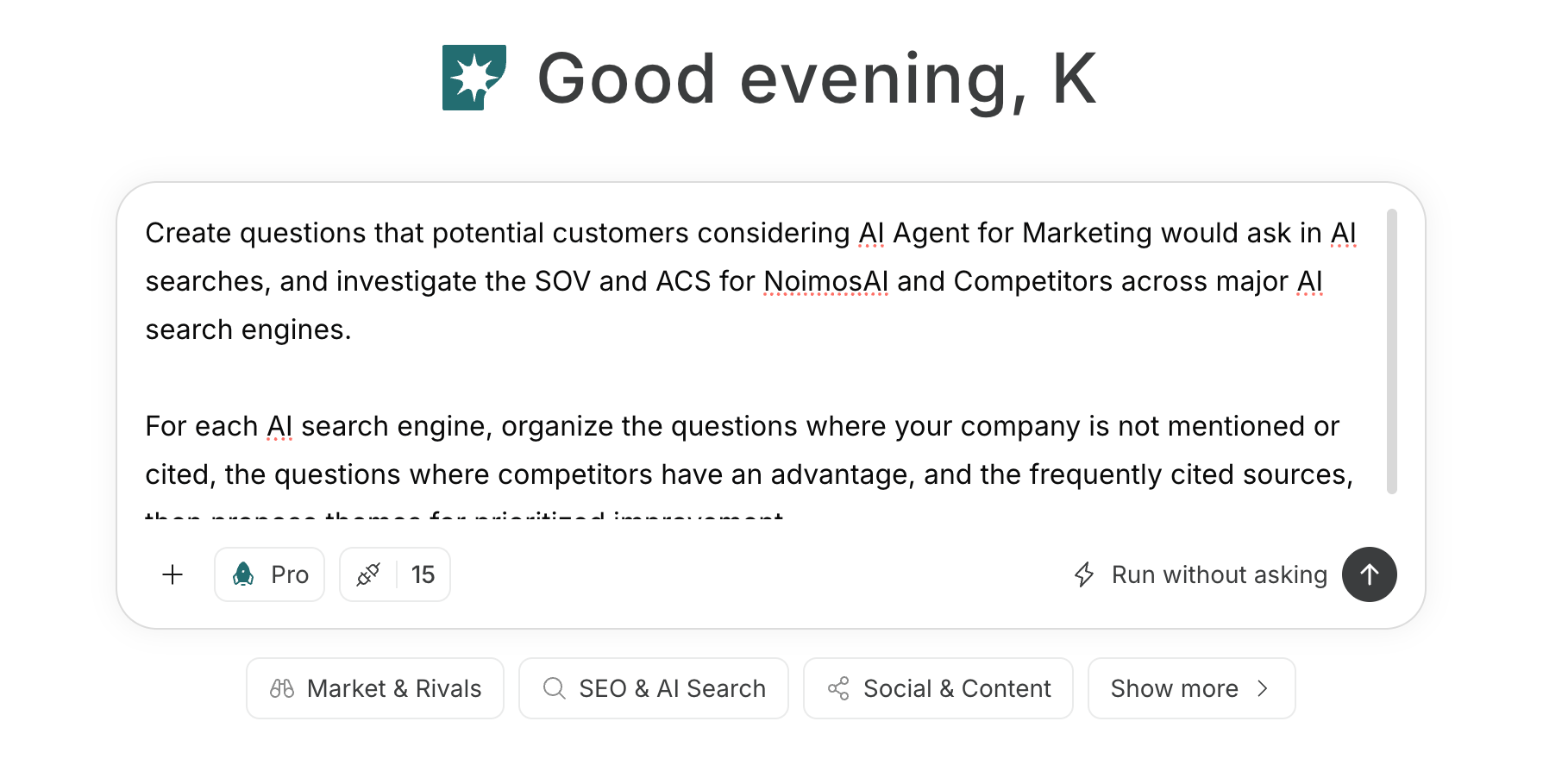
For instructions on entering a prompt in chat, see [Enter your own prompt](/help-center/chat/enter-your-own-prompt).

<img src="https://mintcdn.com/agoslabstechnologiesfzco/nVMsHgQOcR2qTlLN/public/playbooks/consumer/geo-chat-prompt.png?fit=max&auto=format&n=nVMsHgQOcR2qTlLN&q=85&s=3b5e26cbc6ac4863b3f0383d94a78a46" alt="Screen for entering instructions in NoimosAI chat" style={{ width: "100%", border: "1px solid #e5e7eb", borderRadius: "8px", margin: "18px 0" }} width="1818" height="902" data-path="public/playbooks/consumer/geo-chat-prompt.png" />

If you want to create an agent by describing goals and conditions in a prompt, see [Create an agent from chat](/help-center/ai-team/create-a-trigger-from-chat). If you want to enter each setting manually on the configuration screen, see [Create an agent from scratch](/help-center/ai-team/create-an-agent-from-scratch).
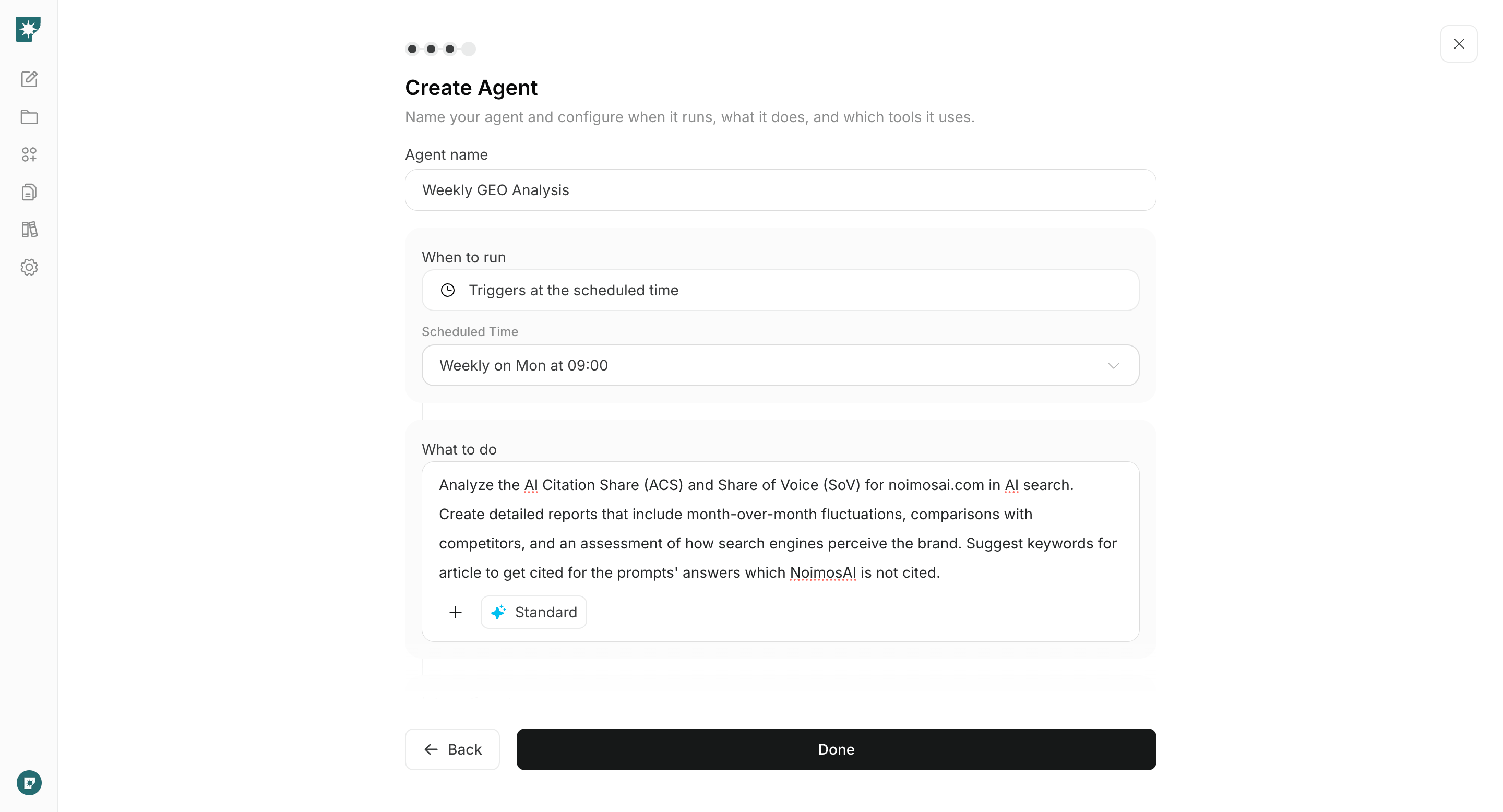
<img src="https://mintcdn.com/agoslabstechnologiesfzco/nVMsHgQOcR2qTlLN/public/playbooks/consumer/geo-create-monitoring-agent.png?fit=max&auto=format&n=nVMsHgQOcR2qTlLN&q=85&s=ffe0f14acd0f8b52ede160feee5f8b60" alt="Screen for configuring triggers and actions for a scheduled agent" style={{ width: "100%", border: "1px solid #e5e7eb", borderRadius: "8px", margin: "18px 0" }} width="2880" height="1556" data-path="public/playbooks/consumer/geo-create-monitoring-agent.png" />

<a id="practice-ai-visibility" />

### 1. Check visibility in AI search

First, investigate your company’s SOV and ACS in chat. For research about product selection, do not include the brand name; use questions that customers would naturally ask about product categories, problems, how to choose, and comparisons. For post-purchase research, use questions that users would ask about how to use the product and how to solve problems.

#### Prompt for chat

```text theme={null}
Create questions that customers considering [product category], or users of [product/service], would ask in AI search. Investigate SOV and ACS in major AI searches for [your brand] and [competitor brands].

For each AI search system, identify questions where the brand is absent, questions where competitors dominate, and sources cited repeatedly. Recommend the highest-priority topics to improve and explain why.
```

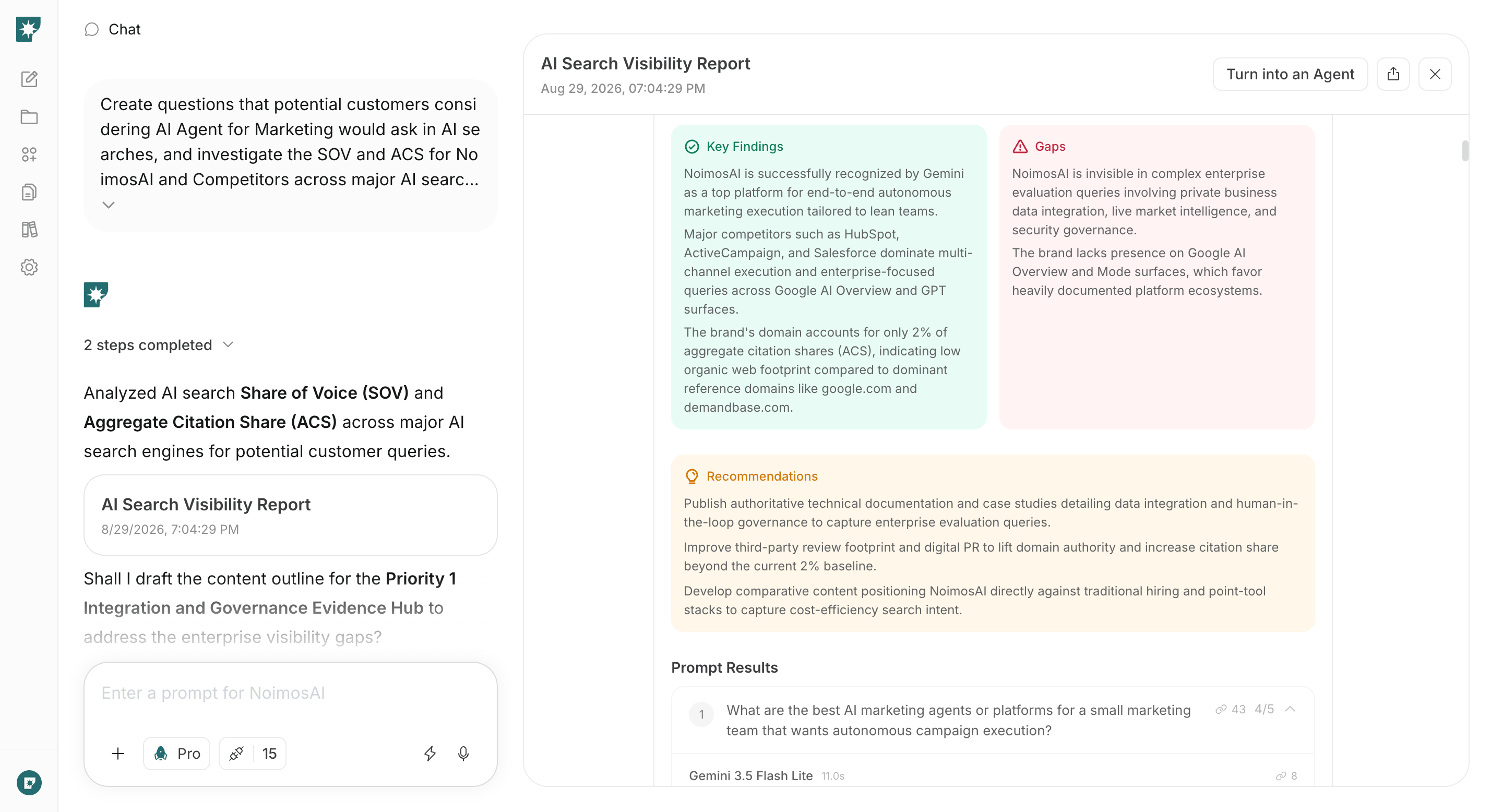
<img src="https://mintcdn.com/agoslabstechnologiesfzco/nVMsHgQOcR2qTlLN/public/playbooks/consumer/geo-visibility-report.png?fit=max&auto=format&n=nVMsHgQOcR2qTlLN&q=85&s=024a6652bfca3e05b079023a6d1f73d0" alt="Report of NoimosAI visibility in AI search and improvement recommendations" style={{ width: "100%", border: "1px solid #e5e7eb", borderRadius: "8px", margin: "18px 0" }} width="2880" height="1556" data-path="public/playbooks/consumer/geo-visibility-report.png" />

This step does not require app integrations. NoimosAI will enter questions into multiple AI searches and compile <Tooltip tip="Shows how often your brand is mentioned in AI responses compared with competitors.">**SOV**</Tooltip> and <Tooltip tip="Shows the share of cited sources in AI responses that come from your website.">**ACS**</Tooltip>.
In the results, review not only questions with low scores but also why competitors are cited and which sources support the answers. Select the questions to improve and identify the related pages and content to review in the next step.

<a id="practice-geo-site" />

### 2. Make your website easy for AI systems to access and cite

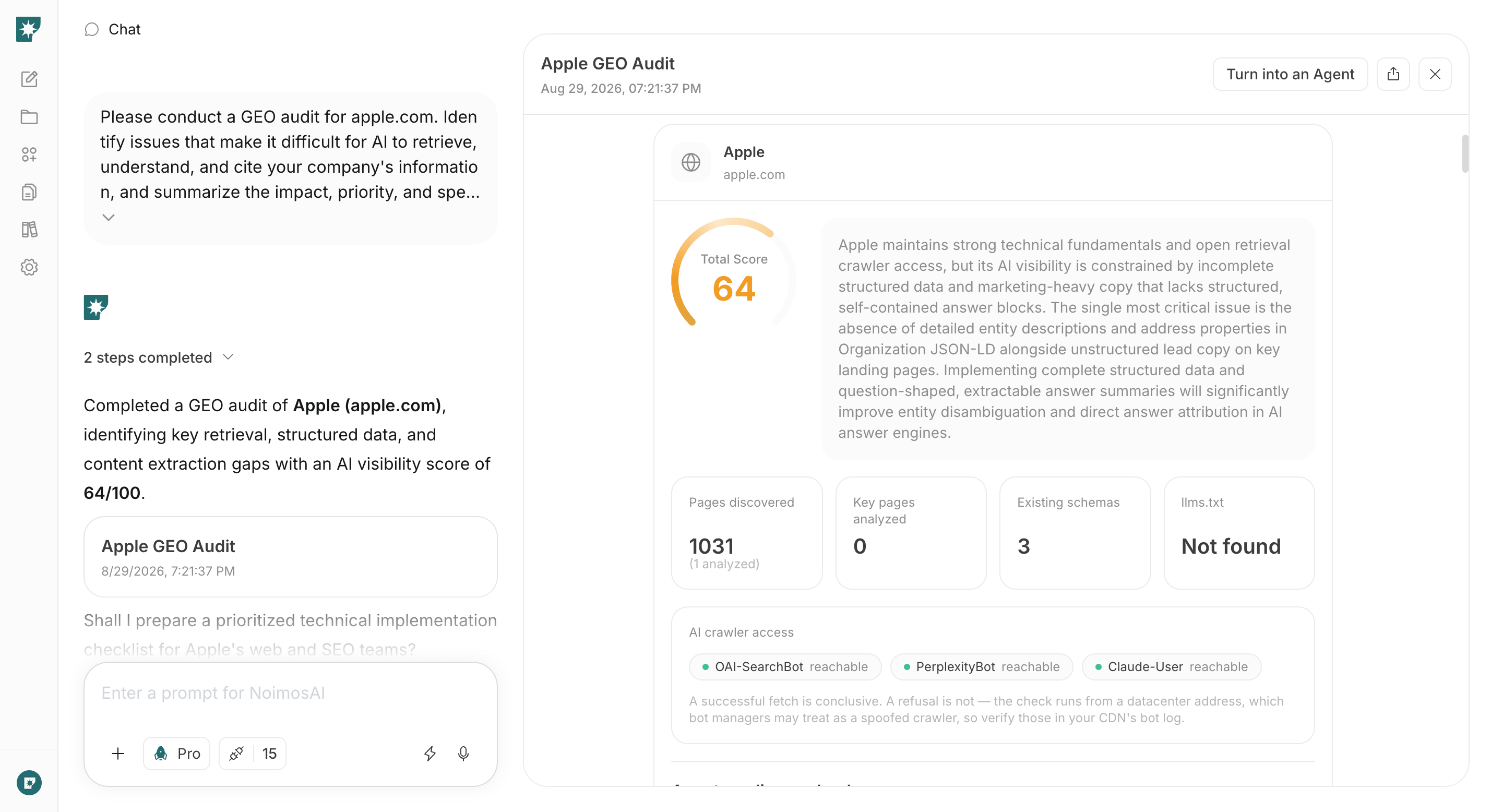
Enter the public website URL in chat to run a GEO audit. NoimosAI will fetch the pages, test whether important information is discoverable, map relevant URLs, assess the information structure, and flag accuracy or credibility issues that make citation difficult.

#### Prompt for chat

```text theme={null}
Perform a GEO audit of the live website at [Public website URL]. Identify issues that make it difficult for AI to retrieve, understand, or cite your company information, summarize their impact and priority, and provide concrete remediation steps.
```

<img src="https://mintcdn.com/agoslabstechnologiesfzco/nVMsHgQOcR2qTlLN/public/playbooks/consumer/geo-audit-result.png?fit=max&auto=format&n=nVMsHgQOcR2qTlLN&q=85&s=6dcc25d1a6723f220864696f49176b66" alt="NoimosAI GEO audit showing website issues and priorities" style={{ width: "100%", border: "1px solid #e5e7eb", borderRadius: "8px", margin: "18px 0" }} width="2880" height="1556" data-path="public/playbooks/consumer/geo-audit-result.png" />

Review the audit results and prioritize fixing issues that prevent AI from retrieving pages, and pages where key information—company name, product name, pricing, features, etc.—is unclear.

Websites ingested and managed by NoimosAI can be corrected based on the audit results. Request fixes under `Website Settings > SEO and GEO`, review product information and links in the preview, then publish.

After updating your website, verify in Google Search Console that important pages are indexed by Google. For newly created or substantially updated pages, submit an index request via the <Tooltip tip="A feature that lets you check whether Google can access and has indexed the published URL.">**URL Inspection**</Tooltip> tool.
<a id="practice-geo-content" />

### 3. Create content that AI answers can cite

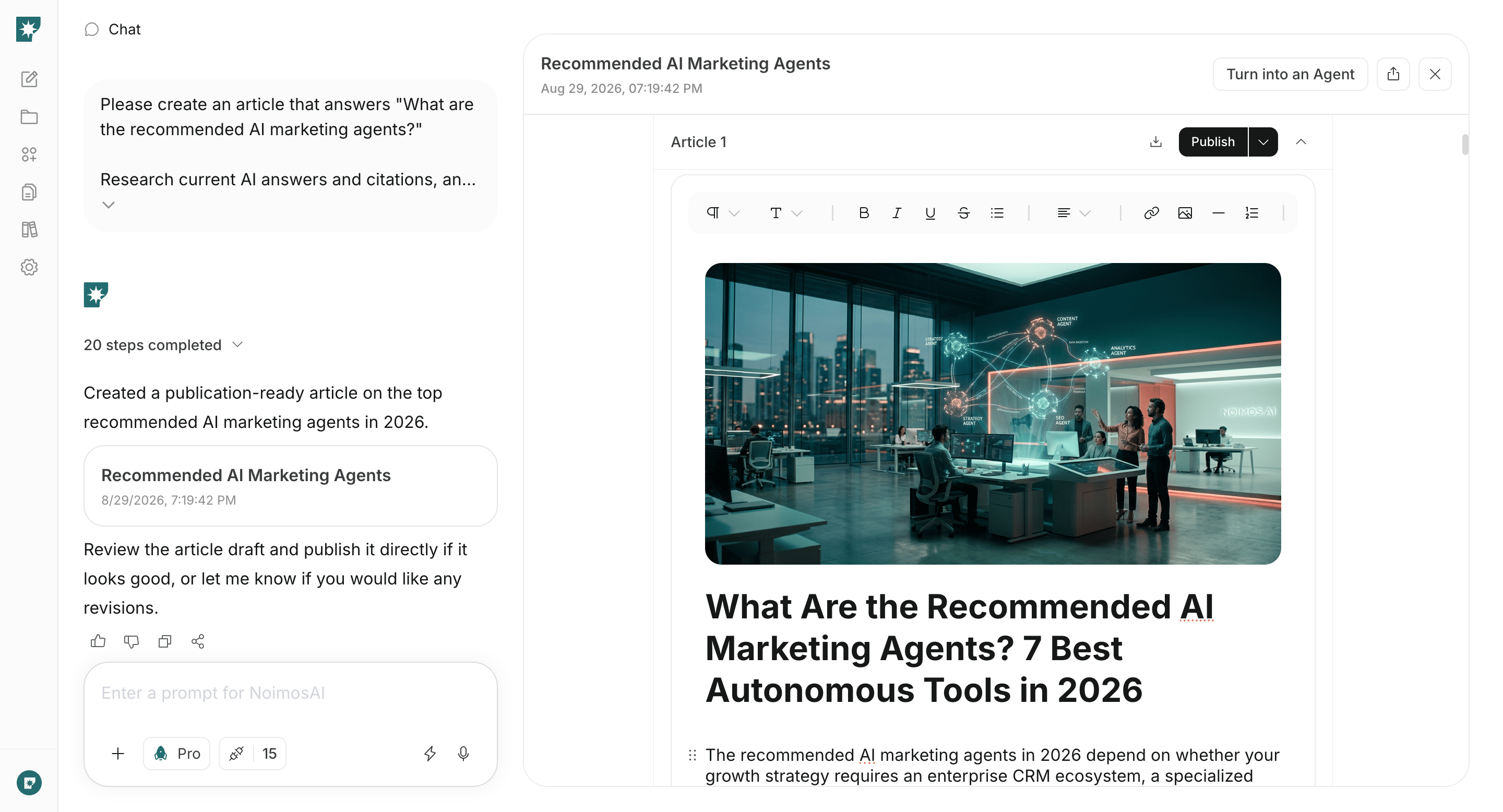
Write and publish articles that answer questions identified in the initial audit where your company was underrepresented. NoimosAI will analyze current AI responses and their sources, then produce a final draft that includes conclusions, supporting evidence, concrete examples, and any required FAQs.

If you have product information, research data, case studies, or existing documentation, provide their URLs or files in the chat. Connecting WordPress or note lets NoimosAI reference existing posts and publish the articles it creates.

#### Prompt for chat

```text theme={null}
Create an article that answers [the question a customer or user would ask in AI search].

Investigate the current AI answers and cited sources, and structure the piece so the question is answered clearly at the beginning. Use accurate information and evidence about [your company’s products or services]. Include comparisons, concrete examples, procedures, and an FAQ when they help, and produce a publication-ready draft.
```

<img src="https://mintcdn.com/agoslabstechnologiesfzco/nVMsHgQOcR2qTlLN/public/playbooks/consumer/geo-article-result.png?fit=max&auto=format&n=nVMsHgQOcR2qTlLN&q=85&s=f4fb5953bb1516f20663fb392fda5513" alt="Article created by NoimosAI to improve mentions and citations in AI search" style={{ width: "100%", border: "1px solid #e5e7eb", borderRadius: "8px", margin: "18px 0" }} width="2880" height="1556" data-path="public/playbooks/consumer/geo-article-result.png" />

For the finished article, verify at the start that it answers the question, contains no unsubstantiated figures or claims, and matches your company’s official information and evidence. If there are no issues, publish on WordPress or note and add internal links from related articles and FAQs. If you publish on your company website, also confirm the published URL is included in sitemap.xml.

Not just articles—social media content and other formats may be used as sources, so identify the target channels and expand content accordingly.

<a id="practice-geo-improvement" />

### 4. Monitor and improve visibility over time

Create an agent to continuously measure visibility using the same queries and AI search. Run it initially about once a week and compare SOV, ACS, answer content, and sources to the previous results.

#### Agent setup

**Trigger:** Schedule / Weekly

**Instructions:**

```text theme={null}
Measure SOV and ACS for [our brand] and [competitor brands] on the specified NoimosAI search queries.

Compare with the previous results and identify queries with increased or decreased mentions or citations, queries where competitors newly gained advantage, sources that changed, and incorrect explanations. Propose web pages to improve or content to create.
```

**Integrations:** None

The agent prioritizes queries that show large changes and queries that most impact the originally set objective.

* If the objective is awareness or customer acquisition, review queries about product categories, comparisons, and how to choose.
* If the objective is solving existing users’ problems, review queries about how to use the product and problem resolution.
* If there is incorrect information, correct the official page or documentation; if your brand does not appear, create articles or FAQs.

After making corrections or publishing content, check SOV, ACS, and changes in answers at the next measurement.

If Google Analytics is integrated, also verify whether customers and users coming from NoimosAI search or related sources are progressing to pages that match the objective. For awareness or acquisition, check product page views, reservations, and purchases; for existing-user problem resolution, check help and documentation page views. Judge results not only by increases in mentions and citations but also by whether they contribute to the set objective.

## Related pages

* [Grow awareness](/playbooks/consumer/grow-awareness)
* [Increase search traffic with SEO](/playbooks/consumer/seo)
* [Create an agent from chat](/help-center/ai-team/create-a-trigger-from-chat)
* [Create an agent from scratch](/help-center/ai-team/create-an-agent-from-scratch)
* [Check agent execution results](/help-center/ai-team/check-agent-execution-results)