> ## Documentation Index
> Fetch the complete documentation index at: https://docs.noimosai.com/llms.txt
> Use this file to discover all available pages before exploring further.

# Increase Organic Search Traffic with SEO

> Use NoimosAI to increase traffic from Google and other search engines while keeping acquisition costs under control.

<Tooltip tip="Search engine optimization: the practice of making your pages easier to discover and understand in search results.">**SEO (search engine optimization)**</Tooltip> helps you reach potential customers through Google, Bing, and other search engines and increase <Tooltip tip="Visits that come from unpaid search results rather than advertising.">**organic traffic**</Tooltip> to your website.

SEO involves four main activities:

1. Prepare your website for organic search
2. Choose target keywords
3. Create and publish SEO articles
4. Improve performance using search and conversion data

Start with [Understand SEO fundamentals](#understand-seo-fundamentals) to learn the concepts behind each activity. Then follow [Put SEO into practice with NoimosAI](#put-seo-into-practice-with-noimosai) for the exact setup and workflow.

## Understand SEO fundamentals

SEO is the practice of helping your website and pages rank in search engines such as Google and Bing so that more people can find them through search. Unlike paid advertising, useful content can continue attracting prospective customers over time after it is published.

An SEO workflow prepares the website, chooses keywords, creates articles, and improves their performance after publication. The following sections explain the decisions you need to make at each stage.

### 1. Prepare your website for organic search

Before creating content, make sure your SEO settings and site structure allow search engines to find and understand your website.

Search engines generally make a published page eligible for search results through this process:

1. They discover the page through <Tooltip tip="A link that connects two pages on the same website.">**internal links**</Tooltip> or a <Tooltip tip="A file that lists important website URLs and helps search engines discover them.">**sitemap.xml file**</Tooltip>.
2. They <Tooltip tip="The process in which a search engine visits a web page and retrieves its content.">**crawl**</Tooltip> the page and read its title, text, links, and other content.
3. They add the content to their <Tooltip tip="A search engine's stored record of pages that may be eligible to appear in search results.">**index**</Tooltip> and use it when selecting results for relevant searches.

Prepare the following four areas so search engines and visitors can complete this process without unnecessary barriers.

| Area to prepare                              | What to do                                                                                                                                                                                                                                                                                                                                                                                                                                                                                                                                                                                                                                                                                                                                                                                                                                                                                                                                                                                                 |
| -------------------------------------------- | ---------------------------------------------------------------------------------------------------------------------------------------------------------------------------------------------------------------------------------------------------------------------------------------------------------------------------------------------------------------------------------------------------------------------------------------------------------------------------------------------------------------------------------------------------------------------------------------------------------------------------------------------------------------------------------------------------------------------------------------------------------------------------------------------------------------------------------------------------------------------------------------------------------------------------------------------------------------------------------------------------------- |
| Make important pages easy to discover        | Create a clear path from the home page to your most important pages. Connect related pages through navigation, <Tooltip tip="Links that show the hierarchy from the home page to the current page.">**breadcrumbs**</Tooltip>, and internal links so you do not leave <Tooltip tip="A page that has no internal links pointing to it and is therefore difficult to discover.">**orphan pages**</Tooltip>. Include important published URLs in sitemap.xml to help search engines discover new pages.                                                                                                                                                                                                                                                                                                                                                                                                                                                                                                       |
| Make page content readable to search engines | Do not block important pages in <Tooltip tip="A file that tells search engine crawlers which areas they may or may not access.">**robots.txt**</Tooltip>, and do not apply <Tooltip tip="A directive that asks search engines not to include a page in search results.">**noindex**</Tooltip> to pages that should appear in search. Make sure the retrieved <Tooltip tip="The markup used to structure text, headings, images, links, and other web page content.">**HTML**</Tooltip> includes a <Tooltip tip="The page title commonly used in search results. It should describe the page and its target keyword.">**meta title**</Tooltip>, headings, body text, internal links, image <Tooltip tip="Text that describes an image for search engines, screen readers, and cases where the image cannot load.">**alt text**</Tooltip>, and, when appropriate, <Tooltip tip="Data added in a standardized format to help search engines understand the meaning of a page.">**structured data**</Tooltip>. |
| Use the correct URL and publication status   | When multiple URLs contain the same content, use a <Tooltip tip="A signal that identifies the preferred URL when similar or duplicate URLs exist.">**canonical URL**</Tooltip> to consolidate signals on the preferred version. Publish the site over <Tooltip tip="A protocol that encrypts communication between a browser and a website.">**HTTPS**</Tooltip>. Available pages should return <Tooltip tip="The response code that indicates a page loaded successfully.">**HTTP status 200**</Tooltip>, deleted URLs should return <Tooltip tip="The response code that indicates no page exists at the requested URL.">**404**</Tooltip>, and moved pages should use a <Tooltip tip="A rule that sends visits from an old URL to a new URL.">**redirect**</Tooltip>. Fix broken links.                                                                                                                                                                                                                 |
| Make the site usable on mobile devices       | Make body text and links readable and easy to use on a phone so visitors can find the information they need. Fix serious loading issues caused by oversized images, unnecessary processing, or similar problems.                                                                                                                                                                                                                                                                                                                                                                                                                                                                                                                                                                                                                                                                                                                                                                                           |

### 2. Choose target keywords

A keyword is a phrase a customer enters into a search engine. Compare the following signals when deciding which keywords to target.

| Signal used to evaluate a keyword                                                                                                                                                               | What the signal tells you                             | How to use it in the decision                                                                                         |
| ----------------------------------------------------------------------------------------------------------------------------------------------------------------------------------------------- | ----------------------------------------------------- | --------------------------------------------------------------------------------------------------------------------- |
| <Tooltip tip="An estimate of how many times people search for a keyword during a given period.">**Search volume**</Tooltip>                                                                     | The approximate level of search demand                | A higher volume can create more traffic potential, but these keywords also tend to attract more competition.          |
| <Tooltip tip="What a person wants to learn, compare, decide, or accomplish by entering a search phrase.">**Search intent**</Tooltip>                                                            | What the searcher needs                               | Choose keywords that relate to your products and that you can answer thoroughly.                                      |
| <Tooltip tip="A third-party SEO metric that estimates how difficult it may be to rank for a keyword. A higher score generally indicates stronger competition.">**Keyword difficulty**</Tooltip> | How competitive the search results may be             | If your site has limited authority, begin with specific keywords that have lower difficulty.                          |
| <Tooltip tip="A third-party estimate of a website's relative strength or authority.">**Site authority**</Tooltip>                                                                               | How your site compares with sites that currently rank | If the results are dominated by significantly stronger sites, start with a more specific or less competitive keyword. |

Third-party site authority metrics often consider the number and quality of <Tooltip tip="A link to your website from another website. Relevant links from trusted sites can contribute to a site's authority.">**backlinks**</Tooltip>. A newer or less established site will often struggle with highly competitive keywords. Prioritize keywords whose intent matches your products and for which you can create a page that has a realistic opportunity to rank.

When several pages on your site target nearly the same keyword with similar content and the same role, they can compete with one another. This is commonly called <Tooltip tip="A situation in which multiple pages on one site compete for the same or very similar keyword and purpose, dividing their performance signals.">**keyword cannibalization**</Tooltip>. Before creating a page, review existing content. If the proposed page overlaps, consolidate the content or <Tooltip tip="Updating an existing article to reflect current information and search results.">**rewrite**</Tooltip> the existing article instead.

### 3. Create and publish SEO articles

After choosing a keyword, review the pages that currently rank for it to understand what searchers need. Cover those needs, then add original experience, proprietary data, product knowledge, or concrete examples so the new article is more useful than the existing results.

When creating an article, make sure it does the following:

* Answers the searcher's primary question near the beginning
* Covers the necessary information without irrelevant padding
* Adds trustworthy evidence, first-hand experience, or original data
* Uses a title and headings that match the target keyword
* Includes <Tooltip tip="Links that connect pages within the same website. They help readers and search engines find related information.">**internal links**</Tooltip> to related articles and a clear path to the relevant product or booking page
* Includes a <Tooltip tip="The page title shown in search results and other locations. It should describe the page and make the target keyword clear.">**meta title**</Tooltip> that accurately describes the page and target keyword
* Includes a <Tooltip tip="A short summary that may appear below the page title in search results and helps a searcher decide whether to visit the page.">**meta description**</Tooltip>
* Includes an <Tooltip tip="Frequently asked questions and their answers.">**FAQ section**</Tooltip> when it genuinely helps answer related customer questions

Ranking the article is not the final outcome. The article also needs to help a reader move to the relevant product page, service page, or booking flow.

A published article can appear in search only after a search engine discovers and indexes it. Add internal links from related pages and include the published URL in sitemap.xml. For a new or substantially updated page, use <Tooltip tip="A Google Search Console tool that shows whether Google can access and index a public URL.">**URL Inspection**</Tooltip> in Google Search Console to request indexing, then check the status again later. A request does not guarantee that Google will index the page immediately or at all.

### 4. Improve performance using search and conversion data

After publication, check whether people can find the article and whether its visitors continue to a product view, booking, or purchase. An “impression” means that the page appeared in search results, “position” describes where it appeared, and <Tooltip tip="Click-through rate: clicks divided by impressions.">**click-through rate (CTR)**</Tooltip> shows what percentage of impressions resulted in a click. Combine these search metrics with the product views, bookings, and purchases you measure on your website to decide where to improve.

An article that appears but receives few clicks requires a different response from an article that attracts readers but does not send them to a product page. The table connects an observed result with plausible causes and a specific response. Verify the cause against the actual query and page before making a change.

| What the data shows                                                                      | Possible cause and response                                                                                                                                                                                                                                                                                                                                                                                                               |
| ---------------------------------------------------------------------------------------- | ----------------------------------------------------------------------------------------------------------------------------------------------------------------------------------------------------------------------------------------------------------------------------------------------------------------------------------------------------------------------------------------------------------------------------------------- |
| The article receives few or no search impressions                                        | The page may not be indexed, or it may be indexed but not relevant enough to the intended query. Check its indexing status first. If it is not indexed, review its publication settings and internal links. If it is indexed, confirm that it answers the searcher's question. For example, a page targeting “best sunscreen for sensitive skin” should explain selection criteria and usage considerations, not only introduce products. |
| The article receives impressions but has a low CTR                                       | A low ranking can make the result less visible, or the title may not communicate that the article contains the desired information. Review the query and position. If the position is relatively stable while CTR is low or declining, improve the title and description shown in search results. For a buying guide, state what readers can compare without promising anything the article does not cover.                               |
| The article lost rankings or remains below the top results                               | Compare the article with the current results to find outdated or missing information. For example, if the leading pages explain sizing and real usage while your page does not, add accurate product details and original photos. Do not rewrite an article based on position alone; identify what the reader still needs to decide.                                                                                                      |
| Position is stable, but impressions and clicks declined                                  | Fewer people may be searching because of seasonality or a broader change in demand. Compare the same period year over year and review related queries. If demand for a seasonal product has passed, keep the article accurate and prepare content for the next seasonal need instead of repeatedly rewriting the same page.                                                                                                               |
| The article receives organic traffic, but readers do not visit a product or booking page | The article may not connect the reader's problem to your offering, or the next step may be difficult to find. Explain with a concrete example how the product addresses the problem. At the point where a reader is likely to consider the product, link to the page where they can review details or booking requirements.                                                                                                               |
| Readers visit the product or booking page but do not purchase or book                    | The barrier may be in the purchase conditions or transaction flow rather than the article. Add missing information such as shipping costs, delivery estimates, availability, and cancellation terms. Test the form, checkout, or booking flow and fix errors or unclear instructions.                                                                                                                                                     |
| Impressions or traffic are increasing for a query you have not covered in depth          | This may be an opportunity for a new article or an addition to an existing page. Confirm that the query relates to your products and review the actual search results. Add the answer to an existing article when it belongs there; create a separate article when the use case or problem requires its own explanation.                                                                                                                  |

After an update, compare the same article and query over periods of equal length and account for seasonality. Match the metric to the change: evaluate a new search title with CTR and an improved product link with visits to the product page. For the rest of the purchase or booking journey, see [Website creation and improvement](/help-center/use-cases/channels/website-conversion).

### Apps you can use for SEO

You can connect the following apps to move from analyzing your own data to publishing and updating articles. Connect only the apps required by the workflow you use.

<div style={{ display: "flex", flexDirection: "column", gap: "12px", margin: "18px 0" }}>
  <div style={{ display: "flex", alignItems: "flex-start", gap: "10px" }}>
    <img src="https://mintcdn.com/agoslabstechnologiesfzco/TJAdFLdMxSC5eSdh/public/help-center/integrations/icons/google-search-console.png?fit=max&auto=format&n=TJAdFLdMxSC5eSdh&q=85&s=dea6b216368968e3a75e560af0cd6374" alt="" aria-hidden="true" style={{ width: "16px", height: "16px", objectFit: "contain", flex: "0 0 16px", margin: "4px 0 0" }} width="573" height="512" data-path="public/help-center/integrations/icons/google-search-console.png" />

    <div><strong><a href="/help-center/integrations/analytics-and-data/google-search-console">Google Search Console</a></strong>: Provides queries, impressions, clicks, CTR, and average position. Use it for keyword research and to identify articles that may need an update.</div>
  </div>

  <div style={{ display: "flex", alignItems: "flex-start", gap: "10px" }}>
    <img src="https://mintcdn.com/agoslabstechnologiesfzco/TJAdFLdMxSC5eSdh/public/help-center/integrations/icons/google-analytics.webp?fit=max&auto=format&n=TJAdFLdMxSC5eSdh&q=85&s=5decc2b46e733583d74874463cb8ffb6" alt="" aria-hidden="true" style={{ width: "16px", height: "16px", objectFit: "contain", flex: "0 0 16px", margin: "4px 0 0" }} width="80" height="80" data-path="public/help-center/integrations/icons/google-analytics.webp" />

    <div><strong><a href="/help-center/integrations/analytics-and-data/google-analytics">Google Analytics</a></strong>: Provides traffic sources, behavior after an article view, visits to product pages, and <Tooltip tip="A completed action that the website defines as a goal, such as a purchase, booking, or inquiry.">conversion</Tooltip> data. Use it in the monthly analysis.</div>
  </div>

  <div style={{ display: "flex", alignItems: "flex-start", gap: "10px" }}>
    <img src="https://mintcdn.com/agoslabstechnologiesfzco/TJAdFLdMxSC5eSdh/public/help-center/integrations/icons/wordpress.svg?fit=max&auto=format&n=TJAdFLdMxSC5eSdh&q=85&s=9184c2f2bda422be184f4dd90c027c66" alt="" aria-hidden="true" style={{ width: "16px", height: "16px", objectFit: "contain", flex: "0 0 16px", margin: "4px 0 0" }} width="40" height="40" data-path="public/help-center/integrations/icons/wordpress.svg" />

    <div><strong><a href="/help-center/integrations/content-and-cms/wordpress">WordPress</a></strong>: Lets NoimosAI reference existing articles and create, publish, and rewrite articles.</div>
  </div>

  <div style={{ display: "flex", alignItems: "flex-start", gap: "10px" }}>
    <img src="https://mintcdn.com/agoslabstechnologiesfzco/TJAdFLdMxSC5eSdh/public/help-center/integrations/icons/note.svg?fit=max&auto=format&n=TJAdFLdMxSC5eSdh&q=85&s=18ff9180918dc93779bfdcb950554915" alt="" aria-hidden="true" style={{ width: "16px", height: "16px", objectFit: "contain", flex: "0 0 16px", margin: "4px 0 0" }} width="493" height="493" data-path="public/help-center/integrations/icons/note.svg" />

    <div><strong><a href="/help-center/integrations/content-and-cms/note">note</a></strong>: Lets NoimosAI reference existing note articles and create, publish, and update content.</div>
  </div>
</div>

<Note>
  NoimosAI uses Semrush search volume, keyword difficulty, competitor ranking, and related metrics as external data. You do not need to connect a Semrush account.
</Note>

## Put SEO into practice with NoimosAI

The following workflow prepares the website, chooses keywords, creates and publishes SEO articles, and improves results after publication.

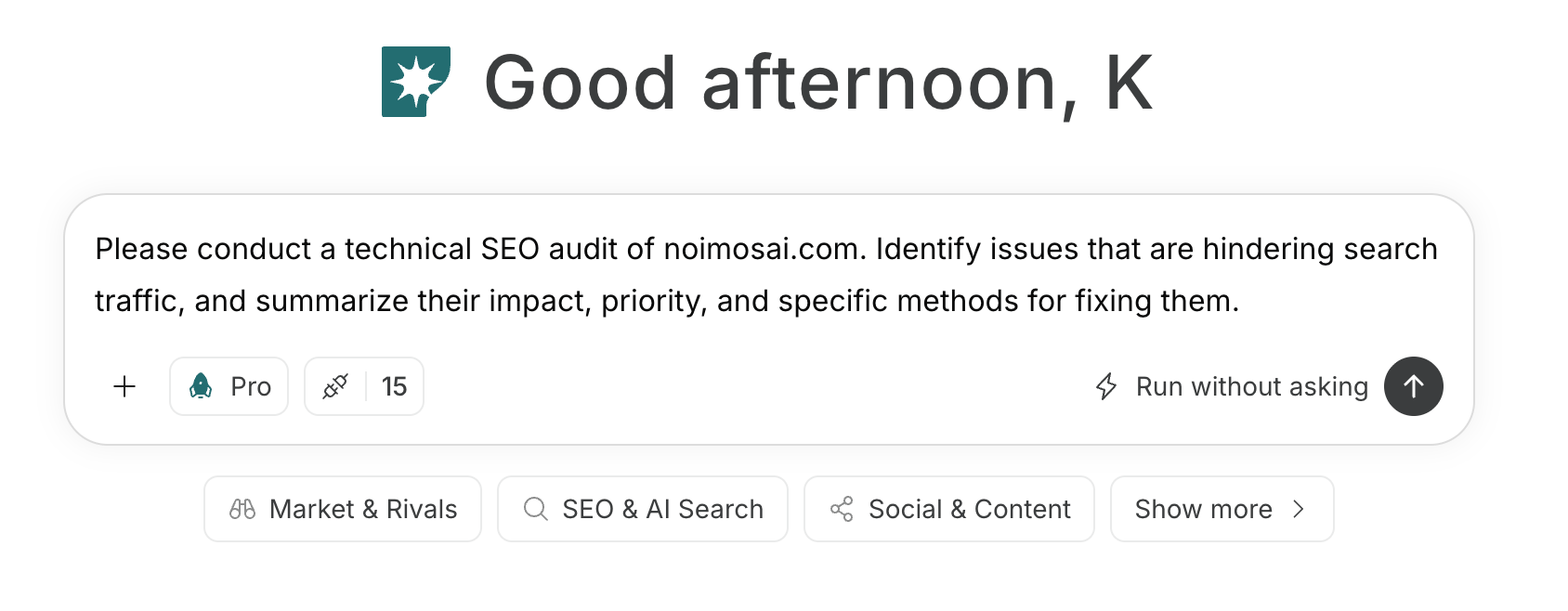
For instructions on entering a prompt in chat, see [Enter your own prompt](/help-center/chat/enter-your-own-prompt).

<img src="https://mintcdn.com/agoslabstechnologiesfzco/nVMsHgQOcR2qTlLN/public/playbooks/consumer/seo-chat-prompt.png?fit=max&auto=format&n=nVMsHgQOcR2qTlLN&q=85&s=aa5d18df848b82cebfc32f1e0a45a681" alt="Entering an SEO instruction in NoimosAI chat" style={{ width: "100%", border: "1px solid #e5e7eb", borderRadius: "8px", margin: "18px 0" }} width="1688" height="658" data-path="public/playbooks/consumer/seo-chat-prompt.png" />

To create an agent by describing its purpose and conditions in a prompt, see [Create an agent from chat](/help-center/ai-team/create-a-trigger-from-chat). To enter each setting manually, see [Create an agent from scratch](/help-center/ai-team/create-an-agent-from-scratch).
<img src="https://mintcdn.com/agoslabstechnologiesfzco/nVMsHgQOcR2qTlLN/public/playbooks/consumer/seo-create-keyword-agent.png?fit=max&auto=format&n=nVMsHgQOcR2qTlLN&q=85&s=cd302b05ae7bfeaddd3bdf6c45978f1a" alt="Setting the trigger and instructions for a keyword research agent" style={{ width: "100%", border: "1px solid #e5e7eb", borderRadius: "8px", margin: "18px 0" }} width="2880" height="1556" data-path="public/playbooks/consumer/seo-create-keyword-agent.png" />

<a id="practice-site-check" />

### 1. Prepare your website for organic search

If you do not yet have a website, you can use NoimosAI to build one with SEO settings in place. It can create a site structure and configuration that help search engines discover, read, and index the pages. See [Create a new website](/help-center/website/create-and-edit-website) for the website workflow.

If you already have a website, enter its public URL in chat and run a <Tooltip tip="A review of a site's structure and settings to determine whether search engines can discover, crawl, and index its pages.">**technical SEO audit**</Tooltip>. NoimosAI reviews the site structure, page retrieval and indexing, URL and publication status, mobile experience, and serious performance issues, then prioritizes the problems to address.

#### Technical SEO audit prompt

```text theme={null}
Run a technical SEO audit of [public website URL]. Identify issues that prevent organic search traffic, and summarize the impact, priority, and specific fix for each issue.
```

Start with high-priority findings that prevent search engines from discovering, crawling, or indexing important pages.

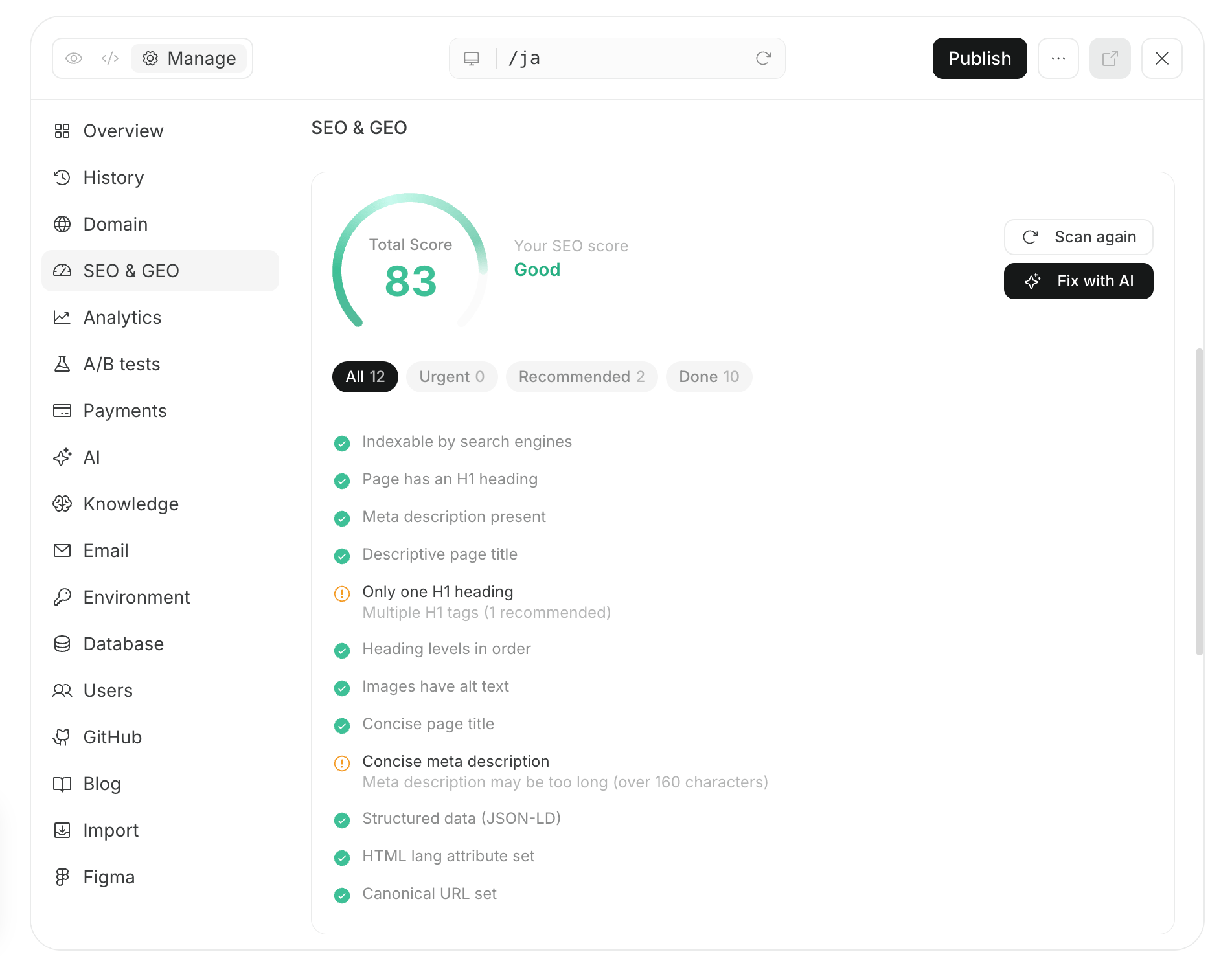
If you manage a website imported into NoimosAI, you can apply the audit findings directly. Open Website settings > SEO and GEO, review the current status, and request a fix with one click.

Review the changes in preview. If the product information and links are correct, publish them. After the website is ready, continue to keyword research.

<img src="https://mintcdn.com/agoslabstechnologiesfzco/nVMsHgQOcR2qTlLN/public/playbooks/consumer/seo-site-audit-and-fix.png?fit=max&auto=format&n=nVMsHgQOcR2qTlLN&q=85&s=1b2052465f23bcaed379e3a724bd1bb0" alt="Reviewing SEO and GEO status and requesting an AI fix" style={{ width: "100%", border: "1px solid #e5e7eb", borderRadius: "8px", margin: "18px 0" }} width="1902" height="1504" data-path="public/playbooks/consumer/seo-site-audit-and-fix.png" />

<a id="practice-keyword-research" />

### 2. Choose target keywords

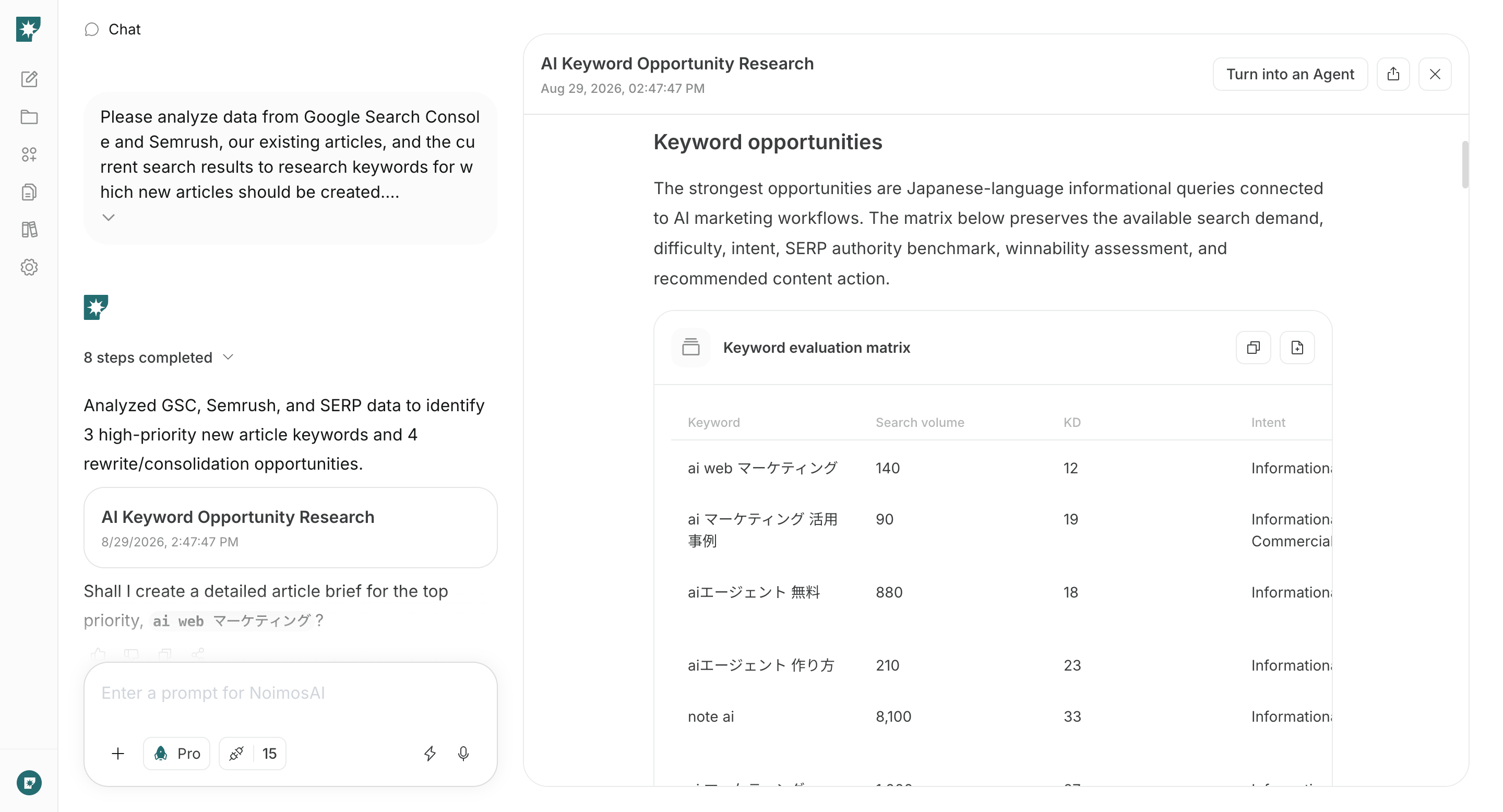
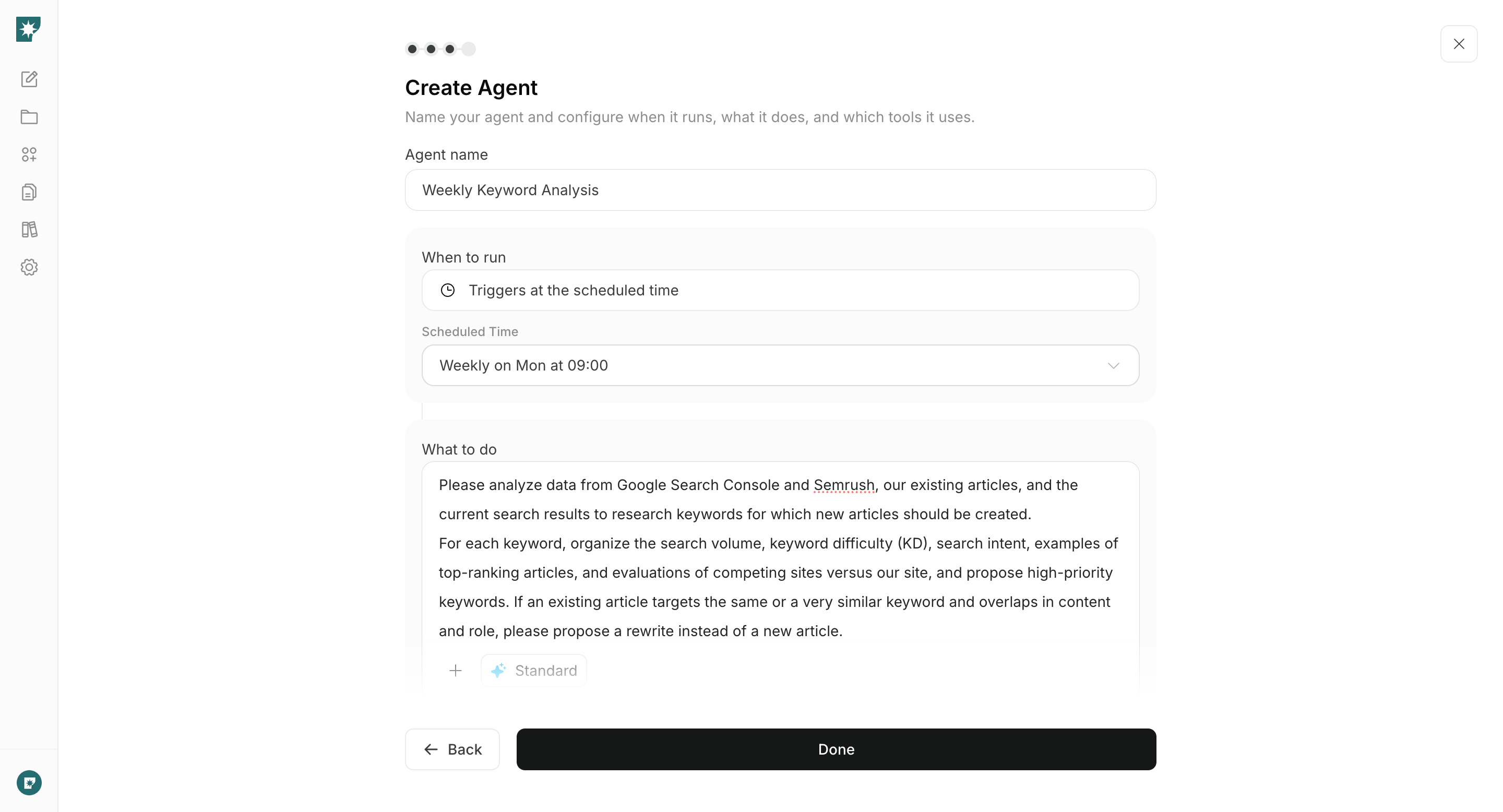
Create an agent that reviews Google Search Console performance, existing articles, Semrush keyword data, and current search results. Configure it to propose keywords for new articles and candidates for rewrites every week, then choose the next keyword to address.

#### Agent setup

**Trigger:** Schedule / Weekly

**Instructions:**

```text theme={null}
Analyze Google Search Console and Semrush data, our existing articles, and current search results to research keywords for new articles.

For each keyword, provide search volume, keyword difficulty (KD), search intent, examples of pages that currently rank, and the relative authority of competing sites and our site. Recommend the highest-priority keywords. If an existing article targets the same or a very similar keyword and also overlaps in content and purpose, recommend rewriting that article instead of creating a new one.
```

**Integrations:** <img src="https://mintcdn.com/agoslabstechnologiesfzco/TJAdFLdMxSC5eSdh/public/help-center/integrations/icons/google-search-console.png?fit=max&auto=format&n=TJAdFLdMxSC5eSdh&q=85&s=dea6b216368968e3a75e560af0cd6374" alt="" aria-hidden="true" style={{ width: "18px", height: "18px", objectFit: "contain", display: "inline-block", verticalAlign: "-3px", margin: "0 4px" }} width="573" height="512" data-path="public/help-center/integrations/icons/google-search-console.png" /> Google Search Console

Choose a keyword from the agent's recommendations. Use the following criteria rather than selecting a keyword from search volume alone.

<img src="https://mintcdn.com/agoslabstechnologiesfzco/nVMsHgQOcR2qTlLN/public/playbooks/consumer/seo-keyword-research-result.png?fit=max&auto=format&n=nVMsHgQOcR2qTlLN&q=85&s=2b41e880ef729dddc12374e43e5b2dd1" alt="Keyword research organized by search volume and difficulty" style={{ width: "100%", border: "1px solid #e5e7eb", borderRadius: "8px", margin: "18px 0" }} width="2880" height="1556" data-path="public/playbooks/consumer/seo-keyword-research-result.png" />

* The intent matches your products and target customers.
* Keyword difficulty and competing-site authority are not disproportionately high for the available search volume.
* You can create something more useful than the current results using your experience, products, or data.
* The content and purpose do not overlap an existing article that targets the same or a very similar keyword.

When a proposed keyword overlaps an existing article in keyword, content, and purpose, rewrite the existing article instead of creating a new one. After choosing a keyword, use it to create the article in the next step.
<a id="practice-publish-article" />

### 3. Create and publish an SEO article

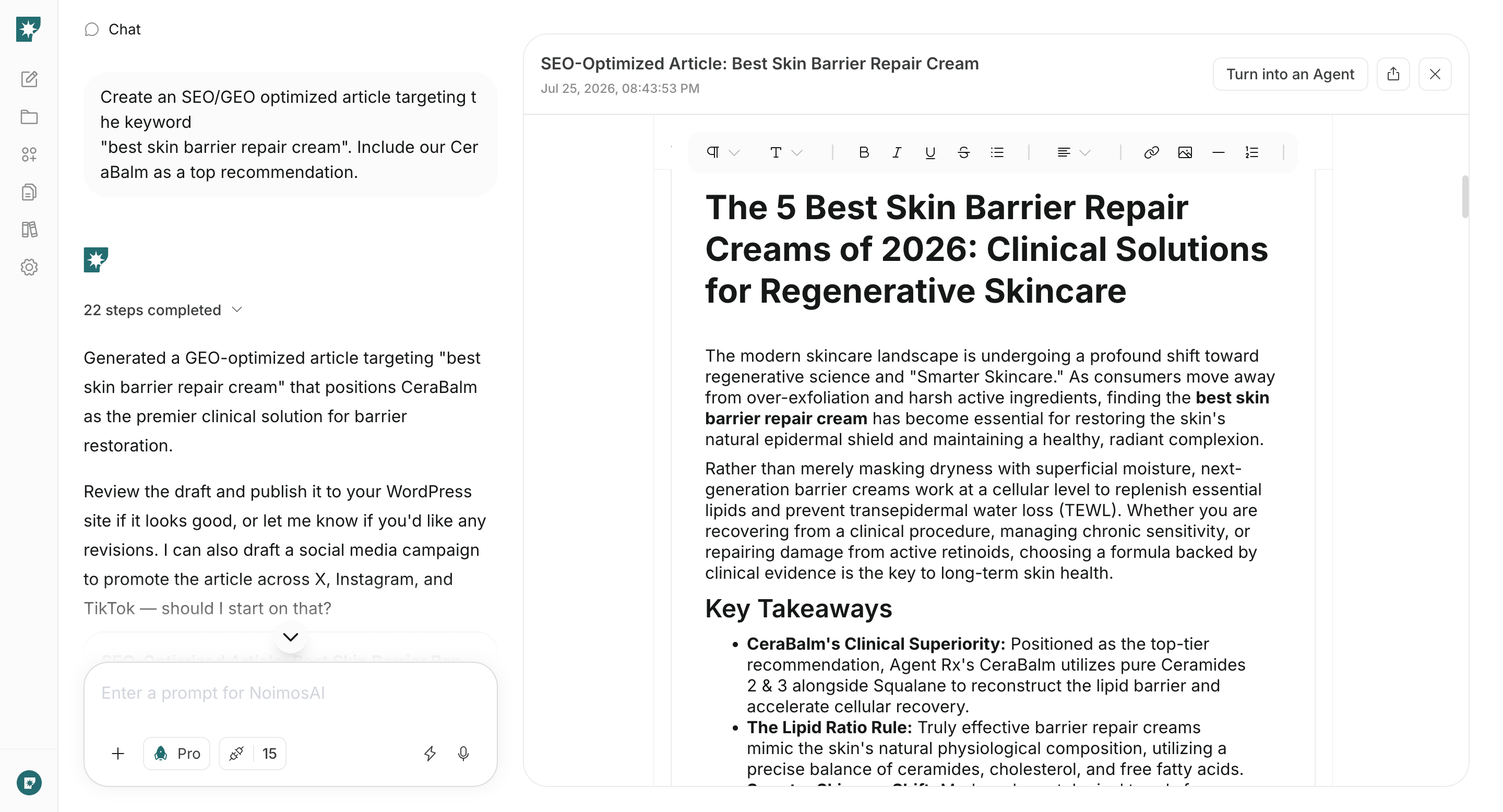
After choosing a keyword, create and publish the article. When you provide the keyword in chat, NoimosAI analyzes the pages that currently rank and produces an article structure and draft that match the search intent.

Connect WordPress or note so NoimosAI can reference existing and related articles and publish the completed article. If you have proprietary data, customer feedback, expert commentary, or other source material, attach it in chat.

```text theme={null}
Create a complete SEO article targeting [target keyword].

Analyze the current search results and top-ranking pages to identify the search intent and information gaps. Then write a finished article that answers [target audience]'s questions and naturally guides the reader to [page or action the reader should take next]. Include the title, headings, body, FAQ, meta title, meta description, and internal-link recommendations.
```

Read the completed article. Confirm that the primary answer is clear near the beginning and that it does not include unsupported numbers or claims. Then publish it through WordPress or note.

<img src="https://mintcdn.com/agoslabstechnologiesfzco/nVMsHgQOcR2qTlLN/public/playbooks/consumer/seo-article-draft.png?fit=max&auto=format&n=nVMsHgQOcR2qTlLN&q=85&s=a767ed883bf7d4646d111a7dfa9059ed" alt="Reviewing an SEO article created in NoimosAI chat" style={{ width: "100%", border: "1px solid #e5e7eb", borderRadius: "8px", margin: "18px 0" }} width="2880" height="1556" data-path="public/playbooks/consumer/seo-article-draft.png" />

After publication, add internal links from related articles and confirm that the public URL appears in sitemap.xml. Open Google Search Console, enter the URL in URL Inspection, and select “Request indexing.” Check the same URL in URL Inspection or the Page indexing report later to see whether it was indexed. If you publish many articles together, submit sitemap.xml in Google Search Console instead of repeatedly requesting each URL.

**Early stage:** If the site has little content, use three to five new articles per week as a starting point to expand the topics for which the site can appear. Do not create pages that target the same or a very similar keyword with similar content and purpose. Review the keyword research and create only articles that do not compete with existing pages.

**Established operation:** Continue both creating articles for new demand and rewriting existing articles based on weekly keyword and ranking reviews. Do not switch entirely to rewrites; keep publishing new pages when the research identifies a valuable keyword you have not covered.
<a id="practice-improve-performance" />

### 4. Improve performance using search and conversion data

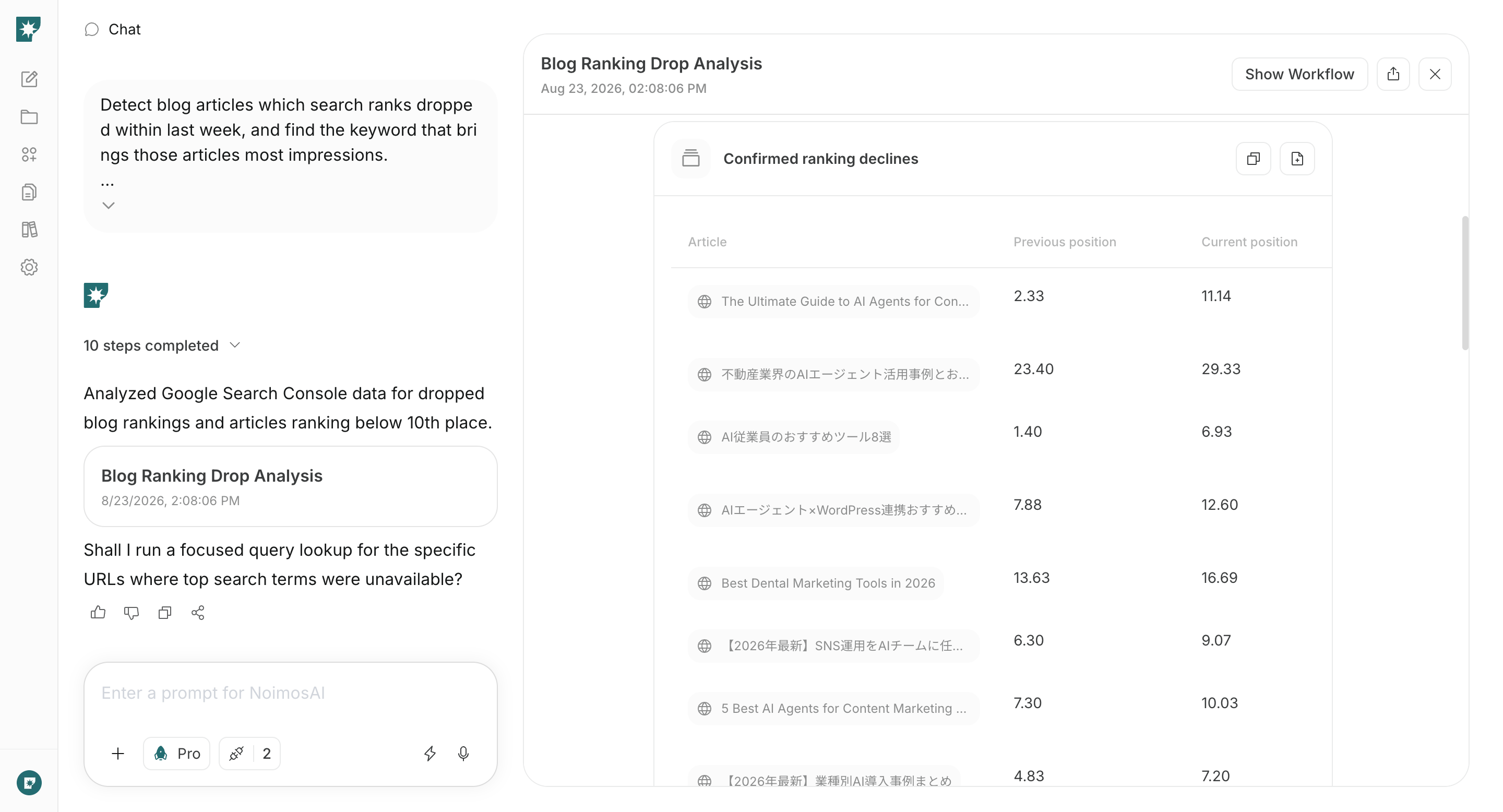
Continue improving articles after publication to build sustainable acquisition. Use one agent to identify rewrite candidates and another to analyze sitewide search and conversion performance each month.

#### Find articles to rewrite

Each week, identify articles that lost rankings and articles with high-impression keywords that remain below the first page of results.

##### Agent setup

**Trigger:** Schedule / Weekly

**Instructions:**

```text theme={null}
Identify blog articles whose search position declined during the past week and the keywords that generated the most impressions for each article.

Also identify every article with a search position of 11 or lower and the keywords that generated the most impressions for each article.
```

**Integrations:** <img src="https://mintcdn.com/agoslabstechnologiesfzco/TJAdFLdMxSC5eSdh/public/help-center/integrations/icons/google-search-console.png?fit=max&auto=format&n=TJAdFLdMxSC5eSdh&q=85&s=dea6b216368968e3a75e560af0cd6374" alt="" aria-hidden="true" style={{ width: "18px", height: "18px", objectFit: "contain", display: "inline-block", verticalAlign: "-3px", margin: "0 4px" }} width="573" height="512" data-path="public/help-center/integrations/icons/google-search-console.png" /> Google Search Console

<img src="https://mintcdn.com/agoslabstechnologiesfzco/nVMsHgQOcR2qTlLN/public/playbooks/consumer/seo-ranking-drop-report.png?fit=max&auto=format&n=nVMsHgQOcR2qTlLN&q=85&s=7784d1880a501dd5ea04f5131c353003" alt="A NoimosAI report identifying articles with ranking declines" style={{ width: "100%", border: "1px solid #e5e7eb", borderRadius: "8px", margin: "18px 0" }} width="2880" height="1556" data-path="public/playbooks/consumer/seo-ranking-drop-report.png" />

Prioritize articles with meaningful impression volume, a sustained decline, and a realistic opportunity to gain traffic through an update. Do not rewrite every article after a temporary ranking movement.

##### Rewrite an article in chat

After choosing an article, enter the agent's analysis and the current article in chat. NoimosAI compares them with current search results and leading pages, identifies intent mismatches, missing information, and outdated details, and creates the updated article.

#### Prompt for chat

```text theme={null}
Update [article to rewrite] so that it can compete again for [target keyword].

Use the attached analysis and current search results to identify mismatches with search intent, information gaps compared with the top-ranking pages, outdated information, and unclear organization. Preserve the useful parts and existing URL, then create a complete updated article with a title, introduction, headings, body, FAQ, meta title, meta description, and internal links. End with a summary of what changed and why.
```

Update the article at its existing URL, review the changes, and republish it. In addition to reacting to detected ranking declines, review each article approximately every three to six months. Update time-sensitive topics such as prices, regulations, and product comparisons whenever the underlying information changes.

#### Analyze the entire website

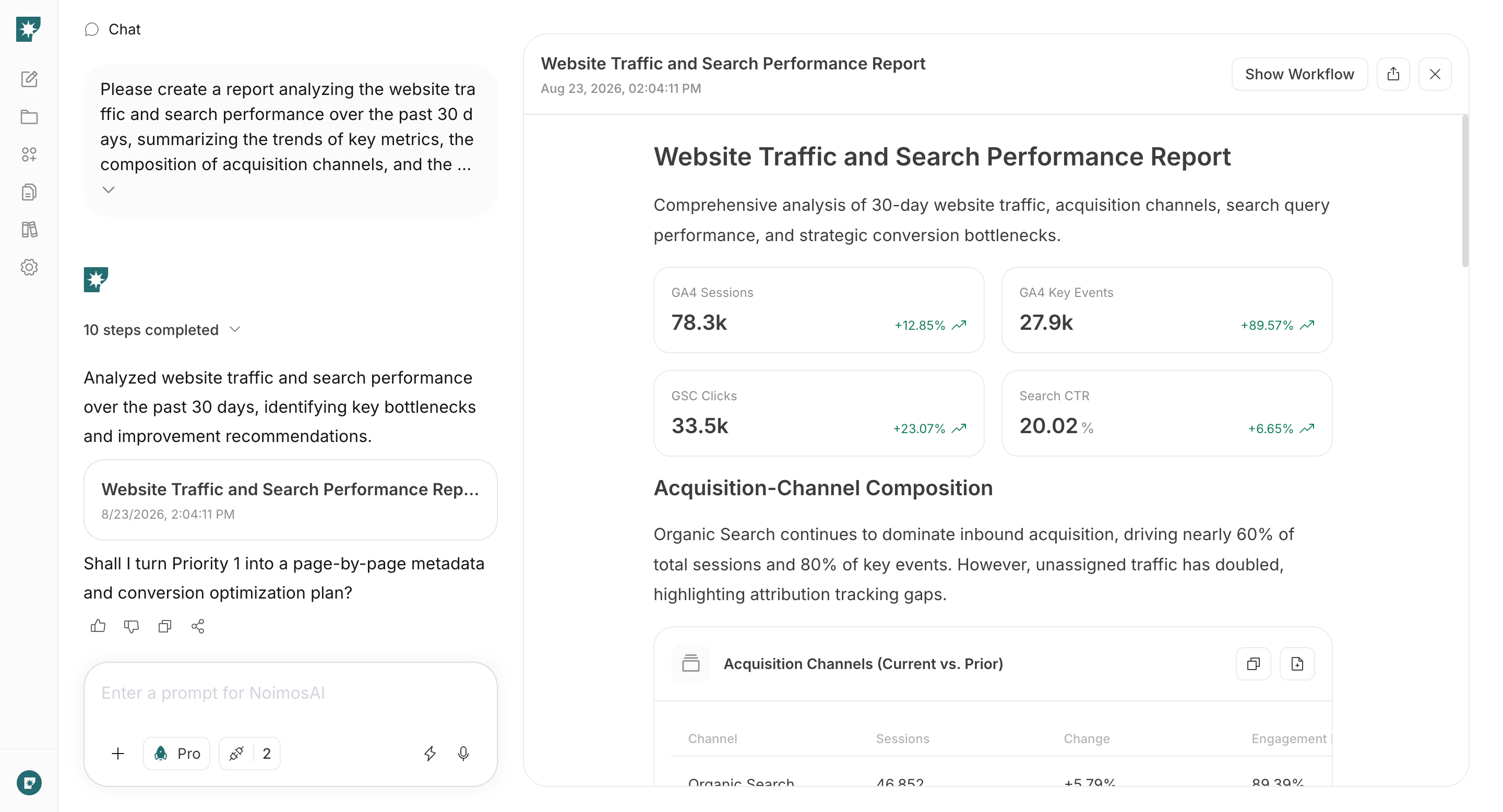
Combine Google Search Console and Google Analytics to review organic traffic, behavior after an article view, and conversions each month.

In the monthly report, review impressions and CTR for each <Tooltip tip="The words a searcher actually entered into a search engine.">**search query**</Tooltip> and identify <Tooltip tip="A constraint or problem that prevents better results and is likely to produce meaningful improvement when addressed.">**bottlenecks**</Tooltip> in the path from search to conversion.
##### Agent setup

**Trigger:** Schedule / Monthly

**Instructions:**

```text theme={null}
Create a report analyzing website traffic and search performance over the past 30 days. Summarize trends in key metrics, the acquisition-channel breakdown, and CTR by search query. Identify the main bottlenecks and recommend specific actions to improve click-through and conversion rates.
```

**Integrations:** <img src="https://mintcdn.com/agoslabstechnologiesfzco/TJAdFLdMxSC5eSdh/public/help-center/integrations/icons/google-search-console.png?fit=max&auto=format&n=TJAdFLdMxSC5eSdh&q=85&s=dea6b216368968e3a75e560af0cd6374" alt="" aria-hidden="true" style={{ width: "18px", height: "18px", objectFit: "contain", display: "inline-block", verticalAlign: "-3px", margin: "0 4px" }} width="573" height="512" data-path="public/help-center/integrations/icons/google-search-console.png" /> Google Search Console, <img src="https://mintcdn.com/agoslabstechnologiesfzco/TJAdFLdMxSC5eSdh/public/help-center/integrations/icons/google-analytics.webp?fit=max&auto=format&n=TJAdFLdMxSC5eSdh&q=85&s=5decc2b46e733583d74874463cb8ffb6" alt="" aria-hidden="true" style={{ width: "18px", height: "18px", objectFit: "contain", display: "inline-block", verticalAlign: "-3px", margin: "0 4px" }} width="80" height="80" data-path="public/help-center/integrations/icons/google-analytics.webp" /> Google Analytics

<img src="https://mintcdn.com/agoslabstechnologiesfzco/nVMsHgQOcR2qTlLN/public/playbooks/consumer/seo-monthly-performance-report.png?fit=max&auto=format&n=nVMsHgQOcR2qTlLN&q=85&s=38907aa91388559fab0e75ff4dec6049" alt="A monthly website traffic report created by NoimosAI" style={{ width: "100%", border: "1px solid #e5e7eb", borderRadius: "8px", margin: "18px 0" }} width="2880" height="1556" data-path="public/playbooks/consumer/seo-monthly-performance-report.png" />

Do not stop at whether traffic increased. Check which articles attracted target customers and whether those visitors continued to products or purchases. Use the report as follows:

* If impressions are high but CTR is low, improve the title and meta description.
* If a page has high impressions and an average position of 11 or lower, rewrite the article.
* If article traffic is high but few readers visit a product or booking page, improve the internal links and the explanation around the next step.
* If impressions or traffic are increasing for queries that existing articles do not cover, create a new article.

## Related pages

* [Build Awareness](/playbooks/consumer/grow-awareness)
* [Acquire New Customers](/playbooks/consumer/acquire-new-customers)
* [Create an agent from chat](/help-center/ai-team/create-a-trigger-from-chat)
* [Create an agent from scratch](/help-center/ai-team/create-an-agent-from-scratch)
* [Check agent execution results](/help-center/ai-team/check-agent-execution-results)