> ## Documentation Index
> Fetch the complete documentation index at: https://docs.noimosai.com/llms.txt
> Use this file to discover all available pages before exploring further.

# Build and Improve Your Website

> Use NoimosAI to create and improve websites that communicate product value and drive sign-ups, installs, and activation.

Use NoimosAI to create and improve websites that clearly convey the value, features, pricing, and onboarding flow of your software or app. This can be used for both building a new website and reviewing an existing site.

Website creation and improvement proceed through three phases:

1. Create and improve a website that drives sign-ups and getting started
2. Prepare a foundation that search engines and AI can read
3. Improve based on user behavior

In the first half, review the decision criteria for each phase in [Understand the basics of website creation](#basics), and in the second half, see concrete steps in [Create and improve websites with NoimosAI](#practice).

<a id="basics" />

## Understand website fundamentals

A website should help target users understand the relevant use case, decide whether the product fits their needs, and start the appropriate sign-up or install flow. It should also make public product information accessible to search engines and AI systems and support ongoing improvement from observed user behavior.

### 1. Build a website that drives sign-ups and activation

First, define the target users, the jobs they can complete with the product, and the primary conversion action. That action should match how users begin using the product, such as creating an account, starting a free trial, installing the app, or requesting a demo.

The <Tooltip tip="The area visible without scrolling immediately after the page opens.">**above-the-fold area**</Tooltip> should communicate:

* Who the product is for
* Which jobs or problems it improves and how
* What to do first to start using it

Provide the information users need for comparison and registration according to each page’s role.

| Page or content                                                                                                                                                                    | Communicates                                                                                               |
| ---------------------------------------------------------------------------------------------------------------------------------------------------------------------------------- | ---------------------------------------------------------------------------------------------------------- |
| Top / landing page                                                                                                                                                                 | Target users, problems solved, outcomes delivered, primary CTA                                             |
| Features / use cases                                                                                                                                                               | Not just feature descriptions, but which jobs can be completed and how                                     |
| Pricing / plans                                                                                                                                                                    | Pricing units, free plans or free trials, usage limits, how to choose a plan                               |
| Getting started flow                                                                                                                                                               | Steps for registration, initial setup, and receiving the first value                                       |
| Trust signals                                                                                                                                                                      | Reviews, customer metrics, security, data handling, support                                                |
| <Tooltip tip="Abbreviation of frequently asked questions. A section summarizing common questions and answers.">**FAQ (frequently asked questions)**</Tooltip>                      | Answers to pre-start questions such as supported environments, cancellations, payments, and data migration |
| <Tooltip tip="Buttons or links that encourage the next action such as registration, installation, or purchase. Abbreviation of call to action.">**CTA (call to action)**</Tooltip> | Specific wording that makes clear what happens after clicking                                              |

If initial setup is completed inside the product after registration, state the required time and the information users should prepare on the website. Ensure the website’s descriptions and the screens or conditions shown after registration do not conflict.

### 2. Make your website easy for search engines and AI to understand

Ensure search engines and AI can discover important pages and correctly understand product name, features, pricing, and supported environments. Do not place information only behind login; publish information needed for search and comparison on public pages.

| Items to prepare so search and AI can find you | What to check on public pages and actions if there are issues                                                                                                                                                                                                                                           |
| ---------------------------------------------- | ------------------------------------------------------------------------------------------------------------------------------------------------------------------------------------------------------------------------------------------------------------------------------------------------------- |
| Paths to important pages                       | From navigation, <Tooltip tip="Links that connect pages within the same website.">**internal links**</Tooltip>, and the <Tooltip tip="A list file that tells search engines the main URLs on your website.">**sitemap.xml**</Tooltip>, make sure users can reach features, pricing, use cases, and help |
| Page discovery settings                        | Check <Tooltip tip="A file that tells crawlers which areas are accessible.">**robots.txt**</Tooltip> and <Tooltip tip="A setting that tells search engines not to index a page.">**noindex**</Tooltip> so pages you want public can be crawled                                                          |
| URL hygiene                                    | Check <Tooltip tip="A setting that indicates the preferred URL when multiple similar URLs exist.">**canonical settings**</Tooltip>, HTTPS, broken links, and redirects                                                                                                                                  |
| Page content                                   | Use title, headings, body text, and image alt text to clearly indicate the product and the page’s purpose                                                                                                                                                                                               |
| Product information                            | Where appropriate, set `SoftwareApplication` <Tooltip tip="Data that describes page information in a standardized format that search engines and AI can more easily understand.">**structured data**</Tooltip> to match actual page content such as product name, pricing, supported OS, and app type   |
| Display and interactions                       | Ensure readability on smartphones and make sure users can complete sign-up or continue to the appropriate app store                                                                                                                                                                                     |

### 3. Improve based on user behavior

After launch, review user actions from visits through sign-up to getting started. Don’t judge by page views alone; look at the proportion who move to the next step.

| What the data shows                                               | Possible cause and response                                                                                                                                                                                             |
| ----------------------------------------------------------------- | ----------------------------------------------------------------------------------------------------------------------------------------------------------------------------------------------------------------------- |
| The website receives few visits from relevant users               | Important feature, use-case, comparison, or help pages may be missing or hard to discover. Check indexing, search and AI visibility, referral sources, and app-store links before creating more general content.        |
| Visitors arrive but do not start signing up or installing         | The audience, use case, outcome, pricing, or requirements may be unclear. Review the above-the-fold message and make the CTA lead to the correct web sign-up or app-store destination for that user.                    |
| Users start registration but do not finish                        | Fields, authentication, verification email, errors, or a store redirect may block completion. Reproduce the flow on the affected device and source, then fix or explain the first failing step.                         |
| Users register or install but do not begin using the product      | Pre-sign-up promises may not match onboarding, or the first valuable action may be difficult to reach. Compare the website message with initial setup and simplify the route to the first meaningful outcome.           |
| Conversion is much lower on a specific device or operating system | Rendering, buttons, forms, redirects, downloads, permissions, or performance may fail in that environment. Test the full journey on the actual device and fix the environment-specific issue before changing the offer. |

Pick one problem that affects many users and compare before-and-after under the same conditions. For detailed analysis after registration, see [Improve conversion for sign-up, getting started, and monetization](/playbooks/software-apps/improve-conversion).

### Apps you can connect for website analysis

If you only need to create a website, app integrations are not required. To analyze post-publish behavior and search performance, use the following apps.

<div style={{ display: "flex", flexDirection: "column", gap: "12px", margin: "18px 0" }}>
  <div style={{ display: "flex", alignItems: "flex-start", gap: "10px" }}>
    <img src="https://mintcdn.com/agoslabstechnologiesfzco/TJAdFLdMxSC5eSdh/public/help-center/integrations/icons/google-analytics.webp?fit=max&auto=format&n=TJAdFLdMxSC5eSdh&q=85&s=5decc2b46e733583d74874463cb8ffb6" alt="" aria-hidden="true" style={{ width: "16px", height: "16px", display: "inline-block", objectFit: "contain", flex: "0 0 16px", margin: "4px 0 0" }} width="80" height="80" data-path="public/help-center/integrations/icons/google-analytics.webp" />

    <div><strong>Google Analytics</strong>: Collect user behavior such as traffic sources, pages viewed, CTAs, sign-ups, and product starts to identify pages to improve.</div>
  </div>

  <div style={{ display: "flex", alignItems: "flex-start", gap: "10px" }}>
    <img src="https://mintcdn.com/agoslabstechnologiesfzco/TJAdFLdMxSC5eSdh/public/help-center/integrations/icons/google-search-console.png?fit=max&auto=format&n=TJAdFLdMxSC5eSdh&q=85&s=dea6b216368968e3a75e560af0cd6374" alt="" aria-hidden="true" style={{ width: "16px", height: "16px", display: "inline-block", objectFit: "contain", flex: "0 0 16px", margin: "4px 0 0" }} width="573" height="512" data-path="public/help-center/integrations/icons/google-search-console.png" />

    <div><strong>Google Search Console</strong>: Retrieve search queries, impressions, clicks, rankings, and <Tooltip tip="The process of submitting pages so search engines can display them in search results.">**indexing**</Tooltip> status to monitor discoverability and search traffic for published pages.</div>
  </div>
</div>

<a id="practice" />

## Build and improve your website with NoimosAI

NoimosAI enables website creation and audits via chat, and runs regular post-launch analyses using agents.

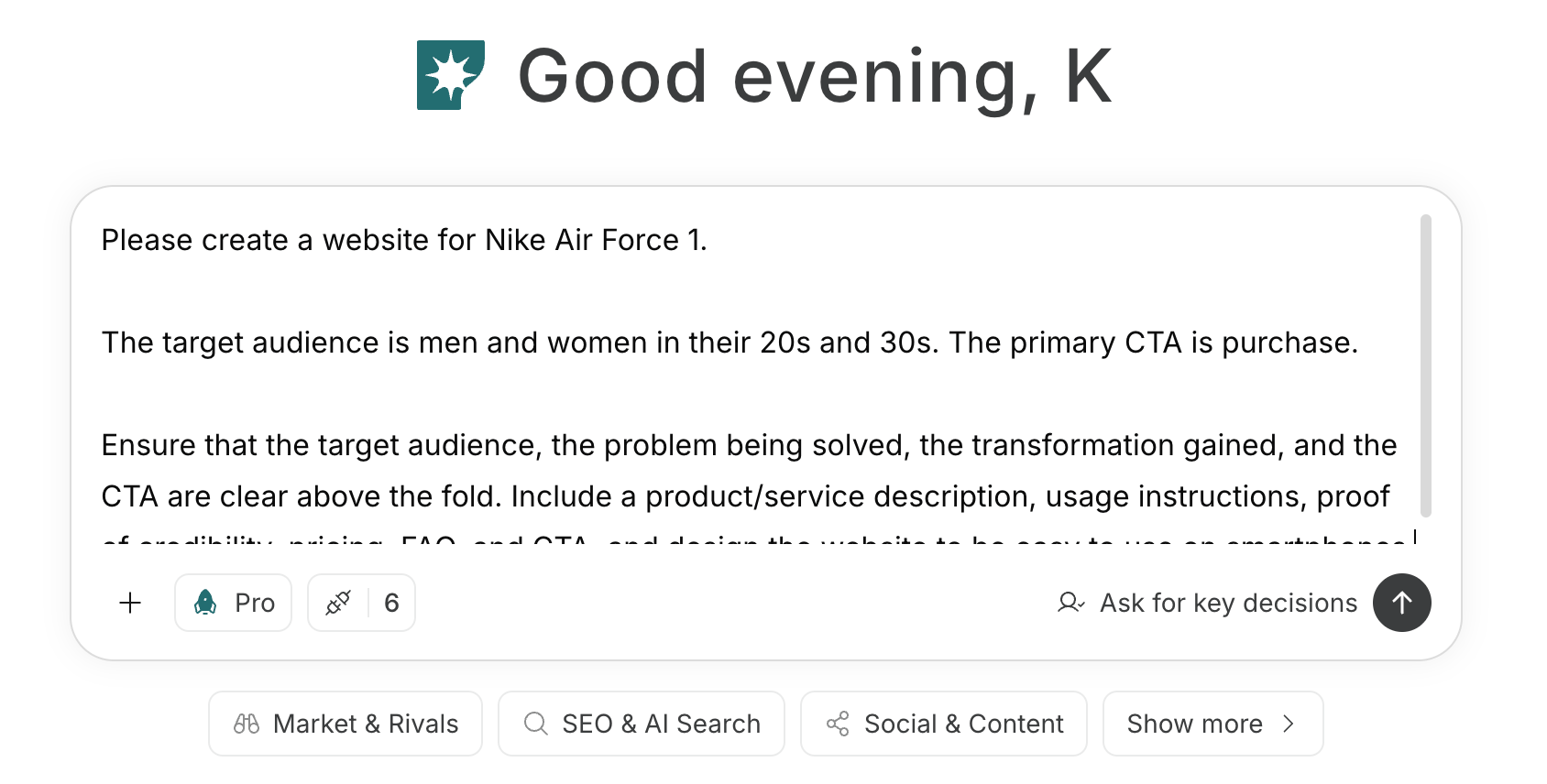
For instructions on entering a prompt in chat, see [Enter your own prompt](/help-center/chat/enter-your-own-prompt).

<img src="https://mintcdn.com/agoslabstechnologiesfzco/nVMsHgQOcR2qTlLN/public/playbooks/consumer/website-chat-prompt.png?fit=max&auto=format&n=nVMsHgQOcR2qTlLN&q=85&s=469c7742929a2ffeac20a3f77eed2862" alt="NoimosAI chat with software website creation instructions entered" style={{ width: "100%", border: "1px solid #e5e7eb", borderRadius: "8px", margin: "18px 0" }} width="1688" height="856" data-path="public/playbooks/consumer/website-chat-prompt.png" />

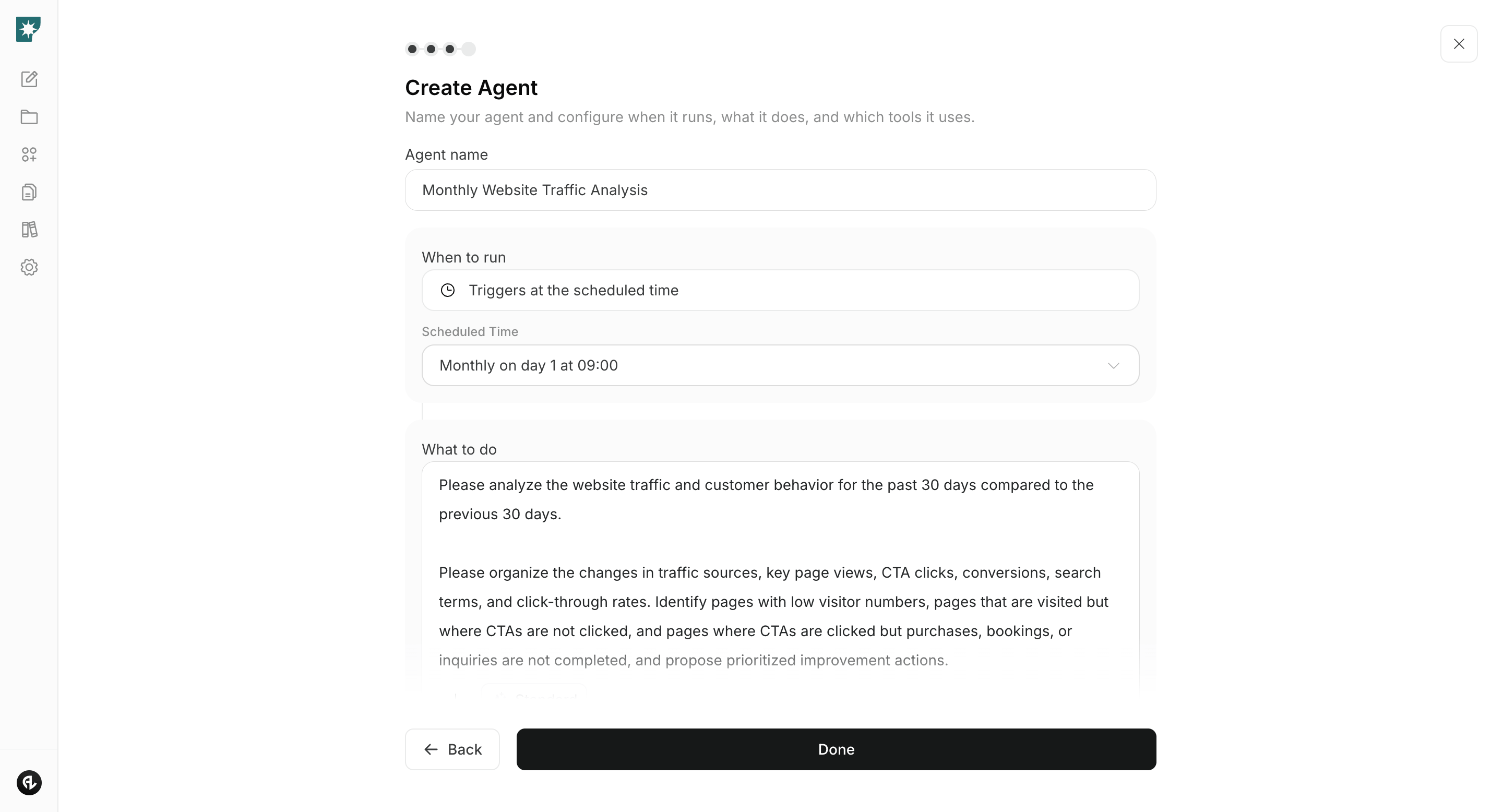
To create an agent by specifying goals and conditions in a prompt, see [Create an agent from chat](/help-center/ai-team/create-a-trigger-from-chat). To enter each field manually in the settings screen, see [Create an agent from scratch](/help-center/ai-team/create-an-agent-from-scratch).
<img src="https://mintcdn.com/agoslabstechnologiesfzco/nVMsHgQOcR2qTlLN/public/playbooks/consumer/website-create-agent.png?fit=max&auto=format&n=nVMsHgQOcR2qTlLN&q=85&s=5b5ac8da5362b21c0bb9b64b22a9d423" alt="Screen for configuring the schedule and instructions for a monthly website analytics agent" style={{ width: "100%", border: "1px solid #e5e7eb", borderRadius: "8px", margin: "18px 0" }} width="2880" height="1556" data-path="public/playbooks/consumer/website-create-agent.png" />

### 1. Create and improve a website that drives sign-ups and activation

When creating a new site, enter the target users, the jobs the product enables, the first actions that deliver value after sign-up, and the primary CTA into the chat. Have NoimosAI generate the page structure, copy, and design, then use the preview to confirm visitors can proceed smoothly from sign-up or install to activation.

#### Prompt for chat

```text theme={null}
Create a website for [Product Name].

The target users are [Target Users]. Explain how it solves [Users' jobs or problems] and what [Results achieved after use] users will obtain. The primary CTA is [e.g., Sign up free, Install, Start demo]. After sign-up, have users complete [First action to gain value].

Include a hero section, features and use cases, pricing and plans, onboarding flow, trust elements such as reviews and security, FAQ, and CTAs. Ensure the site allows sign-up from smartphones.
```

After creation, verify that the actual features, pricing, supported environments, and contract terms match. Preview on desktop and smartphone and complete the sign-up flow; if there are no issues, publish. For detailed steps, see [Create a new website](/help-center/website/create-and-edit-website).

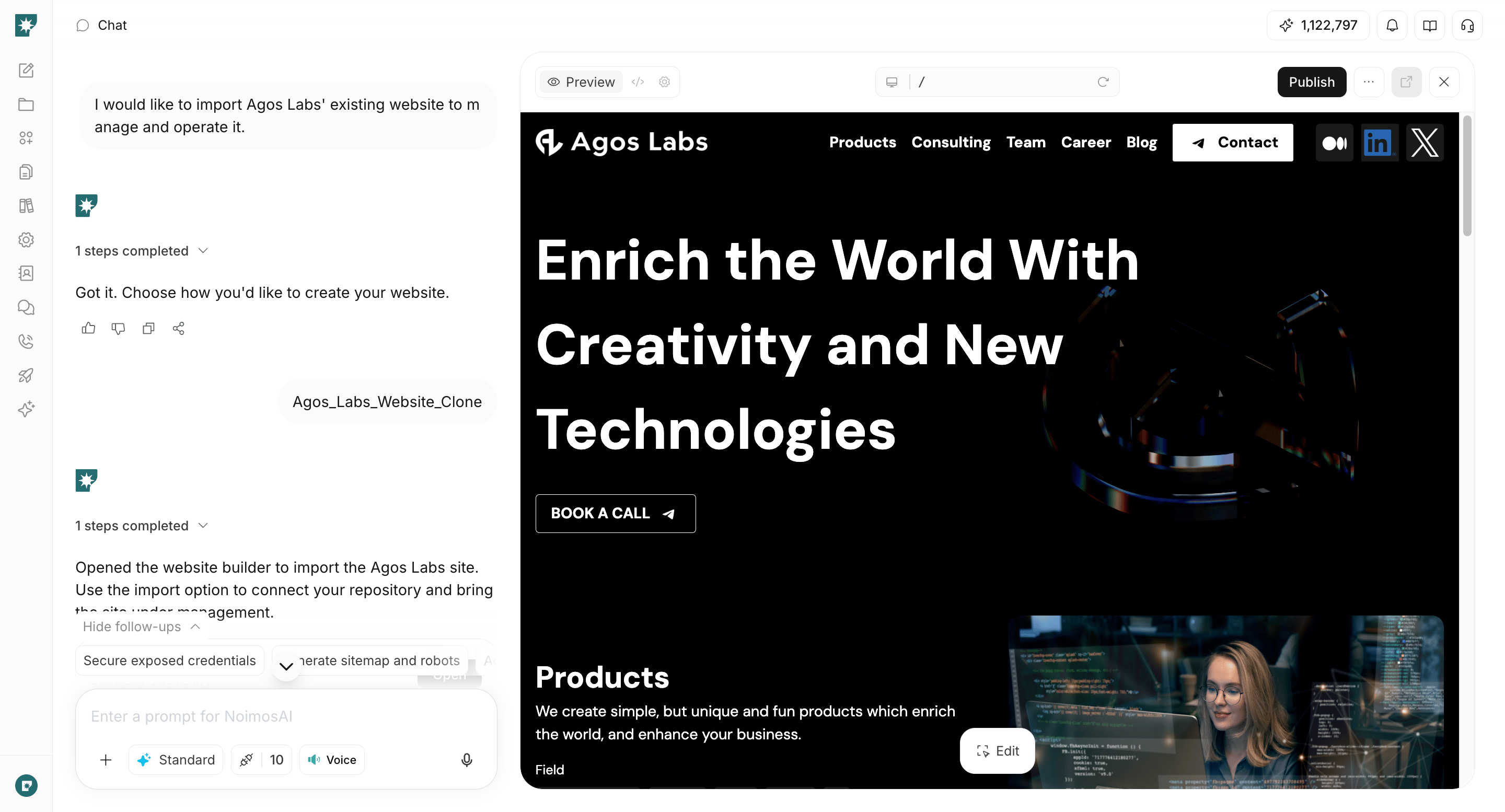
If improving an existing site, enter the published URL into the chat.

#### Prompt for chat

```text theme={null}
Analyze [website URL] and confirm the target users, tasks that can be completed, outcomes delivered, pricing, onboarding flow, and whether the primary CTAs are clear.

Identify missing information, unclear explanations, trust signals, FAQs, and navigation that block registration or installation, and create a prioritized page structure and copy to fix them.
```
<img src="https://mintcdn.com/agoslabstechnologiesfzco/WUdTSmFBnDccnDQ0/public/help-center/website/website-builder-overview.png?fit=max&auto=format&n=WUdTSmFBnDccnDQ0&q=85&s=be6b42ecd9918acf5958b9f9d8f415e1" alt="Screen for reviewing and editing a website in NoimosAI" style={{ width: "100%", border: "1px solid #e5e7eb", borderRadius: "8px", margin: "18px 0" }} width="2880" height="1554" data-path="public/help-center/website/website-builder-overview.png" />

For directly editing an existing site in NoimosAI, see [Create from an existing website](/help-center/website/import-existing-website).

### 2. Make your website easy for search engines and AI to understand

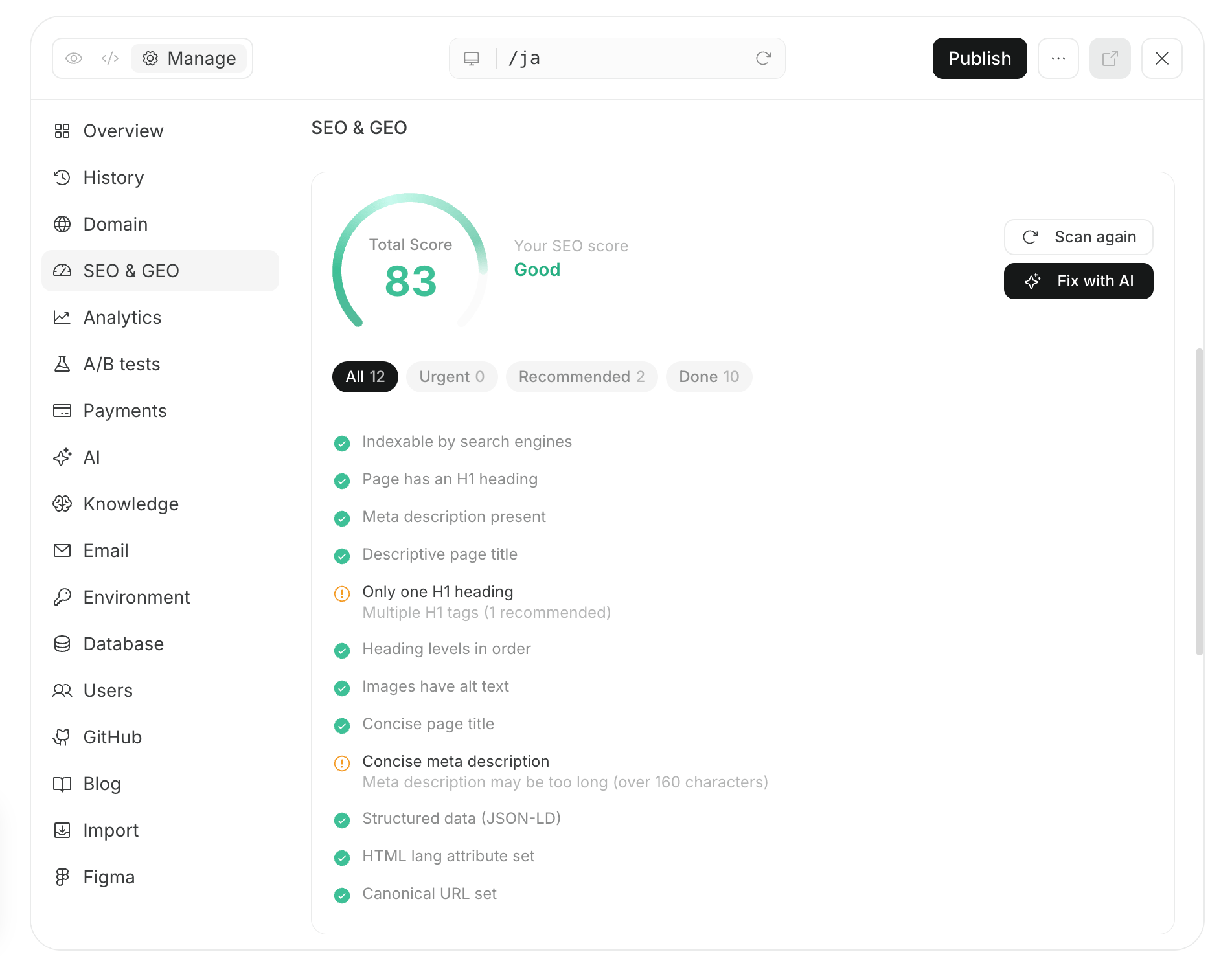
Enter the public URL into the chat to audit issues that prevent search engines and AI from fetching and understanding your site. Verify that product names, features, pricing, and supported environments are being read correctly, and fix issues that prevent discovery or indexing of important pages.

#### Prompt for chat

```text theme={null}
Audit [website URL] to determine whether search engines and AI can easily retrieve and understand product information.

Check product features, pricing, use cases, site structure and internal links to help users and help pages, sitemap.xml, robots.txt, noindex and canonical settings, titles, headings, structured data, smartphone display, and any critical speed issues. Summarize each issue’s impact, priority, and specific fixes.
```

Prioritize fixes for important pages that cannot be retrieved, incorrectly registered URLs, or product information that differs from reality. For sites managed with NoimosAI, request fixes in the same chat, review the preview, then publish.
<img src="https://mintcdn.com/agoslabstechnologiesfzco/nVMsHgQOcR2qTlLN/public/playbooks/consumer/seo-site-audit-and-fix.png?fit=max&auto=format&n=nVMsHgQOcR2qTlLN&q=85&s=1b2052465f23bcaed379e3a724bd1bb0" alt="Screen for auditing and fixing a website’s SEO and GEO status with NoimosAI" style={{ width: "100%", border: "1px solid #e5e7eb", borderRadius: "8px", margin: "18px 0" }} width="1902" height="1504" data-path="public/playbooks/consumer/seo-site-audit-and-fix.png" />

After publishing, check sitemap.xml and request indexing for new important pages via Google Search Console’s URL Inspection. Verify indexing status later.

### 3. Improve based on user behavior

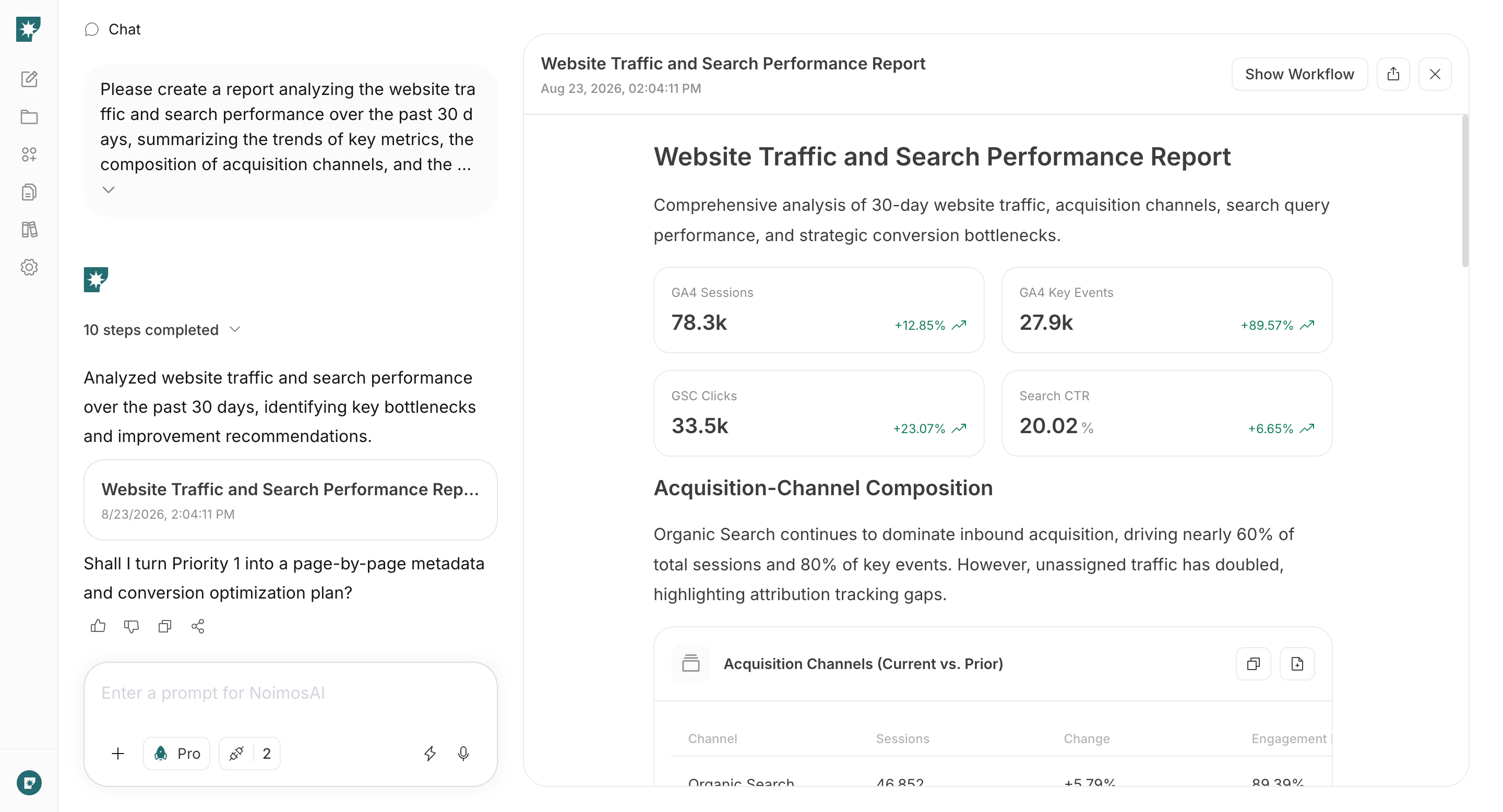
Create an agent that uses Google Analytics and Google Search Console to compare monthly performance from acquisition through sign-up and activation. It identifies pages where visits fail to convert to sign-ups and the user flows where sign-ups fail to progress to activation, and provides prioritized improvement recommendations.

#### Agent setup

**Trigger:** Schedule / Monthly

**Instructions:**

```text theme={null}
Compare website traffic, search performance, sign-ups, and user behavior leading to activation for the past 30 days with the previous 30-day period.

Organize by traffic source, top page views, CTA clicks, sign-up starts, sign-up completions, activations, search queries, and click-through rates. Based on the number of users affected and the business impact, select one page to prioritize for improvement, provide evidence for the problem, and propose fixes. For metrics that cannot be obtained, mark them as unmeasured rather than guessing.
```

**Integrations:** <span style={{ display: "inline-flex", alignItems: "center", lineHeight: "24px" }}><img src="https://mintcdn.com/agoslabstechnologiesfzco/TJAdFLdMxSC5eSdh/public/help-center/integrations/icons/google-analytics.webp?fit=max&auto=format&n=TJAdFLdMxSC5eSdh&q=85&s=5decc2b46e733583d74874463cb8ffb6" alt="" aria-hidden="true" style={{ width: "16px", height: "16px", display: "inline-block", objectFit: "contain", margin: "0 6px 0 0" }} width="80" height="80" data-path="public/help-center/integrations/icons/google-analytics.webp" />Google Analytics</span>, <span style={{ display: "inline-flex", alignItems: "center", lineHeight: "24px" }}><img src="https://mintcdn.com/agoslabstechnologiesfzco/TJAdFLdMxSC5eSdh/public/help-center/integrations/icons/google-search-console.png?fit=max&auto=format&n=TJAdFLdMxSC5eSdh&q=85&s=dea6b216368968e3a75e560af0cd6374" alt="" aria-hidden="true" style={{ width: "16px", height: "16px", display: "inline-block", objectFit: "contain", margin: "0 6px 0 0" }} width="573" height="512" data-path="public/help-center/integrations/icons/google-search-console.png" />Google Search Console</span>
<img src="https://mintcdn.com/agoslabstechnologiesfzco/nVMsHgQOcR2qTlLN/public/playbooks/consumer/seo-monthly-performance-report.png?fit=max&auto=format&n=nVMsHgQOcR2qTlLN&q=85&s=38907aa91388559fab0e75ff4dec6049" alt="Monthly NoimosAI report analyzing website traffic and search performance" style={{ width: "100%", border: "1px solid #e5e7eb", borderRadius: "8px", margin: "18px 0" }} width="2880" height="1556" data-path="public/playbooks/consumer/seo-monthly-performance-report.png" />

Edit the proposed page in chat, and record what was changed and the date of the change. The following month, compare the same traffic sources, devices, and user segments to verify whether sign-up rate and activation rate improved.

## Related pages

* [Improve conversion for sign-ups, getting started, and paid plans](/playbooks/software-apps/improve-conversion)
* [Increase search traffic with SEO](/playbooks/software-apps/seo)
* [Be found in AI search by GEO](/playbooks/software-apps/geo)
* [Create a new website](/help-center/website/create-and-edit-website)
* [Create from an existing website](/help-center/website/import-existing-website)