> ## Documentation Index
> Fetch the complete documentation index at: https://docs.noimosai.com/llms.txt
> Use this file to discover all available pages before exploring further.

# Manage Social Media

> Use NoimosAI to continuously share your software or app features, how-to information, and updates to increase awareness, sign-ups, and usage.

Use NoimosAI to plan and publish posts that communicate the value of your software or app. After publishing, measure engagement and the contribution to sign-ups and product usage, then use those insights to improve future posts.

Use this four-step workflow:

1. Choose social media platforms and define your content strategy
2. Plan posts using information about the product and users
3. Create and publish social media content
4. Improve based on performance

Start with [Understand social media fundamentals](#basics), then follow [Manage social media with NoimosAI](#practice) for the specific setup and workflow.

<a id="basics" />

## Understand social media fundamentals

Social media can introduce your product to new audiences, demonstrate features for prospective users, and deliver updates and usage tips to existing users. Choose platforms based on where your target users spend time and the formats you can produce consistently, then refine your content strategy using post performance.

### 1. Choose social media platforms and define your content strategy

Do not run every social media platform from the start. Prioritize platforms based on where your target users get information, formats that best showcase your product, and the assets you can consistently produce.

| Social media platform                                                                                                                                                                                                                                                                                                                                                                                                                                                                                                                                                                                                                                                                                                                                                                                                                                                                                                                                                                                                                                                                                                                                                                                                                                                                                                                                                                                                                                                                                                                                                                                                                                                                                                                                                                                                                                                                                                                                                                                 | Main characteristics and formats                                              | Uses for software and apps                                                                       |
| ----------------------------------------------------------------------------------------------------------------------------------------------------------------------------------------------------------------------------------------------------------------------------------------------------------------------------------------------------------------------------------------------------------------------------------------------------------------------------------------------------------------------------------------------------------------------------------------------------------------------------------------------------------------------------------------------------------------------------------------------------------------------------------------------------------------------------------------------------------------------------------------------------------------------------------------------------------------------------------------------------------------------------------------------------------------------------------------------------------------------------------------------------------------------------------------------------------------------------------------------------------------------------------------------------------------------------------------------------------------------------------------------------------------------------------------------------------------------------------------------------------------------------------------------------------------------------------------------------------------------------------------------------------------------------------------------------------------------------------------------------------------------------------------------------------------------------------------------------------------------------------------------------------------------------------------------------------------------------------------------------- | ----------------------------------------------------------------------------- | ------------------------------------------------------------------------------------------------ |
| <span style={{ display: "inline-flex", alignItems: "center", gap: "6px", whiteSpace: "nowrap" }}><img src="https://mintcdn.com/agoslabstechnologiesfzco/TJAdFLdMxSC5eSdh/public/help-center/integrations/icons/x.png?fit=max&auto=format&n=TJAdFLdMxSC5eSdh&q=85&s=8c358316d7c5a67d603637b823f1996f" alt="" aria-hidden="true" style={{ width: "16px", height: "16px", display: "inline-block", objectFit: "contain", margin: "0" }} width="80" height="80" data-path="public/help-center/integrations/icons/x.png" />X</span>                                                                                                                                                   | Real-time text, images, video, public conversations                           | Release announcements, short how-tos, outage and recovery info, conversations with users         |
| <span style={{ display: "inline-flex", alignItems: "center", gap: "6px", whiteSpace: "nowrap" }}><img src="https://mintcdn.com/agoslabstechnologiesfzco/TJAdFLdMxSC5eSdh/public/help-center/integrations/icons/facebook.png?fit=max&auto=format&n=TJAdFLdMxSC5eSdh&q=85&s=4139a36ac43b31ea2c4a00243445e52c" alt="" aria-hidden="true" style={{ width: "16px", height: "16px", display: "inline-block", objectFit: "contain", margin: "0" }} width="68" height="68" data-path="public/help-center/integrations/icons/facebook.png" />Facebook</span>                                                                                    | Page-centered images, video, links, communities                               | App use cases, events, customer stories, community announcements                                 |
| <span style={{ display: "inline-flex", alignItems: "center", gap: "6px", whiteSpace: "nowrap" }}><img src="https://mintcdn.com/agoslabstechnologiesfzco/TJAdFLdMxSC5eSdh/public/help-center/integrations/icons/instagram.png?fit=max&auto=format&n=TJAdFLdMxSC5eSdh&q=85&s=374d4ee4d3dd4d95ad552c4bda45eb2c" alt="" aria-hidden="true" style={{ width: "16px", height: "16px", display: "inline-block", objectFit: "contain", margin: "0" }} width="73" height="72" data-path="public/help-center/integrations/icons/instagram.png" />Instagram</span>                                                                           | Images, multi-photo posts, Reels, Stories                                     | Short demos using the screen, before-and-after results, templates, behind-the-scenes development |
| <span style={{ display: "inline-flex", alignItems: "center", gap: "6px", whiteSpace: "nowrap" }}><img src="https://mintcdn.com/agoslabstechnologiesfzco/TJAdFLdMxSC5eSdh/public/help-center/integrations/icons/threads.png?fit=max&auto=format&n=TJAdFLdMxSC5eSdh&q=85&s=b511507a488416e7419ed3d433b6d150" alt="" aria-hidden="true" style={{ width: "16px", height: "16px", display: "inline-block", objectFit: "contain", margin: "0" }} width="73" height="72" data-path="public/help-center/integrations/icons/threads.png" />Threads</span>                                                                                             | Topic- and text-focused conversations                                         | Product thinking, short usage tips, context behind updates, conversations with users             |
| <span style={{ display: "inline-flex", alignItems: "center", gap: "6px", whiteSpace: "nowrap" }}><img src="https://mintcdn.com/agoslabstechnologiesfzco/TJAdFLdMxSC5eSdh/public/help-center/integrations/icons/tiktok.png?fit=max&auto=format&n=TJAdFLdMxSC5eSdh&q=85&s=7dcf0cd22a760b2cfac4b01c5aa37479" alt="" aria-hidden="true" style={{ width: "16px", height: "16px", display: "inline-block", objectFit: "contain", margin: "0" }} width="500" height="500" data-path="public/help-center/integrations/icons/tiktok.png" />TikTok</span>                                                                                                  | Vertical short-form video discovered via recommendations                      | Short demos showcasing a single feature, usage tips, changes in workflow                         |
| <span style={{ display: "inline-flex", alignItems: "center", gap: "6px", whiteSpace: "nowrap" }}><img src="https://mintcdn.com/agoslabstechnologiesfzco/TJAdFLdMxSC5eSdh/public/help-center/integrations/icons/youtube.png?fit=max&auto=format&n=TJAdFLdMxSC5eSdh&q=85&s=1826c7e658de5d708405a6c035634a0b" alt="" aria-hidden="true" style={{ width: "16px", height: "16px", display: "inline-block", objectFit: "contain", margin: "0" }} width="144" height="144" data-path="public/help-center/integrations/icons/youtube.png" />YouTube</span>                                                                                         | Longer videos and Shorts that are discoverable via search and recommendations | Tutorials, product demos, comparisons, webinars, troubleshooting                                 |
| <span style={{ display: "inline-flex", alignItems: "center", gap: "6px", whiteSpace: "nowrap" }}><img src="https://mintcdn.com/agoslabstechnologiesfzco/TJAdFLdMxSC5eSdh/public/help-center/integrations/icons/pinterest.svg?fit=max&auto=format&n=TJAdFLdMxSC5eSdh&q=85&s=af0839218ef3de2da0985351f2b07310" alt="" aria-hidden="true" style={{ width: "16px", height: "16px", display: "inline-block", objectFit: "contain", margin: "0" }} width="24" height="24" data-path="public/help-center/integrations/icons/pinterest.svg" />Pinterest</span>                                                                           | Pins for searching and saving images and videos                               | Templates, step-by-step workflows, design examples, usage ideas                                  |
| <span style={{ display: "inline-flex", alignItems: "center", gap: "6px", whiteSpace: "nowrap" }}><img src="https://mintcdn.com/agoslabstechnologiesfzco/TJAdFLdMxSC5eSdh/public/help-center/integrations/icons/linkedin-personal.png?fit=max&auto=format&n=TJAdFLdMxSC5eSdh&q=85&s=8d4b91eb130864a5f6aa0a2d6afa6523" alt="" aria-hidden="true" style={{ width: "16px", height: "16px", display: "inline-block", objectFit: "contain", margin: "0" }} width="83" height="72" data-path="public/help-center/integrations/icons/linkedin-personal.png" />LinkedIn (personal)</span> | Text, images, video, and documents about work and expertise                   | Insights from developers and founders, workplace use cases, background on product updates        |
| <span style={{ display: "inline-flex", alignItems: "center", gap: "6px", whiteSpace: "nowrap" }}><img src="https://mintcdn.com/agoslabstechnologiesfzco/TJAdFLdMxSC5eSdh/public/help-center/integrations/icons/mastodon.svg?fit=max&auto=format&n=TJAdFLdMxSC5eSdh&q=85&s=19b2cfe5742f8498ebd638b32ce85b0a" alt="" aria-hidden="true" style={{ width: "16px", height: "16px", display: "inline-block", objectFit: "contain", margin: "0" }} width="74" height="79" data-path="public/help-center/integrations/icons/mastodon.svg" />Mastodon</span>                                                                                    | Community-specific text, images, and video for like-minded groups             | Technical updates, open source, conversations with niche communities                             |
| <span style={{ display: "inline-flex", alignItems: "center", gap: "6px", whiteSpace: "nowrap" }}><img src="https://mintcdn.com/agoslabstechnologiesfzco/TJAdFLdMxSC5eSdh/public/help-center/integrations/icons/bluesky.svg?fit=max&auto=format&n=TJAdFLdMxSC5eSdh&q=85&s=b4ef349448970a4d7fdc8851c9f7ba2c" alt="" aria-hidden="true" style={{ width: "16px", height: "16px", display: "inline-block", objectFit: "contain", margin: "0" }} width="568" height="501" data-path="public/help-center/integrations/icons/bluesky.svg" />Bluesky</span>                                                                                         | Real-time, text-focused public conversations                                  | Release information, short usage tips, views on development and the industry                     |

Once you have chosen the priority platforms, define the audience, the message, and the intended next action. Give each post one primary objective: awareness, sign-up, activation, or continued use.

### 2. Plan posts from product and user information

Plan posts not only from external topics but also starting from information you can get from your own product and users.

The main materials for planning are as follows.

* New features, improvements, integrations, pricing or plan changes
* The steps, templates, or shortcuts to complete a particular task
* Frequently asked questions before signing up, stumbling blocks during use, inquiries to support
* User case studies, reviews, results achieved using the product
* Published content such as articles, help docs, videos, events
* Past company posts that performed well
* Themes, formats, and opening hooks of competitor posts or videos used for reference

Do not imitate reference posts exactly; break down why they attracted engagement. Add your own screens, data, use cases, and perspectives to turn them into new ideas that help your target users.

If your brand or product receives enough mentions, use <Tooltip tip="Collect continuous mentions of brands and products on social media and the web and analyze their content and trends.">**social listening**</Tooltip> to identify requests, complaints, and misunderstandings that should inform future posts, help content, or product improvements.

### 3. Create and publish social media content

Once the plan is decided, create copy, images, and videos suited to the social media platform. When posting the same content to multiple social media platforms, adjust length, opening lines, aspect ratio, title, and destination link as needed.

For product posts, confirm the following points:

* It’s clear which users and which jobs it helps
* It shows not just the feature name but the operation and the result obtained
* It matches the current UI, features, pricing, and supported environments
* There is an appropriate destination link for the post’s purpose, such as sign-up, feature page, help, or app store
* You have the rights to use users’ posts, images, and reviews

### 4. Improve based on performance

After publishing, check whether people saw the post, showed interest, or progressed toward using the product.

| Outcome to check                   | Key metrics                                                         | What to review next                                                                                                                                                        |
| ---------------------------------- | ------------------------------------------------------------------- | -------------------------------------------------------------------------------------------------------------------------------------------------------------------------- |
| Was it seen?                       | Reach, impressions, video views                                     | If distribution is weak across several posts, check audience fit, topic relevance, the opening, publishing time, and whether the format works on that platform.            |
| Did it generate interest?          | Likes, comments, saves, shares, engagement rate, audience retention | Compare high- and low-performing posts on the same platform. Review the clarity of the use case, demo, outcome, copy, structure, and visual format.                        |
| Did it lead people to the product? | Profile views, link clicks, website visits, sign-ups                | If engagement is strong but progression is weak, make the CTA relevant to the demonstrated use case and ensure the profile and destination continue the same promise.      |
| Did it lead to meaningful use?     | Activation after sign-up, feature usage, ongoing use                | If sign-ups rise without activation, check whether the post attracted the intended users and whether the first in-product experience delivers the value shown in the post. |

Because metric definitions vary by social media platform, do not compare raw numbers across different platforms. First identify the top-performing posts within each platform, then apply themes, formats, openings, and CTAs common to multiple high-performing posts to your next planning cycle.

### Social media apps you can connect

NoimosAI connects to the social media platforms you use to create, publish, and analyze posts. Click each app name to view connection requirements and usage instructions.

<div style={{ display: "flex", flexDirection: "column", gap: "12px", margin: "18px 0" }}>
  <div style={{ display: "flex", alignItems: "flex-start", gap: "10px" }}><img src="https://mintcdn.com/agoslabstechnologiesfzco/TJAdFLdMxSC5eSdh/public/help-center/integrations/icons/x.png?fit=max&auto=format&n=TJAdFLdMxSC5eSdh&q=85&s=8c358316d7c5a67d603637b823f1996f" alt="" aria-hidden="true" style={{ width: "16px", height: "16px", objectFit: "contain", flex: "0 0 16px", margin: "4px 0 0" }} width="80" height="80" data-path="public/help-center/integrations/icons/x.png" /><div><strong><a href="/help-center/integrations/social-media/x">X</a></strong>: Use posts, published conversations, reactions, and account performance for planning, publishing, and analysis.</div></div>
  <div style={{ display: "flex", alignItems: "flex-start", gap: "10px" }}><img src="https://mintcdn.com/agoslabstechnologiesfzco/TJAdFLdMxSC5eSdh/public/help-center/integrations/icons/facebook.png?fit=max&auto=format&n=TJAdFLdMxSC5eSdh&q=85&s=4139a36ac43b31ea2c4a00243445e52c" alt="" aria-hidden="true" style={{ width: "16px", height: "16px", objectFit: "contain", flex: "0 0 16px", margin: "4px 0 0" }} width="68" height="68" data-path="public/help-center/integrations/icons/facebook.png" /><div><strong><a href="/help-center/integrations/social-media/facebook">Facebook</a></strong>: Use Facebook Page posts, comments, and Page performance for publishing and analysis.</div></div>
  <div style={{ display: "flex", alignItems: "flex-start", gap: "10px" }}><img src="https://mintcdn.com/agoslabstechnologiesfzco/TJAdFLdMxSC5eSdh/public/help-center/integrations/icons/instagram.png?fit=max&auto=format&n=TJAdFLdMxSC5eSdh&q=85&s=374d4ee4d3dd4d95ad552c4bda45eb2c" alt="" aria-hidden="true" style={{ width: "16px", height: "16px", objectFit: "contain", flex: "0 0 16px", margin: "4px 0 0" }} width="73" height="72" data-path="public/help-center/integrations/icons/instagram.png" /><div><strong><a href="/help-center/integrations/social-media/instagram">Instagram</a></strong>: Use posts, images, videos, comments, and account performance for creating, publishing, and analysis.</div></div>
  <div style={{ display: "flex", alignItems: "flex-start", gap: "10px" }}><img src="https://mintcdn.com/agoslabstechnologiesfzco/TJAdFLdMxSC5eSdh/public/help-center/integrations/icons/threads.png?fit=max&auto=format&n=TJAdFLdMxSC5eSdh&q=85&s=b511507a488416e7419ed3d433b6d150" alt="" aria-hidden="true" style={{ width: "16px", height: "16px", objectFit: "contain", flex: "0 0 16px", margin: "4px 0 0" }} width="73" height="72" data-path="public/help-center/integrations/icons/threads.png" /><div><strong><a href="/help-center/integrations/social-media/threads">Threads</a></strong>: Use posts, published conversations, and reactions for planning, publishing, and analysis.</div></div>
  <div style={{ display: "flex", alignItems: "flex-start", gap: "10px" }}><img src="https://mintcdn.com/agoslabstechnologiesfzco/TJAdFLdMxSC5eSdh/public/help-center/integrations/icons/tiktok.png?fit=max&auto=format&n=TJAdFLdMxSC5eSdh&q=85&s=7dcf0cd22a760b2cfac4b01c5aa37479" alt="" aria-hidden="true" style={{ width: "16px", height: "16px", objectFit: "contain", flex: "0 0 16px", margin: "4px 0 0" }} width="500" height="500" data-path="public/help-center/integrations/icons/tiktok.png" /><div><strong><a href="/help-center/integrations/social-media/tiktok">TikTok</a></strong>: Use videos, comments, and account performance for creating, publishing, and analysis.</div></div>
  <div style={{ display: "flex", alignItems: "flex-start", gap: "10px" }}><img src="https://mintcdn.com/agoslabstechnologiesfzco/TJAdFLdMxSC5eSdh/public/help-center/integrations/icons/youtube.png?fit=max&auto=format&n=TJAdFLdMxSC5eSdh&q=85&s=1826c7e658de5d708405a6c035634a0b" alt="" aria-hidden="true" style={{ width: "16px", height: "16px", objectFit: "contain", flex: "0 0 16px", margin: "4px 0 0" }} width="144" height="144" data-path="public/help-center/integrations/icons/youtube.png" /><div><strong><a href="/help-center/integrations/social-media/youtube">YouTube</a></strong>: Use videos, Shorts, comments, and channel performance for planning, preparing to publish, and analysis.</div></div>
  <div style={{ display: "flex", alignItems: "flex-start", gap: "10px" }}><img src="https://mintcdn.com/agoslabstechnologiesfzco/TJAdFLdMxSC5eSdh/public/help-center/integrations/icons/pinterest.svg?fit=max&auto=format&n=TJAdFLdMxSC5eSdh&q=85&s=af0839218ef3de2da0985351f2b07310" alt="" aria-hidden="true" style={{ width: "16px", height: "16px", objectFit: "contain", flex: "0 0 16px", margin: "4px 0 0" }} width="24" height="24" data-path="public/help-center/integrations/icons/pinterest.svg" /><div><strong><a href="/help-center/integrations/social-media/pinterest">Pinterest</a></strong>: Use Pins, saves, and clicks performance for creating, publishing, and analysis.</div></div>
  <div style={{ display: "flex", alignItems: "flex-start", gap: "10px" }}><img src="https://mintcdn.com/agoslabstechnologiesfzco/TJAdFLdMxSC5eSdh/public/help-center/integrations/icons/linkedin-personal.png?fit=max&auto=format&n=TJAdFLdMxSC5eSdh&q=85&s=8d4b91eb130864a5f6aa0a2d6afa6523" alt="" aria-hidden="true" style={{ width: "16px", height: "16px", objectFit: "contain", flex: "0 0 16px", margin: "4px 0 0" }} width="83" height="72" data-path="public/help-center/integrations/icons/linkedin-personal.png" /><div><strong><a href="/help-center/integrations/social-media/linkedin-personal">LinkedIn (Personal)</a></strong>: Use personal profile posts and performance for publishing and analysis.</div></div>
  <div style={{ display: "flex", alignItems: "flex-start", gap: "10px" }}><img src="https://mintcdn.com/agoslabstechnologiesfzco/TJAdFLdMxSC5eSdh/public/help-center/integrations/icons/mastodon.svg?fit=max&auto=format&n=TJAdFLdMxSC5eSdh&q=85&s=19b2cfe5742f8498ebd638b32ce85b0a" alt="" aria-hidden="true" style={{ width: "16px", height: "16px", objectFit: "contain", flex: "0 0 16px", margin: "4px 0 0" }} width="74" height="79" data-path="public/help-center/integrations/icons/mastodon.svg" /><div><strong><a href="/help-center/integrations/social-media/mastodon">Mastodon</a></strong>: Use posts and reactions for community-focused publishing and analysis.</div></div>
  <div style={{ display: "flex", alignItems: "flex-start", gap: "10px" }}><img src="https://mintcdn.com/agoslabstechnologiesfzco/TJAdFLdMxSC5eSdh/public/help-center/integrations/icons/bluesky.svg?fit=max&auto=format&n=TJAdFLdMxSC5eSdh&q=85&s=b4ef349448970a4d7fdc8851c9f7ba2c" alt="" aria-hidden="true" style={{ width: "16px", height: "16px", objectFit: "contain", flex: "0 0 16px", margin: "4px 0 0" }} width="568" height="501" data-path="public/help-center/integrations/icons/bluesky.svg" /><div><strong><a href="/help-center/integrations/social-media/bluesky">Bluesky</a></strong>: Use posts, published conversations, and reactions for planning, publishing, and analysis.</div></div>
  <div style={{ display: "flex", alignItems: "flex-start", gap: "10px" }}><img src="https://mintcdn.com/agoslabstechnologiesfzco/TJAdFLdMxSC5eSdh/public/help-center/integrations/icons/google-analytics.webp?fit=max&auto=format&n=TJAdFLdMxSC5eSdh&q=85&s=5decc2b46e733583d74874463cb8ffb6" alt="" aria-hidden="true" style={{ width: "16px", height: "16px", objectFit: "contain", flex: "0 0 16px", margin: "4px 0 0" }} width="80" height="80" data-path="public/help-center/integrations/icons/google-analytics.webp" /><div><strong><a href="/help-center/integrations/analytics-and-data/google-analytics">Google Analytics</a></strong>: Check how users who come from social media platforms proceed through sign-up, product activation, and conversion to paid plans.</div></div>
</div>

<Note>Facebook uses Facebook Pages. For Instagram, prepare an Instagram Business account connected to a Facebook Page and the required permissions. Check each app's Help Center for detailed requirements.</Note>

<a id="practice" />

## Manage social media with NoimosAI

Choose your social media channels and content strategy, plan posts using product and user insights, publish the content, and use performance data to improve future posts.

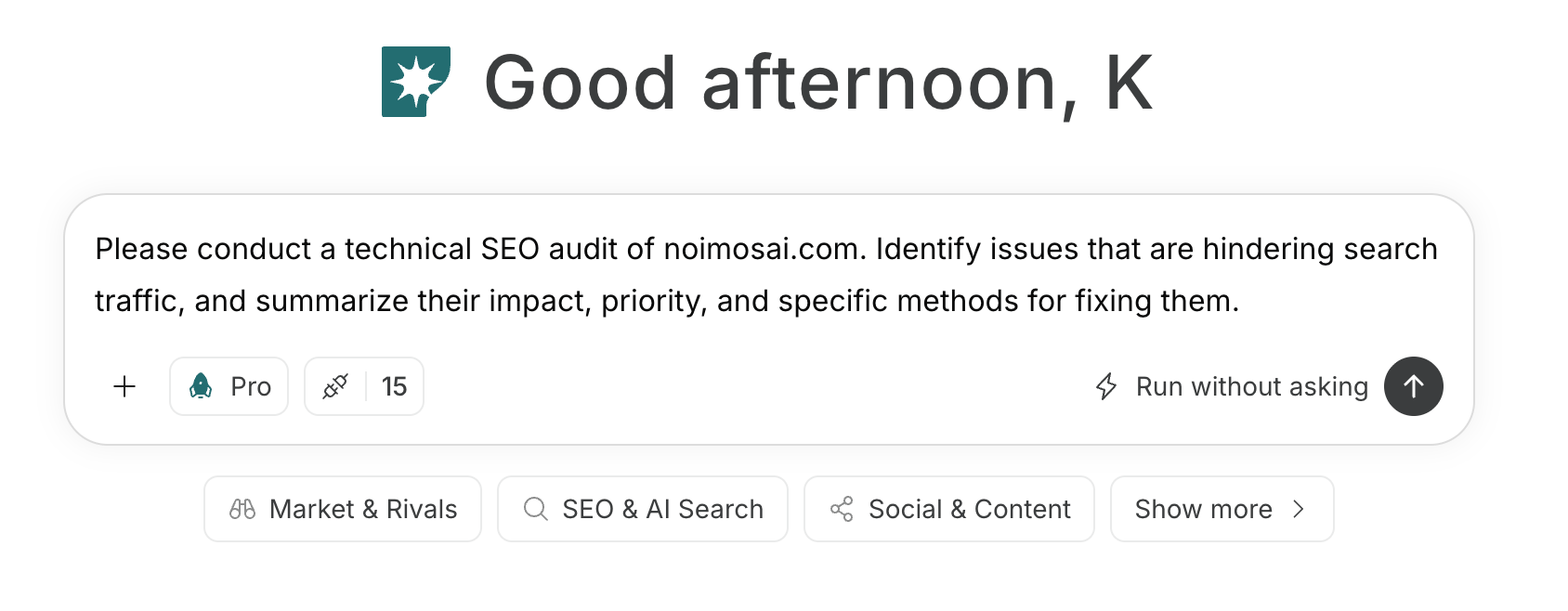
For instructions on entering a prompt in chat, see [Enter your own prompt](/help-center/chat/enter-your-own-prompt).

<img src="https://mintcdn.com/agoslabstechnologiesfzco/nVMsHgQOcR2qTlLN/public/playbooks/consumer/seo-chat-prompt.png?fit=max&auto=format&n=nVMsHgQOcR2qTlLN&q=85&s=aa5d18df848b82cebfc32f1e0a45a681" alt="NoimosAI chat with social media management instructions entered" style={{ width: "100%", border: "1px solid #e5e7eb", borderRadius: "8px", margin: "18px 0" }} width="1688" height="658" data-path="public/playbooks/consumer/seo-chat-prompt.png" />

If you want to create an agent by communicating goals and conditions in a prompt, see [Create an agent from chat](/help-center/ai-team/create-a-trigger-from-chat). If you prefer to enter each field manually in the settings screen, you can review [Create an agent from scratch](/help-center/ai-team/create-an-agent-from-scratch).
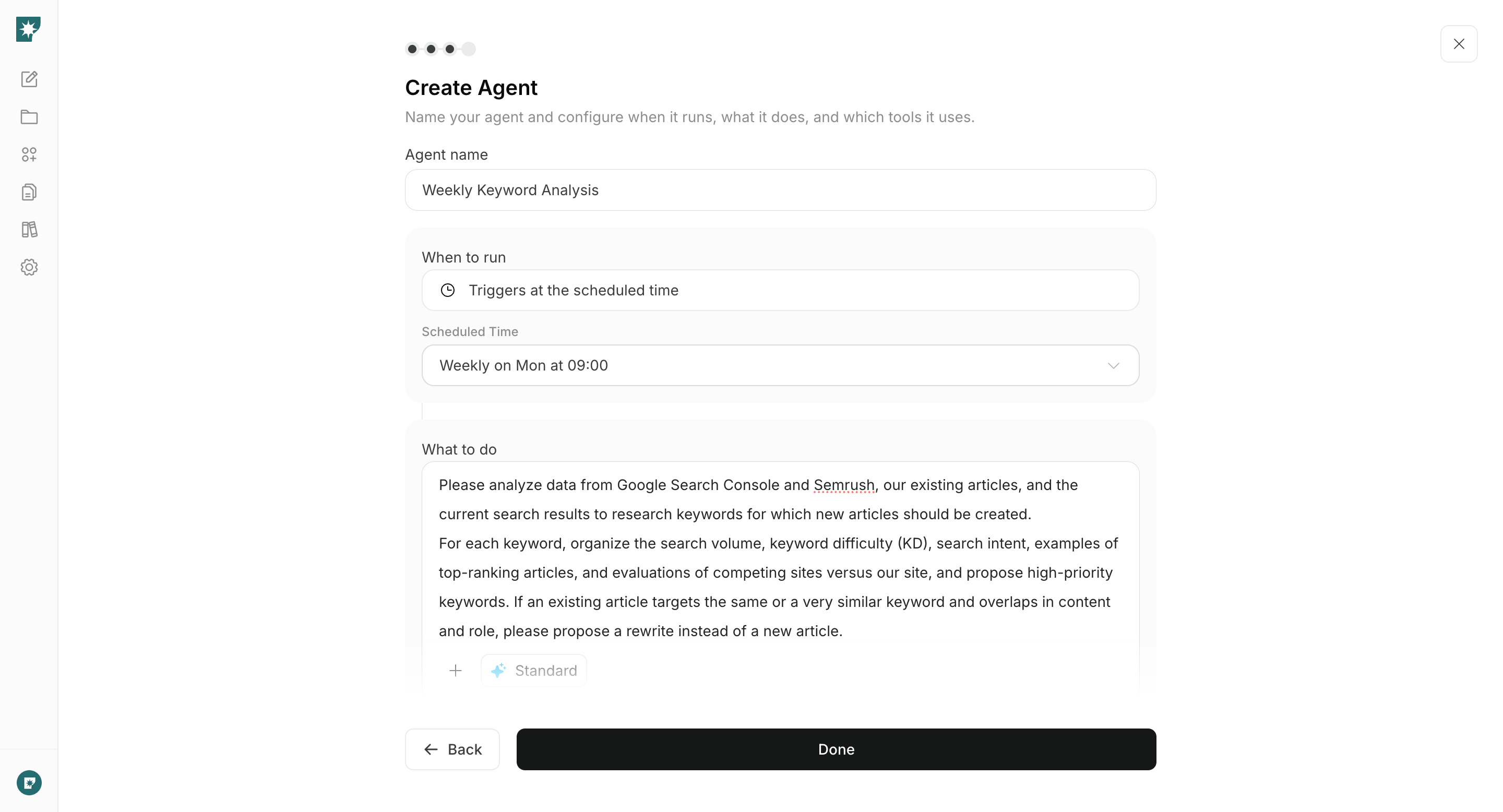
<img src="https://mintcdn.com/agoslabstechnologiesfzco/nVMsHgQOcR2qTlLN/public/playbooks/consumer/seo-create-keyword-agent.png?fit=max&auto=format&n=nVMsHgQOcR2qTlLN&q=85&s=cd302b05ae7bfeaddd3bdf6c45978f1a" alt="Screen for configuring schedule and instructions for a social media management agent" style={{ width: "100%", border: "1px solid #e5e7eb", borderRadius: "8px", margin: "18px 0" }} width="2880" height="1556" data-path="public/playbooks/consumer/seo-create-keyword-agent.png" />

### 1. Choose social media platforms and define your content strategy

Enter the target users, product, business goals, and available assets in chat. Ask NoimosAI to recommend priority social media platforms and messaging themes based on each platform’s formats and discovery patterns. Define the action each type of post should encourage, such as signing up, installing, or completing the first workflow.

#### Prompt for chat

```text theme={null}
Create a social media strategy for [Product Name].

The target users are [Target Users], and the goal is [awareness / sign-ups / getting started / continued use]. Available content you can publish includes [product screens / videos / articles / templates / user case studies, etc.].

Compare how content is discovered on each social media platform, the formats that perform well, fit with the target users, and our ability to publish consistently. Recommend which platforms to prioritize. For each platform, specify the recurring themes, post formats, intended next action, and metrics to monitor.
```

From the recommendations, prioritize platforms that the target users actually use and for which you can produce content on a weekly basis. Start operating on connected platforms and revise the strategy based on real responses.

### 2. Plan posts using product and user information

Enter a new feature, how-to topic, user question, existing content item, or reference post in chat. Define the target users, value to communicate, facts and assets available, and suitable platforms and formats. Choose only concepts supported by product information or evidence you can publish.

#### Prompt for chat

```text theme={null}
Based on [new features / how-to / user questions / URL of existing content / URL of reference post], create 3 post campaign ideas for [social media platform].

For each idea, organize why it is useful for [target users] and specify the objective, key message, opening hook, post format, required screens/images/videos, and CTA. If using reference posts, analyze the elements that drove engagement and create original concepts that use our product screens, data, and use cases.
```

Do not copy the wording of reference posts; choose ideas that showcase screens, actions, outcomes, and insights only our company can provide.

If there is sufficient mention of the brand or product, you can add an agent to check requests, complaints, and misunderstandings daily.

#### Social listening setup

**Trigger:** Schedule / Daily

**Instructions:**

```text theme={null}
Collect mentions of [brand name · product name] on YouTube, X, and the web from the past 24 hours. Categorize them into requests, complaints, questions, misunderstandings, and positive usage examples, and provide the source URL for each. Select one item with high impact and propose an appropriate action from reply, explanatory post, help update, or product improvement.
```

**Integrations:** <span style={{ display: "inline-flex", alignItems: "center", lineHeight: "24px" }}><img src="https://mintcdn.com/agoslabstechnologiesfzco/TJAdFLdMxSC5eSdh/public/help-center/integrations/icons/x.png?fit=max&auto=format&n=TJAdFLdMxSC5eSdh&q=85&s=8c358316d7c5a67d603637b823f1996f" alt="" aria-hidden="true" style={{ width: "16px", height: "16px", display: "inline-block", objectFit: "contain", margin: "0 6px 0 0" }} width="80" height="80" data-path="public/help-center/integrations/icons/x.png" />X</span>, <span style={{ display: "inline-flex", alignItems: "center", lineHeight: "24px" }}><img src="https://mintcdn.com/agoslabstechnologiesfzco/TJAdFLdMxSC5eSdh/public/help-center/integrations/icons/youtube.png?fit=max&auto=format&n=TJAdFLdMxSC5eSdh&q=85&s=1826c7e658de5d708405a6c035634a0b" alt="" aria-hidden="true" style={{ width: "16px", height: "16px", display: "inline-block", objectFit: "contain", margin: "0 6px 0 0" }} width="144" height="144" data-path="public/help-center/integrations/icons/youtube.png" />YouTube</span>

### 3. Create and publish social media content

Enter the chosen concept into the chat to generate the post text and the required images/videos. Format the content to match the target social media platform and produce a finished piece that includes the next-step destinations to be guided to, such as the product page, app store, registration, and usage instructions.

#### Prompt for chat

```text theme={null}
Based on [chosen campaign idea], create content to publish on [social media platform].

The target users are [target users], and the goal is [awareness / sign-ups / onboarding / continued use]. State the results that can be expected up front, and explain [product features / operations / use cases] concretely. Create the post copy, the structure of required images or videos, the CTA, and the destination link, and make sure they match the current features and wording on [product official URL].
```
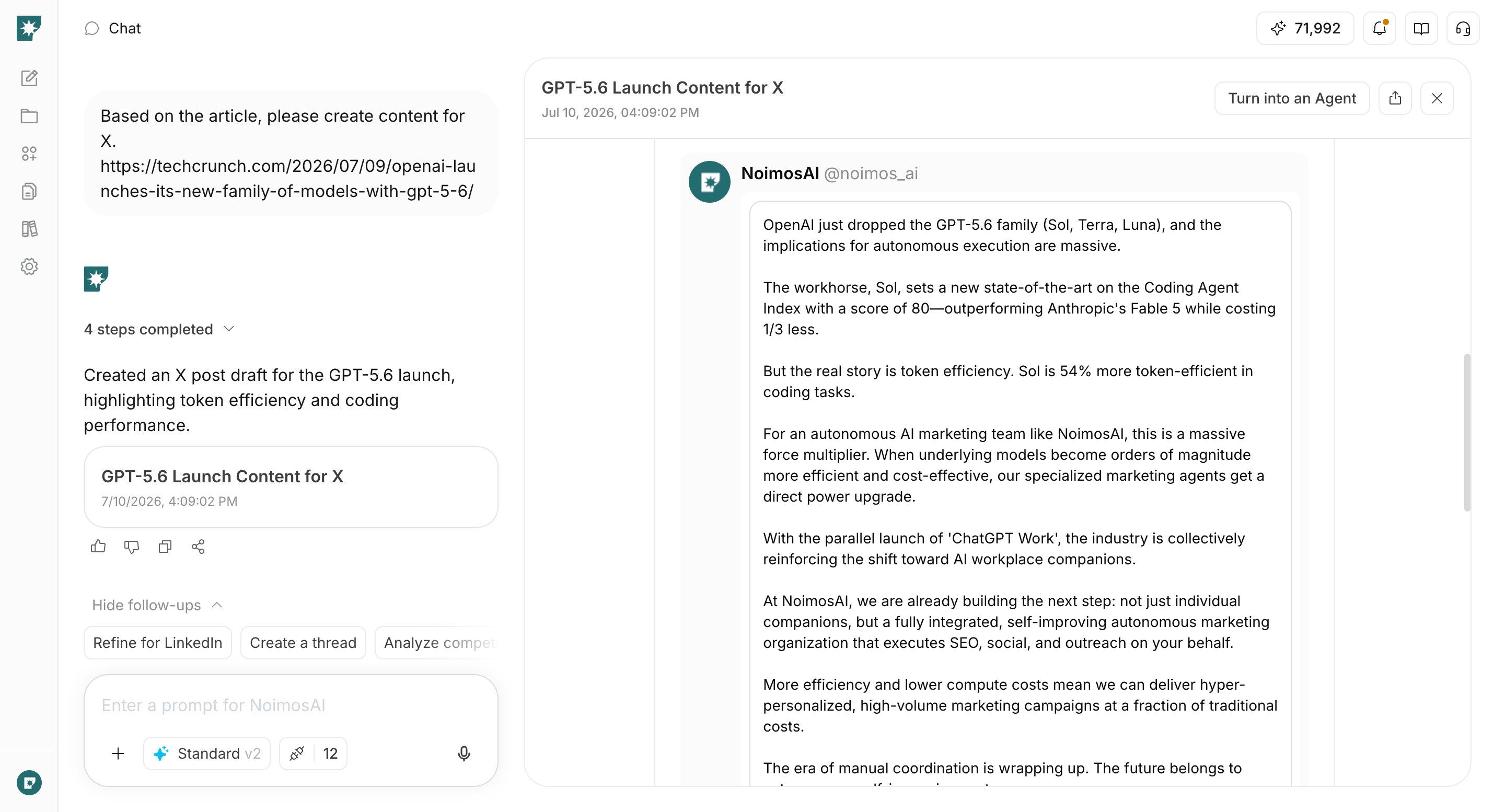
<img src="https://mintcdn.com/agoslabstechnologiesfzco/WUdTSmFBnDccnDQ0/public/help-center/use-cases/channels/social-media-content-creation.png?fit=max&auto=format&n=WUdTSmFBnDccnDQ0&q=85&s=f90a66a7a093a91aa6abd9eb89ad95c5" alt="NoimosAI creating a social media post based on a web page" style={{ width: "100%", border: "1px solid #e5e7eb", borderRadius: "8px", margin: "18px 0" }} width="2880" height="1554" data-path="public/help-center/use-cases/channels/social-media-content-creation.png" />

Confirm features, pricing, screens, links, and rights to materials. If there are no issues, publish or schedule on the connected social media platform.
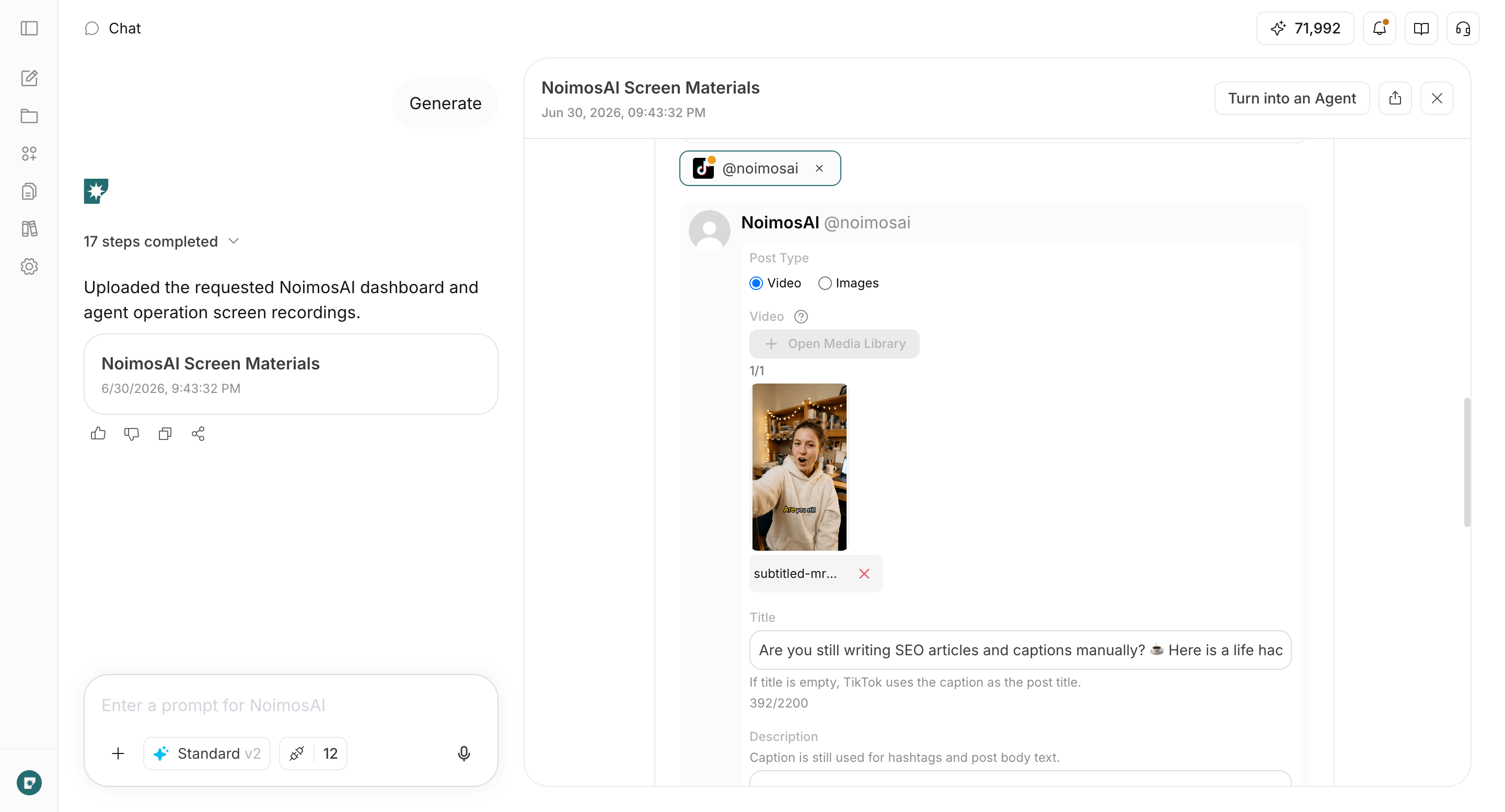
<img src="https://mintcdn.com/agoslabstechnologiesfzco/WUdTSmFBnDccnDQ0/public/help-center/use-cases/channels/social-media-media-creation.png?fit=max&auto=format&n=WUdTSmFBnDccnDQ0&q=85&s=e33143ef207eea15ae8bc1cc5475e4c9" alt="NoimosAI creating a video for a social media post" style={{ width: "100%", border: "1px solid #e5e7eb", borderRadius: "8px", margin: "18px 0" }} width="2880" height="1554" data-path="public/help-center/use-cases/channels/social-media-media-creation.png" />

### 4. Improve based on performance

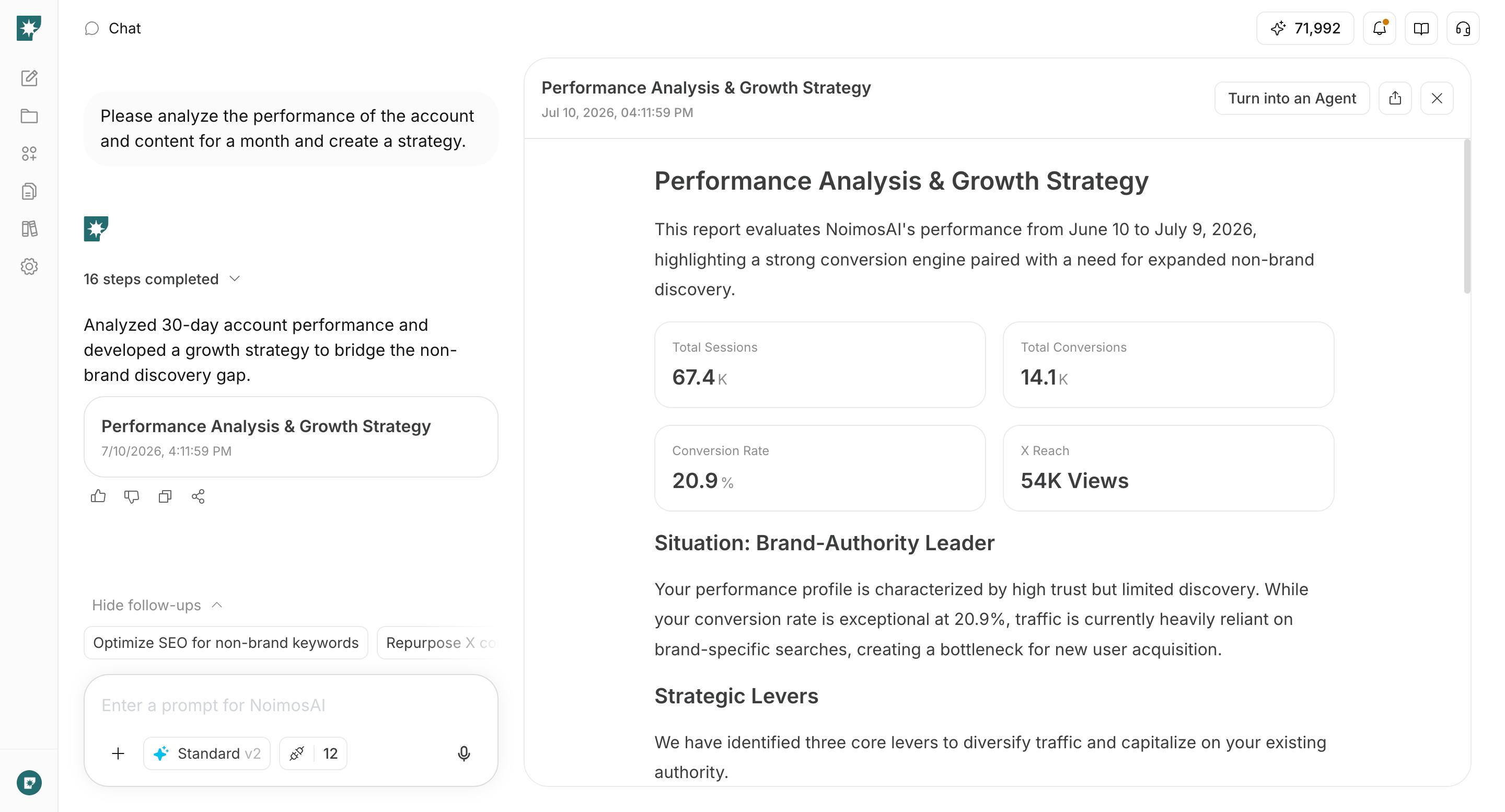
Identify high-performing posts within each social media platform and configure agents to create the next campaigns. Compare theme, format, opening, product presentation, and calls to action to decide which campaigns to continue, improve, or stop.

#### Agent setup

**Trigger:** Schedule / Weekly

**Instructions:**

```text theme={null}
For each connected social media platform, analyze the post performance over the past week.

Within each platform, identify the high- and low-performing posts for reach or impressions, engagements, video views, and link clicks. Do not compare raw numbers across different platforms; instead, organize the themes, formats, openings, product presentation, and CTAs that are common to multiple high-performing posts.

Based on the analysis, create three post concepts to produce in the next week, and for each concept specify the target audience, objective, post format, required assets, and the metrics to check.
```

**Integrations:** Social media platforms to analyze
<img src="https://mintcdn.com/agoslabstechnologiesfzco/WUdTSmFBnDccnDQ0/public/help-center/use-cases/channels/social-media-performance-review.png?fit=max&auto=format&n=WUdTSmFBnDccnDQ0&q=85&s=6b27ddeb708306181ee05062019a6d73" alt="NoimosAI analyzing post performance across multiple social media platforms" style={{ width: "100%", border: "1px solid #e5e7eb", borderRadius: "8px", margin: "18px 0" }} width="2880" height="1554" data-path="public/help-center/use-cases/channels/social-media-performance-review.png" />

Create the proposed concepts as the next posts and check the results using the same metrics. If you use Google Analytics, also verify registrations, activations, and paid conversions from users who came via social media platforms, and revisit concepts that get strong reactions but do not drive product usage.

## Related pages

* [Research competitors](/playbooks/software-apps/research-competitors)
* [Create or improve your website](/playbooks/software-apps/build-website)
* [Improve sign-up, onboarding, and monetization conversion rates](/playbooks/software-apps/improve-conversion)
* [List of social media integrations](/help-center/integrations/social-media/social-media-integrations)